I have encountered another space issue with Snapshot Vaults that is similar to an issue that I had with HybridBackupSync.
I vault my snapshots to my second NAS. By default, I selected to keep 30 copies of each snapshot in the vault. I was thinking vault space on the destination NAS was like snapshot space on the first NAS and that as space was needed old snapshots would be deleted. But that does not appear to be the case. My drive is filling up. So I wanted to change the number of snapshots form 30 to 20 or maybe less. So I tried to do that. Nope. It won’t let me. Says there is not enough space on the destination volume.
This is the same issue I had with HBS a while ago. Your space fills up, you try to adjust the backup to alleviate that space issue and the software won’t let you. The only way I could do it with HBS was to completely delete the backup and start over.
Same here - it looks like the only way to solve this issue is to delete all my vaulted snapshots and start over. But how is that keeping my data safe and secure? I should be able to adjust the size and number of snapshots kept at any time. If I set the software to 20 instead of 30, the first thing it should do is go in and delete the last 10 snapshots in the vault!
Thanks for the report! I’ll have our internal team look into why the number of retained snapshots can’t be reduced when the vault space is nearly full. Thanks!
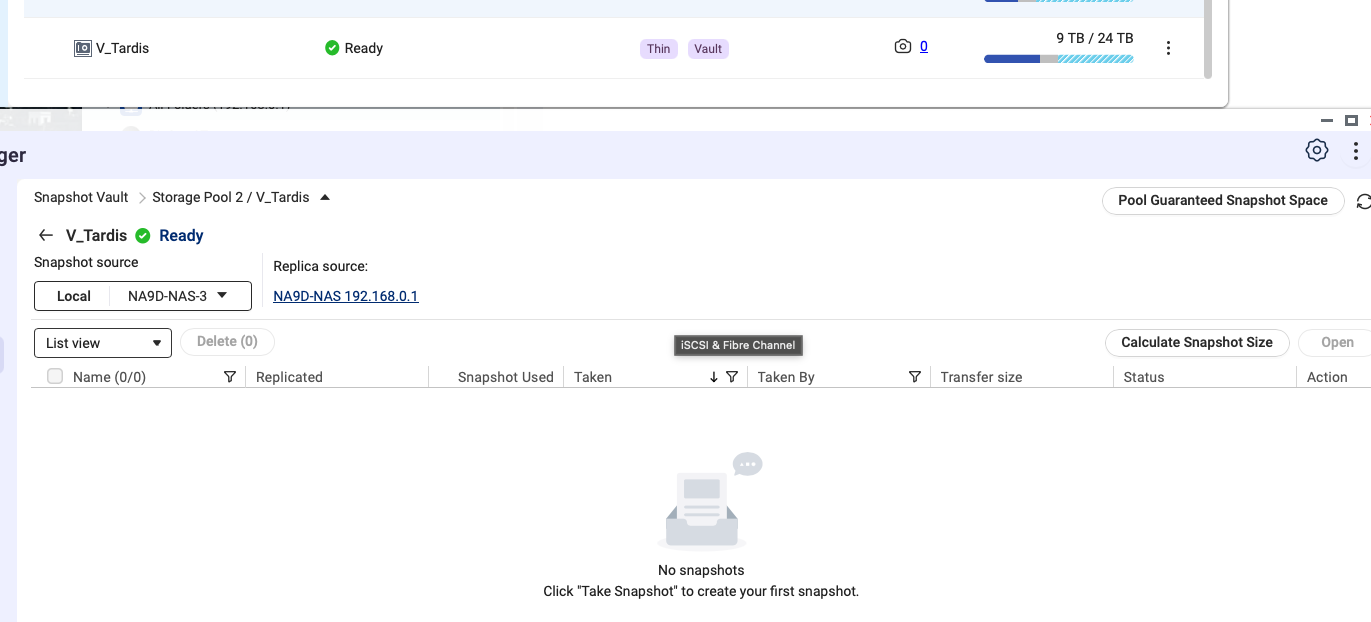
I just deleted all of the snapshots in one of my vaults. Yet, storage manager says that there is still 9TB of data there. That’s impossible since it was deleted!
So tell me anyone from QNAP - how is this possible? V_Tardis is a snapshot vault. If I deleted all of the snapshots from that space, why is it still occupying 9 TB???
I’m going to delete the vault job on the other end and see if that deletes the volume..But I should not have to do this…
And now after deleting the job, removing the vault storage space and freeing 9TB of space, it still tells me the remote does not have enough storage space!!!
Thanks for the report! We’ve confirmed the issue where the number of retained snapshots can’t be reduced when the vault space is nearly full, and our team will fix it as soon as possible.
As for the space still showing as used after you deleted all the snapshots in the vault, we’ll look into that as well. Thanks!
Well, I was able to delete the snapshots in the vault but it was still showing the drive space taken up until I deleted the snapshot job on the other end.