Help I no longer have access after changing my router.

Have you tried what @NA9D posted ?

If so , was your NAS listed under “Network” ?

If it was listed under “Network”, what happened when you double-clicked it?

Please post any error messages (note that you may have to wait a short while as W11 tries to connect)

yes i try it. it’s not listed on network, i juste see NAS icone, when clixk on it, Chrome open the ip of the NAS , i see the same as Qfind pro tonight, i will send you some picture of what i see.

tank’s for all of you

We recommend trying to reset the Windows Credential Manager, and also try mounting/accessing with backslashes to see if it helps.

How to fix the “Enter network credentials” error when connecting to my NAS on Windows 10 or later? | QNAP

yes it’s the same

thank’s

i do that and i have the same problem

Thank’s

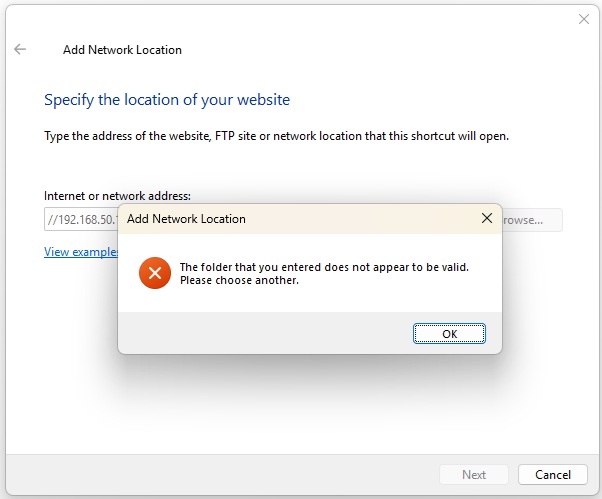
hello, ‘‘the folder that you entered does not appear to by valid, please choose another’’

Thank’s

You’re getting that particular error message because the correct format is to use backslashes in windows. You must also include a shared folder name i.e.

\\192.168.50.168\MySharedFolder

ONLY IF you still get error messages run these 3 commands in PowerShell, hitting Enter after each one.

RUN IN POWERSHELL AS ADMINISTRATOR

Set-SmbClientConfiguration -EnableInsecureGuestLogons $true -Force

Set-SmbClientConfiguration -RequireSecuritySignature $false -Force

Set-SmbServerConfiguration -RequireSecuritySignature $false -Force

Reboot and try again - let us know what happens.

thank’s , i do all and it’s working now :heart_eyes:

Thank you very mush to all of you for your help, i’m very happy

You’re welcome.

\\192.168.50.168:1234\MySharedFolder

Need port number.

Why would you need a port number for SMB shares?

Never used a port number for SMB shares…

My bad.

I’m glad to hear the issue has been resolved!

Just one thing to keep in mind for the future: your NAS’s IP address is currently assigned automatically by the router. Addresses like this can still change over time — for example, after the router or the NAS is restarted or powered off. If the IP changes, the network location you’ve just set up may stop working and would need to be set up again.

If you’d like to avoid this, you might consider binding a fixed IP to your NAS in the router’s DHCP server settings, so you won’t have to worry about the address changing in the future.

If you need any help down the road, feel free to reach out again. Thank you!

@SteveKo Even better is to use the server name instead of the IP when mapping a network drive in windows as it will always resolve to the correct device no matter what the IP is i.e.
\\TS459Pro\Multimedia or \\Movies\Multimedia

If only somebody mentioned the name mount before, let alone the correct dash orientation :melting_face: