I am not an IT-er, but a retired chemist whose hobbies (music and genealogy) use a computer intensely. I have read this section of the forum almost complete, but I cannot say that I understand much.
I My former NAS could no longer be managed well, and made mistakes. I use it now as a big but dumb external HD for my desktop computer.
I bought this new NAS, and decided not to change more than some obvious settings, and forgot about my new gadget.
This computer and a laptop automatically send their daily backups to a folder “Backups” in the Public section.
In the puplic section I find also a few data folders that I frequently use on both computers. They are mapped to a also back-upped daily to the big dumb external disk.
A few weeks ago I started getting warnings from Nassie:
[Warning] [Storage & Snapshots] Notification from your device: NAS5FB0F2-2023
NAS Name: NAS5FB0F2-2023
Severity: Warning
Date/Time: 2026/10/19 17:20:31
App Name: Storage & Snapshots
Category: Volume
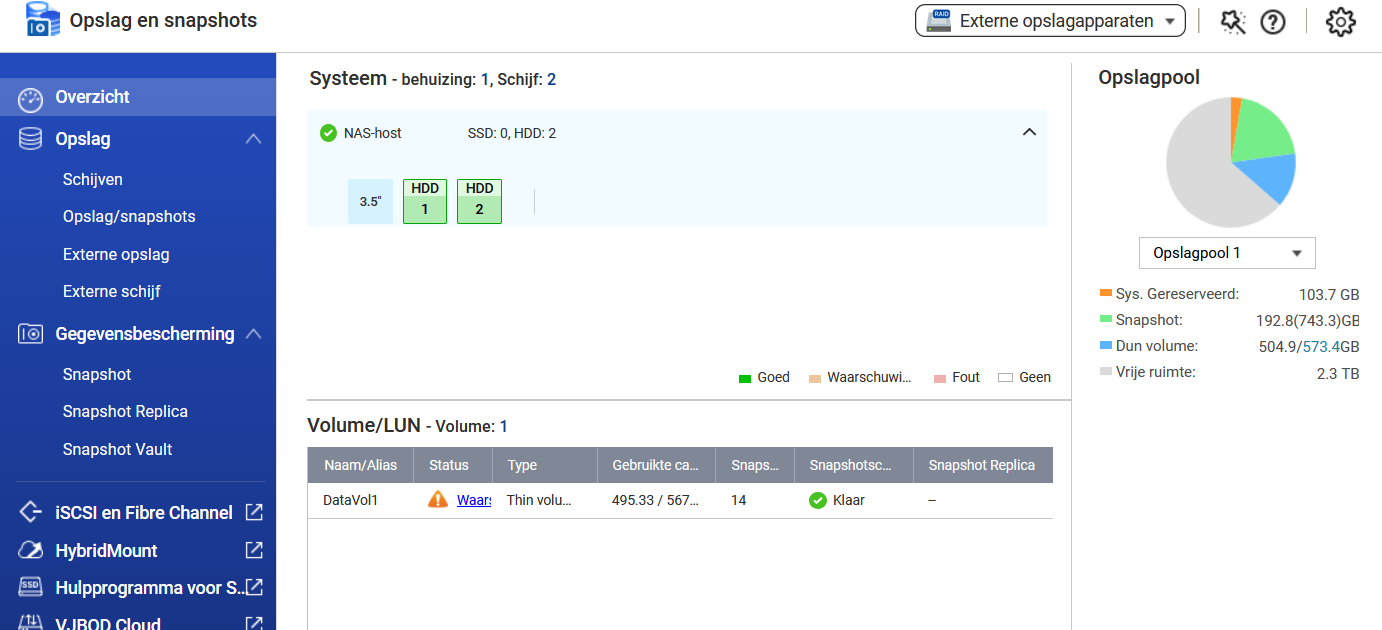
Message: [Storage & Snapshots] Volume “DataVol1” has reached the space alert threshold of “80%”. Storage pool: 1, Free space: 106.13 GB. Insufficient storage space might lead to decreased performance.
It took a while until I ealized, that the matter quickly grew urgent. But browsing through the GUI is my NAS generated more questions than Wisdom.
We have a warning treshold at 80% of the Thin Volume having 567GB capacity. That’s the default setting. I have now run higher, so it alarms. I think 80% is a geat setting, and I do not intend to change that.
But that 567 DB thin volume is just a small part of Disk1, having 3,63 TB (~ 3630 GB) capacity: it’s no more than about 20 %.
I do not remember having set this in 2023 as it is now.
Then there is another Disk: Disk 2 of also 3.63 TB.
I have started using it as is, trusting that I could change settings as necessary. But I can’t find where and how I can change the available space for the thin volume.
I knew something went wrong late last night … It was the late thing…
Well, I found the right page, then the right button, then the right mouse button, and now the volume spins with a full terabyte of capacity, almost 50% in use. still abt 2.5 TB unallocated
Thanks for that!
If I keep increasing in 1/2 TB steps, I will see the moment to do more radical things come gradually.
Speaking of that, how can I find out if the two disks form a particular array, like in RAID, that once saved my ass when one of the two disks of this PC died . That was when I was doing technical translating on it for a living.
As long as you never store anything else on the NAS other than PC backups, then fine, most people store videos/photos/documents/etc on the NAS, to share between devices on the LAN.
You would have to ask the maker of that program, it is not associated with QNAP