It probably isn’t possible—I haven’t found a way at least, but I wanted to ask if maybe I just failed in my search
I have a 6-bay NAS with a RAID 6 array made up of 4 hard drives, each with 2TB. I want to expand it now. The classic method I’ve found everywhere: remove a small drive, insert a large drive, rebuild the RAID, and repeat this for all 4 drives.
Is there a way to put the large drive into one of the empty bays, then basically make a “copy” of the small one, and then remove the small one? I imagine that would be faster?
Hello Dolbyman, sorry for the wrong post, thanks for moving it.
I have a TS-673 with the 5.2.7.3297 software – but I think that’s actually not crucial for my question, since it’s a general question.
To clarify again:
I have a 2TB drive in each of 4 out of the 6 bays – I now want to replace these 4 drives with 4TB drives and expand the RAID.
My question is whether there is a way to simply copy the drives, since I would assume that a 1:1 copy from disk to disk is significantly faster than a RAID rebuild after swapping a drive. So I don’t want to “copy them in parallel” – but rather insert the 4TB, move the data from the 2TB over, and then remove the 2TB. So it’s kind of a swap, but one where the data doesn’t have to be “rebuilt” afterwards, but is already copied beforehand.
That was exactly my question – whether there is a way to do this. If the answer is “no,” then I don’t technically understand why there isn’t such a way – it should be technically easy for Qnap to implement – but if that’s the case, then so be it
We currently do not support the hard drive replacement method you mentioned. I will forward this to our internal team for evaluation, and we will strive to bring a safer and more convenient user experience. Thanks!
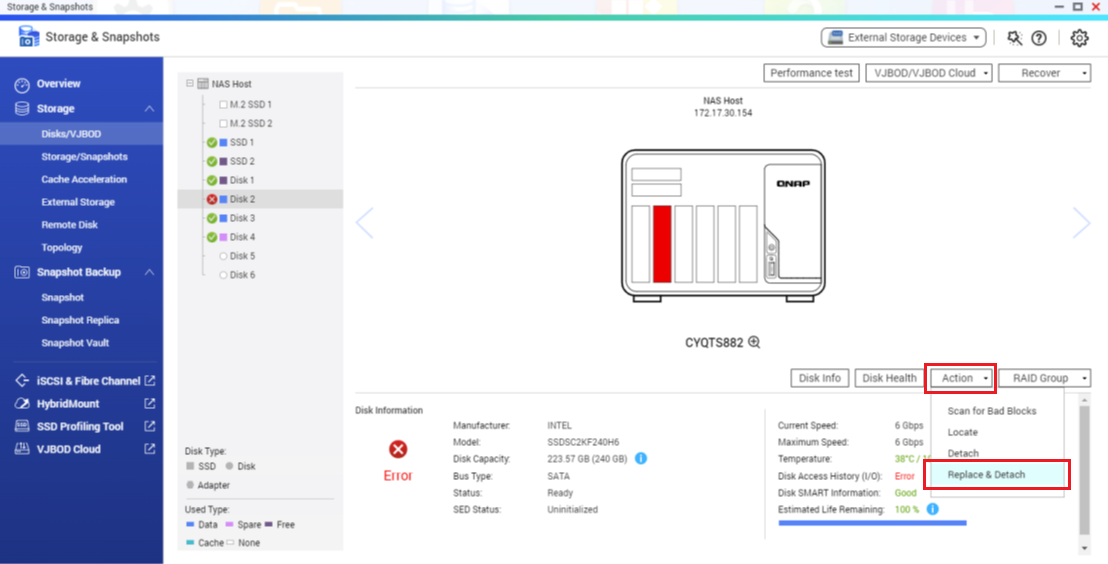
Insert your new hard drive into an empty slot and set it as a spare disk. As long as the new drive’s capacity is greater than or equal to the original one, you can then go to Storage > Disks/VJBOD and perform the Replace & Detach action. This will copy the data from the old disk to the spare disk and then safely detach the problematic disk.
I recall this article was originally in the English section, and we hadn’t noticed it was moved to the German area. We appreciate you letting us know and will reply in German going forward. Thanks!