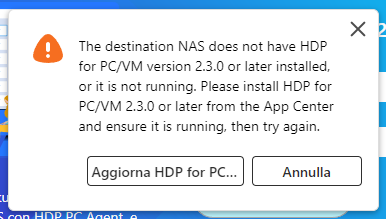
I am using a QNAP TS-451+ to do backup only for eight Win 11 Pro based PCs, using HDP and Net Bak PC
Agent. This system has been working well until I recently updated firmware/software to HDP for PC/VM
v2.3.1 and HDP PC Agent v1.3.0 on each PC. Now all backup operations result in an error message and
failure to back up:
We are currently attempting to reproduce this issue internally. If possible, please open a support ticket for us, and our Support Team will be able to provide further assistance. Thank you!
The same here! Same QNAP, same problems.
I opened a ticket, and I’m waiting for a reply.
When I start the service (2.3.1), It freezes with the window ‘update progress 0%’, then the pop-up ‘failed to start service’ shows up. If I try using HDP PC Agent (1.3.0) from my PC, it tells me that ‘the destination NAS doesn.t have HPD for PC installed’
i recently had the update progress box come up after i stopped HDP and restarted it during a maintenance window. It took a few mins but did go away and let me get into the app. I think the app bring version 1 of a new design has some bugs.
for example im noticing hdp is slower then the old app that opened in its own tab. Over time im guessing they will optimize the app and hopefully resolve these issues.
we probably should have a separate thread for new hdp/netbak to list suggestions, bugs etc. so everyone can track whats going on with it.
Try disabling QuFireWall first, then manually start the backup. If it works, it’s a port issue.
Test your connection with PowerShell: Test-NetConnection -ComputerName <NAS IP> -Port 9103
You can manually add a rule to allow TCP 9103 — that’s how I got it working after the upgrade. Looks like HDP forgot to open the port for itself in the new version…
Why are you running a firewall on your NAS when it is on the LAN? If this is because you have your NAS exposed to the internet, don’t do that! Make sure it is not exposed. You have been warned…
I’ve got a separate but linked issue having upgraded to HDP PC Agent 1.3.1 & HDP for PC/VM 2.3.2.
Having upgraded both the windows pc agent and HDP on my NAS I’m now getting an error that my previously working NAS user does not have permission to connect to the repository. It looks like a NAS admin account is now needed to create a backup job.
So I log into the PC agent with my NAS admin creds (not ideal) from the client but I now get a new device in my inventory in HDP on the NAS. Does anyone have any idea if my previous backups will consolidate or does it look like I’m starting to back up all over again?