After installing this firmware (Version: h6.0.0.3500 Build 20260520 Published: 2026-05-29) my NAS tries for 20 seconds or more to connect during log on, apparently to MyQnapCloud (which I don’t have enabled or use). It will also take another 20 or more to open the Qnap App Center once you log on. If you, like me, have your router blocking random queries to the Internet like this, it will take 20 seconds or longer to log on as the NAS goes through this telemetry sequence. I guess we are one step away from Qnap no longer asking if you want to share data with them. There doesn’t seem to be any way to uninstall or disable MyQnapCloud, though I have all of its related services disabled with no port forwarding. I guess I will have to play around with Qnap’s firewall rules.
Hi and welcome to the forum. 
Opening the App Center application will cause it to update its QPKG lists from the QNAP repository server. This also happens for 3rd-party repositories like myqnap.org. Quite-normal.
If you block access to QNAP’s servers, then your App Center startup is going to take longer than it needs-to, and your local repository lists will be out-of-date.
Thanks for your input. However, my point was that the logging on under the 6.0 firmware initiates a much longer telemetry process if, like me, a user has firewall rules that monitor and prevent your NAS from initiating certain connections. This did not happen with the 5.x firmware. I did not experience 20 or 30 second long logon delays with the previous firmware and don’t understand why my NAS would have to query Qnap servers, every time I log on if I DON’T access App Center, or MyQnapCloud.
If you don’t like the wait, then don’t block the connections.
If you actively prevent the firmware working as it should, you don’t get to complain about the side-effects.
That’s because software evolves. Each version isn’t the same as the previous version. Each version doesn’t work the same as the previous version. Also quite-normal.
Maybe someone from QNAP can comment on exactly what happens during the login process? I’ve accounted for App Center, but I’d be guessing for the reasons during login.
According to the Qnap logs, the NAS is connecting to Amazon AWS servers multiple times from different ports and to different IP addresses in an attempt to, evidently, sync some unknown information at logon. I have no specific rule to block the Qnap connections on my router and, as I said, this never happened with previous firmware. I’m speculating, but I think it’s the nature of the repeated connections at logon that causes my router to reject the queries.
tcp 0 1 172.x.x.x:59822 3.171.85.4:1337 SYN_SENT
tcp 0 1 172.x.x.x:55936 3.171.85.32:1337 SYN_SENT
tcp 0 1 172.x.x.x:55906 3.171.85.32:1337 SYN_SENT
tcp 0 1 172.x.x.x:59826 3.171.85.4:1337 SYN_SENT
tcp 0 1 172.x.x.x:52634 3.171.85.110:1337 SYN_SENT
tcp 0 1 172.x.x.x:55922 3.171.85.32:1337 SYN_SENT
First of all, you don’t have to hide your 172.x.x.x LAN addresses as that is a private address range that is used by millions of people inside their own LANs. It’s not a publicly accessible address space.
Second, there could be all sorts of reasons, none of which relate to “sharing” data with QNAP. It’s entirely possible that the system is doing firmware update checks or other things when starting up. I’m not sure what QNAP is doing in Hero 6 but it’s entirely possible they are being more proactive with security updates, etc. So when the NAS boots up, it might be going and checking if the firmware is the very latest and if you need an update.
Unnecessarily restricting devices is not a best practice security method IMO and if you want to do that, then you need to accept the consequences.
I don’t know why folks have gotten so defensive about my cautionary tale here, especially when things are written that I have not asserted. I did not specifically block Qnap servers before or after installing the 6.0 firmware. I simply noted that logons and access to the App Center were taking a very long time to complete, while Qnap attempted to contact its AWS servers and that this did not happen before the firmware update.
And while a private IP address alone is not directly useful to a potential hacker, there is a risk that, in this AI age, combining a private IP with other information (e.g., exposed services, leaked credentials, or vulnerabilities) could make a local area network vulnerable. So I certainly reserve the right to NOT provide information that is not useful in diagnosing my problem. Anyway, I will consider this topic closed and move on…
Uh, no. Exposing private IPs is absolutely zero risk. Exposing your public IP has risk.
And no one is defensive. Just find it odd that your firewall is blocking outbound queries.
And yeah, we may be a little perturbed because of your title “Beware…” - that’s saying there is something bad happening. There isn’t.
I mean, there is legitimate cases where NAS units would be installed in a strict offline environment
Cold storage, boat without starlink,etc. If this causes the login (or other) process to stall, it could be worth it for QNAP to investigate an option.
I mean everyone could have the issue that your ISP goes down for a few days, for whatever reason, and a laggy NAS because of this could be aggravating.
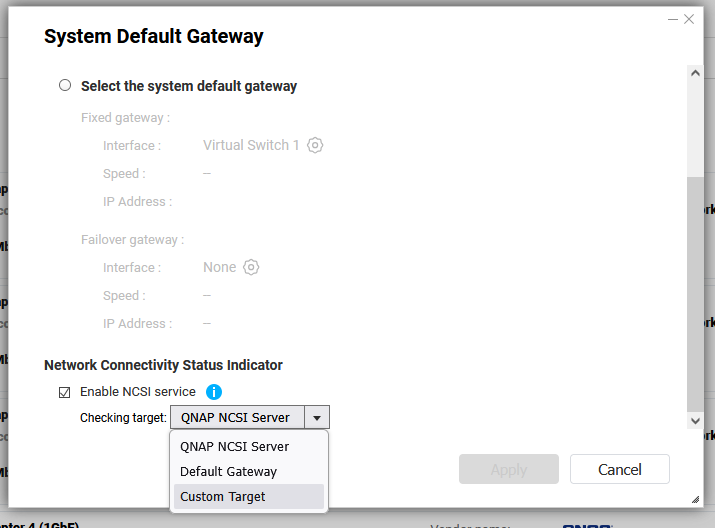
I seem to remember disabling the network connectivity check service would help in these cases
Hi @Bitbytes,
Thank you for reporting this issue and for sharing the detailed observations.
From your description, the delay appears to occur after updating to QuTS hero h6.0.0, especially when the NAS is operating in a network environment where certain outbound connections are restricted or monitored by the router/firewall. We understand that this behavior may be inconvenient, particularly for users who run their NAS in a strict offline or limited-connectivity environment.
To help us investigate this further, could you please share more details about the firewall rules applied to the NAS?
For example:
- Whether outbound connections from the NAS are blocked by default
- Any allow/block rules related to QNAP services, AWS IPs, DNS, HTTPS, or custom ports
- Whether the firewall blocks, rejects, or silently drops these connections
- Any firewall logs around the time of NAS login or App Center launch
- Whether the same delay occurs if the NAS is temporarily placed in a less restricted network environment
You may redact any sensitive public IP addresses or internal network details before sharing.
This information will help us better understand whether the delay is related to a specific connectivity check, service request, or firewall behavior, and will allow us to provide more accurate feedback to our engineering team.
Thank you again for bringing this to our attention.