Hi, I have 2 QHora-301W router in different location with broadband connection, would it be possible to setup a site to site VPN connection to connect both networks?
Thanks!
Hi, I have 2 QHora-301W router in different location with broadband connection, would it be possible to setup a site to site VPN connection to connect both networks?
Thanks!
based on specs seems possible. i have no idea how to do it as i dont have those devices.
Mesh VPN
QuWAN SD-WAN technology automatically establishes a secure mesh VPN with QNAP devices at multiple sites.
Perhaps you could consider installing and deploying QuWAN on both of your QHora devices. Thank you!
Hi Andy Cheung,
Thank you for choosing the QNAP QHora-301W.
Regarding your inquiry about connecting two QHora-301W units, simply add both devices to the QuWAN Orchestrator. The system will automatically establish a Site-to-Site VPN connection for you. This approach not only simplifies the deployment process but also allows you to perform unified configuration and centralized management across different locations via the QuWAN interface.
Please refer to the following steps for the detailed setup:
 QHora-301W Exclusive: QuWAN Auto-Mesh VPN Guide
By using two QHora-301W routers, you can easily bridge two locations, allowing devices at both sites to communicate as if they were in the same office.
Before configuration, please organize your internet connections as follows:
Hub Site (Core): Connect your Public IP to the WAN port of this QHora. This unit acts as the “lighthouse” for the connection.
Edge Site (Branch): This unit does not require a public IP. As long as it has standard internet access (even behind a modem or firewall), it will work perfectly.
Support Tip: Assigning the Public IP to the Hub ensures that the Edge device can always “find its way home” and establish a stable connection automatically, regardless of its local network environment.
Log in to the management interface (QuRouter OS) for both QHora-301W units and navigate to the QuWAN menu:
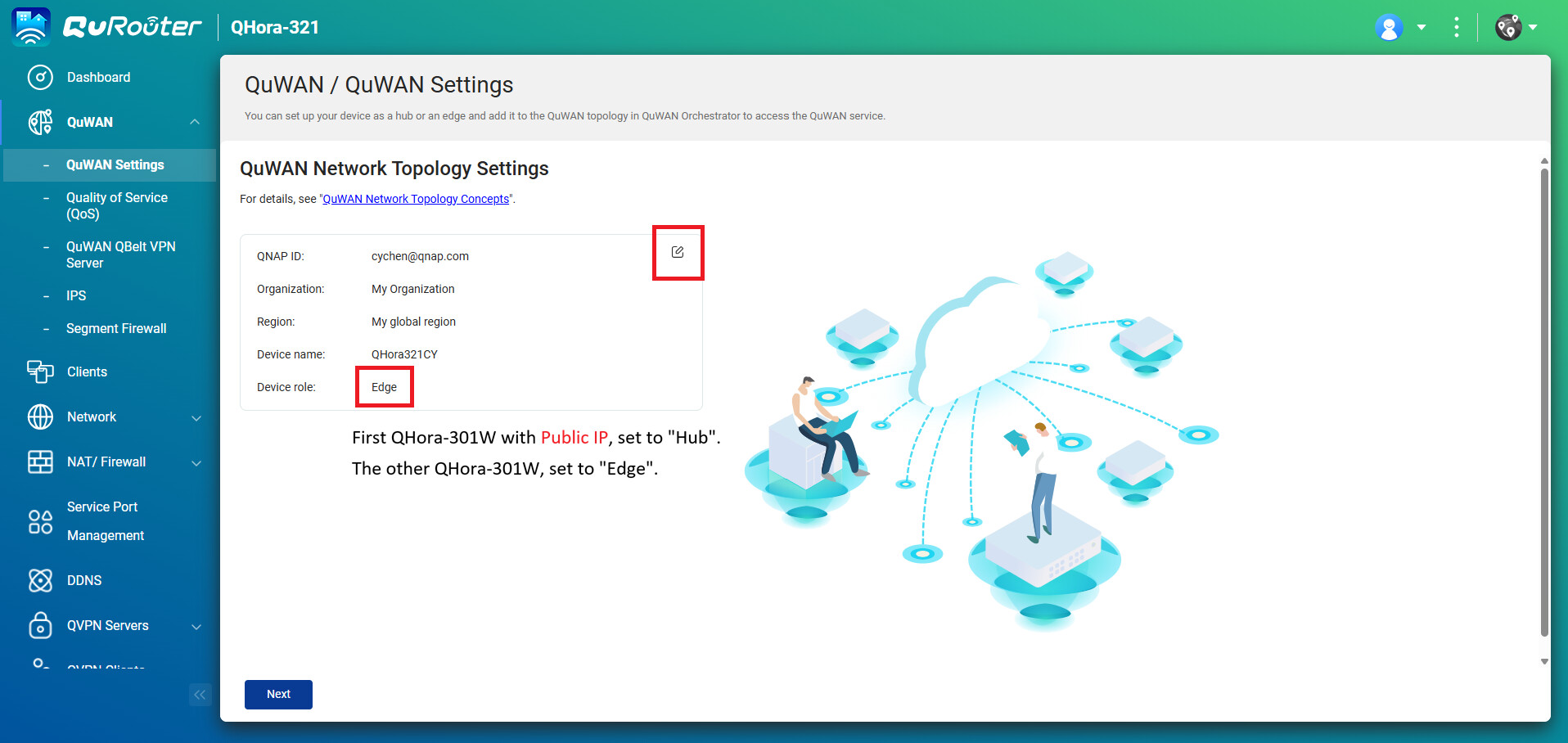
Ensure both units are signed in using the same QNAP ID.
In the Organization selection, simply choose the default “My Organization”. There is no need to create a new one manually, making the setup much faster!
Set the device role to Hub.
The system will automatically detect the Public IP on the WAN port and register it with the cloud orchestrator.
Set the device role to Edge.
Verify IP Segments: To prevent connection conflicts, ensure that the LAN IP ranges of the two units do not overlap.
192.168.1.x, set the Edge to 192.168.2.x.Once configured, the two QHora units will automatically pair via My Organization:
The Edge unit will proactively initiate a secure connection to the Hub.
You do not need to configure complex Port Forwarding or firewall rules; QuWAN handles the encrypted tunneling automatically.
 Quick Checklist
[ ] Same Account: Are both units signed in to the same QNAP ID?
[ ] Default Org: Are both units joined to My Organization?
[ ] Correct Roles: Is the unit with the Public IP set as the Hub?
[ ] Unique Subnets: Are the LAN IP segments different for both sites?
Once completed, you will see a green line connecting your two QHora units in the QuWAN Orchestrator dashboard, indicating a successful Site-to-Site VPN!