I have installed a new Nighthawk router today, the NAS drive is connected and shows up IP address 192.168.0.157 (which is unchanged from the old router, and NAS was working earlier this morning). Qfinder has the NAS there IP address 192.168.0.157. When I type in IP address into webpage it times out. When I double click on qfinder it launches webpage and times out. I have done a soft reset, IP address remains unchanged. I have powered it off, removed the drive and it detects the NAS without a drive in it (IP address is different though) put drive back in and the IP address goes back to 192.168.0.157. I have reconnected the old router and the NAS is visible first go, same IP address. Now I am at a loss as to what is going on, any suggestions would be greatly appreciated.
What is the IP subnet range of your new router?
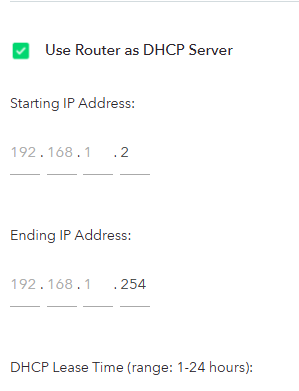
Switch the new router subnet to the old range (192.168.0.x) and it should work
Make sure to limit the DHCP range to NOT include the NAS IP, so no device will one day get the static NAS IP
Although the question has been provided with the best and simplest option, change the subnet range used by your router, you should understand why this happened… as it could easier come back. (It is a very basic networking issue that you should learn why it happened)
Your old router used the IP address range 192.168.0.x and your new one uses 192.168.1.x. Your old devices seem to have static IP addresses in the original 192.168.0.x range. New client devices (your PC, phone etc) presumably are given IP addresses in the 192.168.1.x range as they get it via DHCP. The 2 networks cannot talk to each other (without firewall or routing rules) even though the numbers are close, in networking terms they are isolated from each other.
The simplest solution, since you have static IP devices, is to change everything (starting with the router) to the “old” IP address range. Then things will “magically” work. Any DHCP client device should also be rebooted after the router change to ensure they get “new” IP addresses in the correct range.
Keep in mind that if you reset your router, the default IP range will change back and you will have to change it again.
Another solution is to leave the router as it is and change all the client devices that have static IP addresses to an address in the default range for your router. This will solve any issues long term, particularly if you reset your router (or your ISP does).
There are other options too, less “good” :), you could change the subnet mask to include both address ranges, but this too introduces all sorts of potential issues and would require work on a router reset.
My, more complex, solution is to actually run 2 routers. Your own, and the one provided by your ISP. This gives you the security of being able to fully manage and control your own router, an extra layer of firewall protection, presumably 2 layers and different brands on routers that a hacker would have to get through, but most importantly it completely isolates your personal network from anything your ISP does. If you change ISPs or ISP routers or address ranges, then there is only 1 setting that potentially has to change on your internal router. I’ve been running this way for 35 years through dial up, DSL, cable, fibre. My internal network devices have the same static IP addresses.  Yes, overkill, but has worked well for me.