TS-231P3. Following recent firmware upgrade I could not log on using my credentials and a reset will not allow my mac address to log in either. NAS is visible on my network.
Hello,
when you use QTS 5.2.x the default system administrator password is the Cloud Key of your NAS.
What is the default system administrator password for my NAS? | QNAP
Thanks Becker. Qnap told me the same thing and that works. So thanks for you advice. I managed to discover where my cloud key could be found. I have managed to log back in although windows 11 seems to be inconsistent in listing the nas in windows explorer. Wonder why that is?
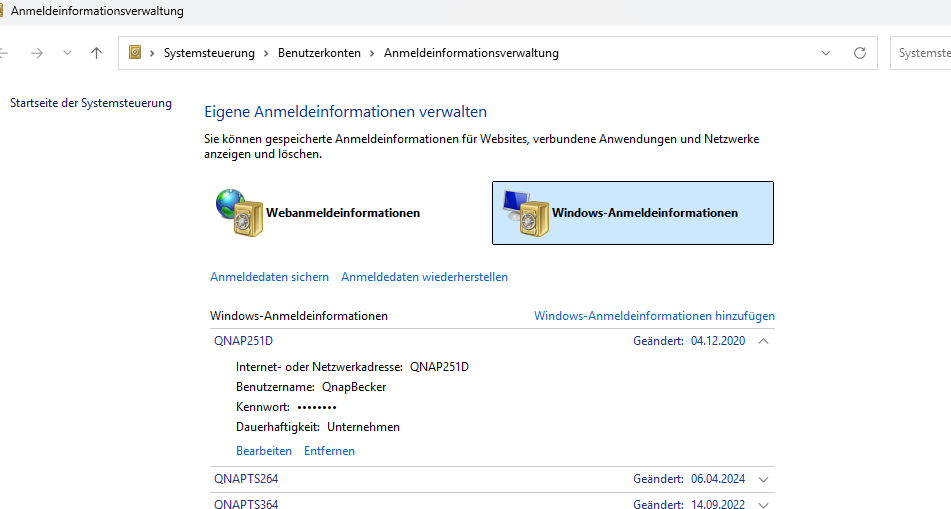
For this type of issue, you may want to try resetting the Windows Credential Manager first. Thanks!
I get round this by opening explorer, clicking on “Network”, putting the name or IP of the device in the address bar ( \\MyNas or \\192.168.1.nn - it’s better with the name ), hit Enter, then right-click the folder under “Network”, and click “Pin to Quick Access”’ so that the link is always available.
It also helps to untick “Show recently used files”, “Show frequently used folders”, “Show files from Office .com”, then clear the file explorer history, under Folder Options > General > Privacy. This will enable you to drag / drop items in the Quick Access section to the position of your choice.
I’d suggest keeping “Desktop” and “Downloads” in the Quick Access section.