QNAP TS-1635 QTS ver 5.2.9.3210.
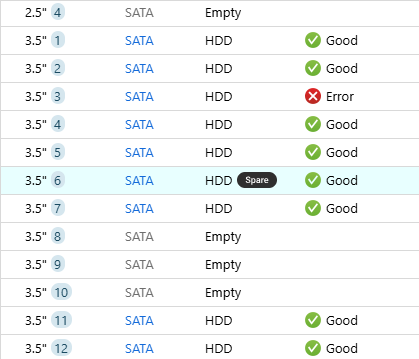
I have a raid array with a failed disk (3). There is a spare identical drive in (6) as seen below.
The spare is (was) not in use. It seemingly failed to take over for the failed drive..
I want to unassign and remove the spare from (6) and then pull (3) and insert the old spare into slot (3) in order to force a rebuild.
My problem is that I can not find any menu or Action anywhere to allow this. Following the Qnap directions, no remove or assign choice is available from the Storage/Snapshots or Disks Page for the disk in slot (6).
What the heck am I missing here ?
Kindly - Kirk Thomas / Kansas
See here:
https://www.qnap.com/en/how-to/faq/article/how-to-configure-a-spare-disk
My guess is that the underlying array needs to be error free first, for the GUI to allow removal
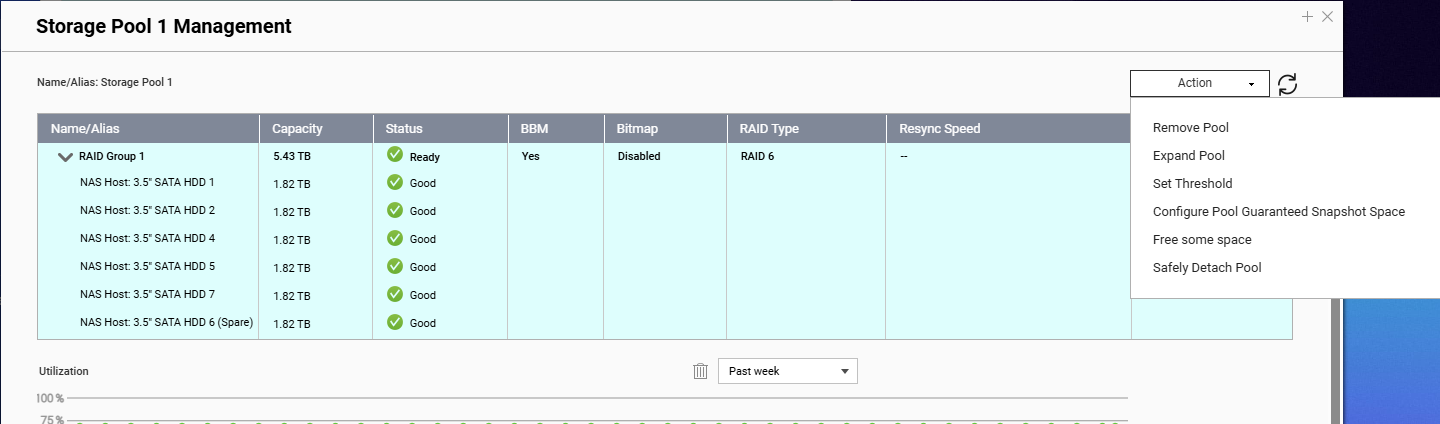
Thanks. That was useful. I suspect you are correct. The hot spare was assigned before the failure. Makes me wonder if the ‘spare’ annotation shown belies the fact that it HAS inserted itself into the raid. How would I know ? If it hasn’t been used, can I just pull it ?
-Kirk
My Storage pool is missing the error drive(3) and no spare remove or assign is available. Does that mean it is being used?
If so, why is it still marked as a spare ?
I would suggest contacting QNAP support and entering a support ticket. They are in the best position to answer your questions and get you up and running correctly.
Maybe the last part of QNAP’s script (marking the spare as ‘in use and not spare anymore’ did not work, so GUI is still showing this drive as spare.
Best to open a ticket, as dosborne said, but in the meantime you could check the array status by doing an md_checker via SSH
There was a short in front of the keyboard.. i found the correct menu, removed hot spare and then pulled bad drive. Plugged in the old spare and it didn’t blow up. The raid array had simply removed the bad drive. When I replaced it with the spare, i had to assign that slot as a hot spare. Somehow, my raid array is working with one less drive. But everything seems to be fine. I hope the hot spare works next time. I don’t think I’ll ever figure out how this whole thing didn’t just blow up..
It’s a RAID6, so it would even work with two missing drives.
Speaking of menus,the UI is definitely NOT for left brained individuals.
That was understood. What i didnt expect was that the bad drive would dissappear from the pool and not rebuild when a new drive was inserted in its place. In any case,I thank the Lord it didn’t all just go away..
Thanks for everyone’s input. Glad I made the decision to go raid6. I’ve had a few bad experiences with raid5 in the past.
But just throwing it out there, I hope you have backups, as a RAID is not backup replacement
I do.. Learned that lesson 50 years ago.
May we ask if your data is currently accessible and functioning normally? Could you also share a screenshot of your current RAID status?
If you’d like further assistance, you’re also welcome to open a support ticket and our Support Team will be happy to help!