I have setup WebDav on my NAS. I have opened ports 5000 & 5001.
I can connect to the NAS remotely from the Cloud URL
I CANNOT connect to the “Public” folder or any other folder in FileStation remotely.
Any help would be much appreciated.I have followed the tutorials on YouTube, no success.
NA9D
March 13, 2026, 11:40am
2
Please do NOT expose your NAS to the internet like this. It is very, very dangerous. Please don’t do it.
If you wish to use the NAS remotely, then please use either a VPN or use the MyQNAPCloud portal.
You have been warned.
Thank you for the good advice, much appreciated
Is there a way I can share certain Folders ONLY via MyQNAPCloud portal?
NA9D
March 14, 2026, 1:31pm
5
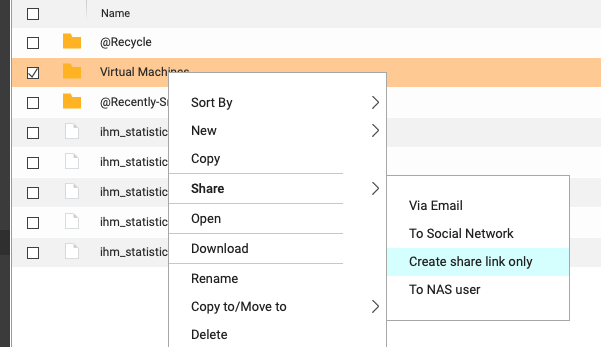
You can create smart share links so you can share anything you want. To share a folder right click on the folder in File Station go down to Share and select “create share link only”
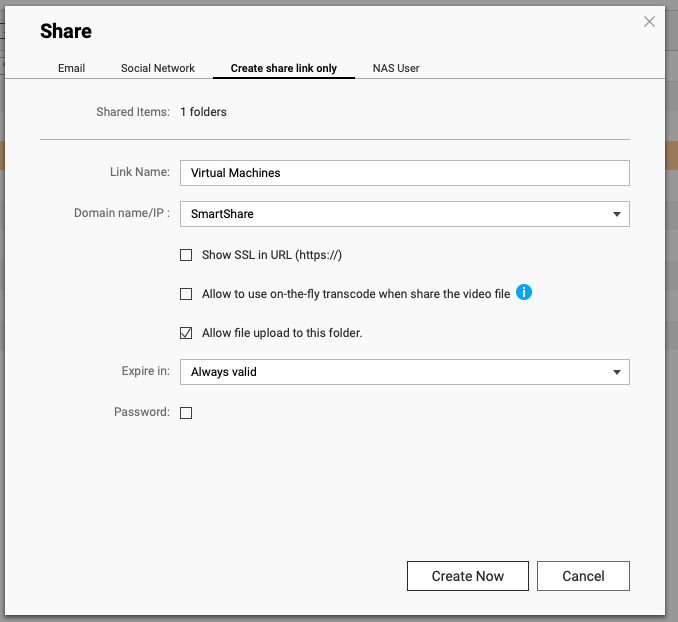
Then in the window that opens select “Smart Share” from the Domain name/IP pull down.
If you want to allow uploaded, check the box like I showed.
You can set a password or expiration date.
A link will be generated that you can now give to anyone and they can access the folder or file.
Thank you so much NA9D, much appreciated.