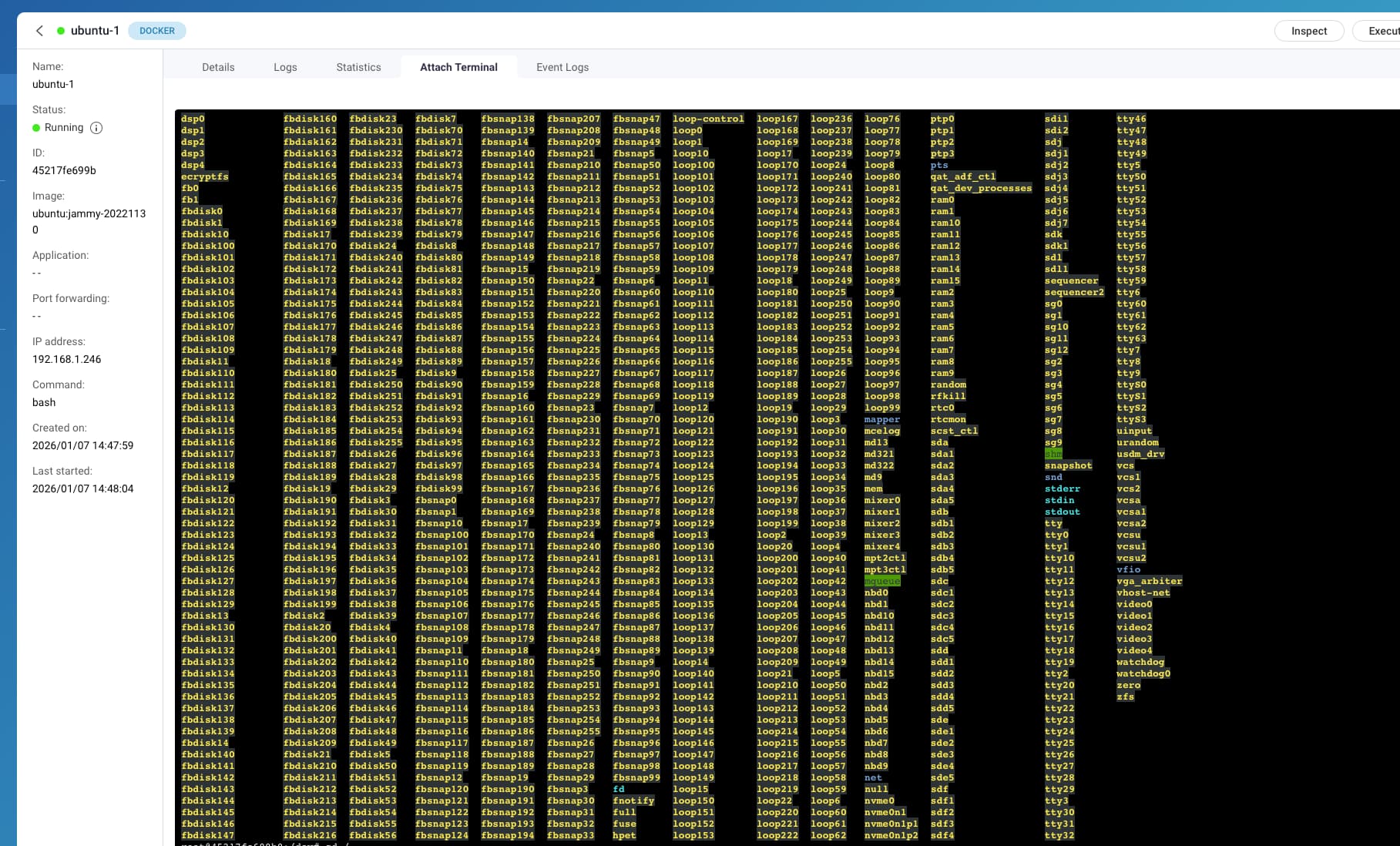
I am trying to do something in a Linux container but I am having some difficulty and finding some surprising results.
I’m trying to identify the device in /dev that is the system volume for the installation. However, when running a command like lsblk I literally see every volume on the NAS!
First of all, I thought a container install was supposed to be “isolated” from the rest of the NAS. It isn’t. It seems like you can’t access the container from the NAS, but dang you sure have access from the container to the rest of the NAS. This is pretty disturbing.
Second, no mount point of / is ever listed.
root@45217fe699b0:/# lsblk
NAME        MAJ:MIN RM   SIZE RO TYPE  MOUNTPOINTS
loop0         7:0    0    64M  1 loop
sda           8:0    0   1.8T  0 disk
|-sda1        8:1    0 517.7M  0 part
| `-md9       9:9    0 517.6M  0 raid1
|-sda2        8:2    0 517.7M  0 part
|-sda3        8:3    0   1.8T  0 part
|-sda4        8:4    0 526.6M  0 part
| `-md13      9:13   0 448.1M  0 raid1
`-sda5        8:5    0  31.5G  0 part
  `-md322     9:322  0  30.4G  0 raid1 [SWAP]
sdb           8:16   0   1.8T  0 disk
|-sdb1        8:17   0 517.7M  0 part
| `-md9       9:9    0 517.6M  0 raid1
|-sdb2        8:18   0 517.7M  0 part
|-sdb3        8:19   0   1.8T  0 part
|-sdb4        8:20   0 526.6M  0 part
| `-md13      9:13   0 448.1M  0 raid1
`-sdb5        8:21   0  31.5G  0 part
  `-md322     9:322  0  30.4G  0 raid1 [SWAP]
sdc           8:32   0   9.1T  0 disk
|-sdc1        8:33   0 517.7M  0 part
| `-md9       9:9    0 517.6M  0 raid1
|-sdc2        8:34   0 517.7M  0 part
|-sdc3        8:35   0   9.1T  0 part
|-sdc4        8:36   0 526.8M  0 part
| `-md13      9:13   0 448.1M  0 raid1
`-sdc5        8:37   0  31.5G  0 part
  `-md322     9:322  0  30.4G  0 raid1 [SWAP]
sdd           8:48   0   9.1T  0 disk
|-sdd1        8:49   0 517.7M  0 part
| `-md9       9:9    0 517.6M  0 raid1
|-sdd2        8:50   0 517.7M  0 part
|-sdd3        8:51   0   9.1T  0 part
|-sdd4        8:52   0 526.8M  0 part
| `-md13      9:13   0 448.1M  0 raid1
`-sdd5        8:53   0  31.5G  0 part
  `-md322     9:322  0  30.4G  0 raid1 [SWAP]
sde           8:64   0   9.1T  0 disk
|-sde1        8:65   0 517.7M  0 part
| `-md9       9:9    0 517.6M  0 raid1
|-sde2        8:66   0 517.7M  0 part
|-sde3        8:67   0   9.1T  0 part
|-sde4        8:68   0 526.8M  0 part
| `-md13      9:13   0 448.1M  0 raid1
`-sde5        8:69   0  31.5G  0 part
  `-md322     9:322  0  30.4G  0 raid1 [SWAP]
sdf           8:80   0   9.1T  0 disk
|-sdf1        8:81   0 517.7M  0 part
| `-md9       9:9    0 517.6M  0 raid1
|-sdf2        8:82   0 517.7M  0 part
|-sdf3        8:83   0   9.1T  0 part
|-sdf4        8:84   0 526.8M  0 part
| `-md13      9:13   0 448.1M  0 raid1
`-sdf5        8:85   0  31.5G  0 part
  `-md322     9:322  0  30.4G  0 raid1 [SWAP]
sdg           8:96   1   1.8T  0 disk
|-sdg1        8:97   1 517.7M  0 part
| `-md9       9:9    0 517.6M  0 raid1
|-sdg2        8:98   1 517.7M  0 part
|-sdg3        8:99   1   1.8T  0 part
|-sdg4        8:100  1 526.6M  0 part
| `-md13      9:13   0 448.1M  0 raid1
`-sdg5        8:101  1  31.5G  0 part
  `-md322     9:322  0  30.4G  0 raid1 [SWAP]
sdh           8:112  1 931.5G  0 disk
|-sdh1        8:113  1 517.7M  0 part
| `-md9       9:9    0 517.6M  0 raid1
|-sdh2        8:114  1 517.7M  0 part
|-sdh3        8:115  1   898G  0 part
|-sdh4        8:116  1 526.2M  0 part
| `-md13      9:13   0 448.1M  0 raid1
`-sdh5        8:117  1  31.5G  0 part
  `-md322     9:322  0  30.4G  0 raid1 [SWAP]
sdi           8:128  0 372.6G  0 disk
|-sdi1        8:129  0   200M  0 part
`-sdi2        8:130  0 372.3G  0 part
sdj           8:144  1   4.6G  0 disk
|-sdj1        8:145  1   5.1M  0 part
|-sdj2        8:146  1 488.4M  0 part
|-sdj3        8:147  1 488.4M  0 part
|-sdj4        8:148  1     1K  0 part
|-sdj5        8:149  1   8.1M  0 part
|-sdj6        8:150  1   8.5M  0 part
`-sdj7        8:151  1   2.7G  0 part
sdk           8:160  0  10.9T  0 disk
`-sdk1        8:161  0  10.9T  0 part
sdl           8:176  0   1.8T  0 disk
`-sdl1        8:177  0   1.8T  0 part
nbd0         43:0    0     0B  0 disk
nbd1         43:32   0     0B  0 disk
nbd2         43:64   0     0B  0 disk
nbd3         43:96   0     0B  0 disk
nbd4         43:128  0     0B  0 disk
nbd5         43:160  0     0B  0 disk
nbd6         43:192  0     0B  0 disk
nbd7         43:224  0     0B  0 disk
fbsnap0     250:0    0     0B  0 disk
fbsnap1     250:1    0     0B  0 disk
fbsnap2     250:2    0     0B  0 disk
fbsnap3     250:3    0     0B  0 disk
fbsnap4     250:4    0     0B  0 disk
fbsnap5     250:5    0     0B  0 disk
fbsnap6     250:6    0     0B  0 disk
fbsnap7     250:7    0     0B  0 disk
fbdisk0     251:0    0     0B  0 disk
fbdisk1     251:1    0     0B  0 disk
fbdisk2     251:2    0     0B  0 disk
fbdisk3     251:3    0     0B  0 disk
fbdisk4     251:4    0     0B  0 disk
fbdisk5     251:5    0     0B  0 disk
fbdisk6     251:6    0     0B  0 disk
fbdisk7     251:7    0     0B  0 disk
nvme1n1     259:0    0   1.8T  0 disk
|-nvme1n1p1 259:1    0 517.7M  0 part
| `-md9       9:9    0 517.6M  0 raid1
|-nvme1n1p2 259:2    0 517.7M  0 part
|-nvme1n1p3 259:3    0   1.8T  0 part
|-nvme1n1p4 259:4    0 526.6M  0 part
| `-md13      9:13   0 448.1M  0 raid1
`-nvme1n1p5 259:5    0  31.5G  0 part
  `-md321     9:321  0  30.4G  0 raid1 [SWAP]
nvme0n1     259:6    0   1.8T  0 disk
|-nvme0n1p1 259:7    0 517.7M  0 part
| `-md9       9:9    0 517.6M  0 raid1
|-nvme0n1p2 259:8    0 517.7M  0 part
|-nvme0n1p3 259:9    0   1.8T  0 part
|-nvme0n1p4 259:10   0 526.6M  0 part
| `-md13      9:13   0 448.1M  0 raid1
`-nvme0n1p5 259:11   0  31.5G  0 part
  `-md321     9:321  0  30.4G  0 raid1 [SWAP]
nbd8         43:256  0     0B  0 disk
nbd9         43:288  0     0B  0 disk
nbd10        43:320  0     0B  0 disk
nbd11        43:352  0     0B  0 disk
nbd12        43:384  0     0B  0 disk
nbd13        43:416  0     0B  0 disk
nbd14        43:448  0     0B  0 disk
nbd15        43:480  0     0B  0 disk
root@45217fe699b0:/#
Third, and this is even more disturbing. Yesterday I was trying to do what I needed in an Alpine container. I wanted to reboot the Alpine instance so I entered this command:
echo "b" > /proc/sysrq-trigger
THE ENTIRE NAS REBOOTED!
This is scary. This means if some bad actor gets access to a Linux container, they can mess with your entire system. This is not how containers are supposed to operate!
Am I completely off here?