I have been creating containers manually from the command line for years, but would like to switch to using compose files. What is the simplest way to create correct compose yaml files? I gather that I I can use docker inspect <container ID> and then edit the output, but that generates a very long file. Can I instead derive from my normal command line content what the compose file should look like, and the system will set up much of the other configurations that appear in the inspect output?
Hi @beneix
You’re right that docker inspect output is too verbose to convert directly — most of it is runtime state and image defaults that don’t belong in a compose file. Instead of editing the full JSON, we’d suggest extracting only the fields a compose file actually needs, using --format:
C=<container_name>

docker inspect -f '{{.Config.Image}}' $C
docker inspect -f '{{.HostConfig.RestartPolicy.Name}}' $C
docker inspect -f '{{range .Config.Env}}{{println .}}{{end}}' $C
docker inspect -f '{{range $p,$b := .NetworkSettings.Ports}}{{if $b}}{{(index $b 0).HostPort}}:{{$p}}{{println}}{{end}}{{end}}' $C
docker inspect -f '{{range .Mounts}}{{.Source}}:{{.Destination}}{{if not .RW}}:ro{{end}}{{println}}{{end}}' $C
docker inspect -f '{{range $n,$_ := .NetworkSettings.Networks}}{{println $n}}{{end}}' $C
These map directly to the image:, restart:, environment:, ports:, volumes:, and networks: sections of a compose file:
services:
  myapp:
    image: <from command 1>
    container_name: myapp
    restart: <from command 2>
    environment:
      - VAR=value        # from command 3
    ports:
      - "8080:80"        # from command 4
    volumes:
      - /share/Container/myapp:/config   # from command 5
A few tips to keep the file clean:
-
Environment variables: command 3 lists all env vars, including the image’s built-in defaults (PATH, LANG, etc.). Only copy the ones you set yourself. You can check the image defaults with
docker inspect -f '{{range .Config.Env}}{{println .}}{{end}}' <image>and skip anything that appears in both. -
Command/entrypoint: don’t add
command:orentrypoint:unless you overrode them when creating the container. Ifdocker inspectshows a long startup command, it’s almost always the image’s built-in default — leave it out and the image will handle it. -
If the docker CLI isn’t in your PATH over SSH, you can locate it with:
export PATH="$PATH:$(getcfg container-station Install_Path -f /etc/config/qpkg.conf)/bin" -
Validate the result with
docker compose configbefore deploying, then bring it up under a new name and compare against the original container before removing it.
Since you mentioned you still have your original docker run commands — that’s actually the ideal source. A compose file is essentially a YAML representation of those same flags (-p → ports, -v → volumes, -e → environment, --restart → restart), so translating your own commands gives you a cleaner file than reverse-engineering a running container.
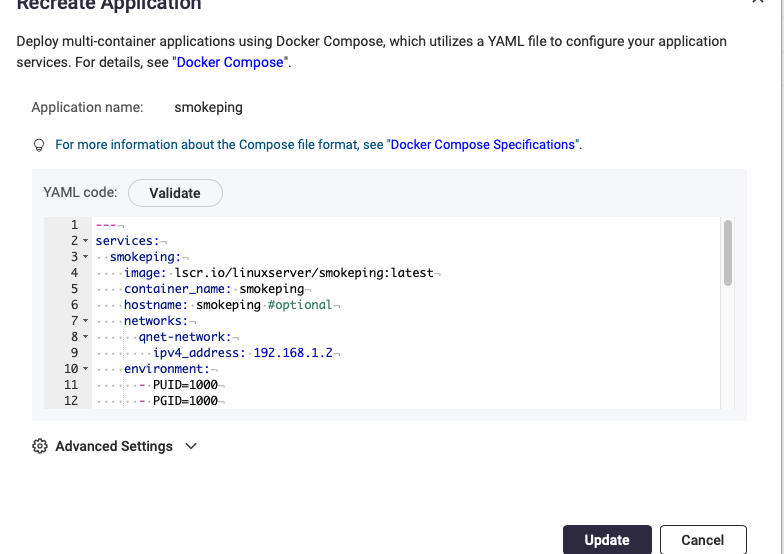
Going forward, you can also create applications directly as compose files in Container Station (Applications → Create), which gives you a YAML editor with validation built in — as NA9D showed above.