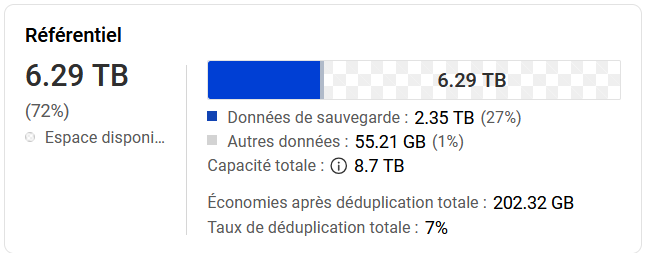
Deduped running constantly on TS-251+ running QTS 5.2.11

I’ve logged a ticked for this problem.

But in case this rings a bell on your side.

The NAS is a TS-251+ running QTS 5.2.11.3661

There are 2 x 12To discs setup with RAID1

HDP for PC/VM version is 2.4.0

I’m have migrated 2 Windows 11 PCs over 3 from netbackup to HDP for PC

I have first setup 2 shared folders on a single datavolume datavol1

1 PC (PC1) has around 2.5 To of data and the other (PC2) around 300Go.

But as I wanted to have 2 different snapshot configuration to allow more snapshot on PC2.

I unconfigured PC2 via HDP and then suppress the share folder and recreate the same on another datavolume Datavol3 which is crypted.

From there on I see

There is a negative deduplication rate!!! (-81%)
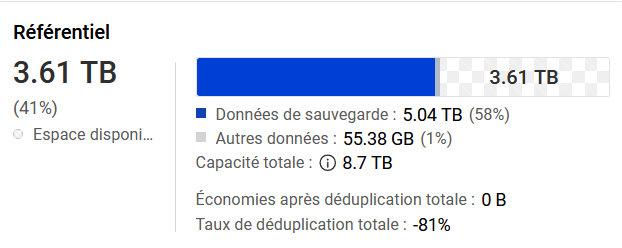
And more importantly depuded is constantly running between 5% and 20% and the discs are constantly spinning (and much more than before)

Also I didn’t create any new backup in the last 4 or 5 days !!

I’m not sure the administrative actions above created the problem but at least this is the context.

How can I clear that situation ?

As the NAS is used only for backup, there is no problem to suppress all backup data and to re-run the backups.

Thanks for your help
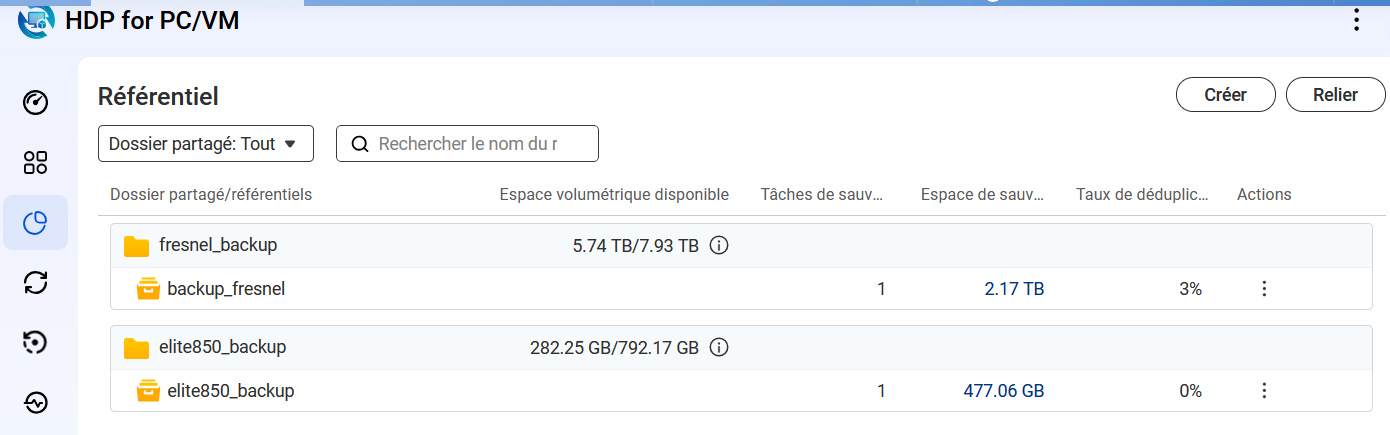
Hi @moebius38,

Thank you for the detailed description and screenshots, and for logging a support ticket. This information is very helpful.

We are checking on your support ticket, and our team will also try to reproduce this behavior based on the steps you described (re-creating the PC2 backup shared folder on an encrypted data volume with HDP for PC/VM 2.4.0). We will keep following up and update you here.

Thanks again for your patience.

Hi @Lucas,

About the potential scenarios that lead to this. One part is the creation of a new crypted data volume as you mentioned earlier.

About the first step wich is the deletion of the previous backups and share folder I see two scenarios:

I have QTS/HDP with French language. I’m translating French “Référentiel” to english “referencial”. I hope it’s the name you choose to represent in Enslish QTS/HDP the HDP notion of association between a share folder and “referencial” for a given physical platform / VM.

Scenario 1

In HDP / Référential : Suppression of the referencial.

There was a question asking if I wanted to also suppress data: I answer yes.

Then in the Control Panel / Share Folders : suppression of the share folder

There was question asking if I wanted to also suppress data: I answer yes.

Then creation of a new HDP referential on a crypted data volume.

Scenario 2

In the Control Panel / Share Folders : suppression of the share folders

There was question asking if I wanted to also supress data: I answer yes.

Oooops! I think the sequence I’m following here is not in the right/logical order.

In HDP / Référential : Suppression of the referencial.

There is a note saying that the share folder is no longer existing

I suppress the referencial.

If there was a was question asking if I wanted to also supress data: I answer yes. I don’t recall if the question was asked.

Then creation of a new HDP referential on a crypted data volume.

Another point on how the clear the point deduped running all the time:

Could you advise me on what sequence of actions to perform to bring back deduplication in a normal state where it’s not looping endlessly?

It can be instructions on the QTS portal as well as unix commands directly on the unix OS of the TS 251+ NAS.

Thanks for your time and efforts.

Hi @moebius38 ,

Thank you for describing both scenarios in such detail. Our team has now reproduced part of the behavior in the lab by following your two scenarios, on both an encrypted and an unencrypted volume. Here is what we found:

  1. The “0 B saved / negative deduplication rate” on the Overview page is a display issue in the statistics. It appears when a repository is in the Detached state (its original size is counted as 0 while the used space is kept) and stays that way until the repository is mounted again. It can also show temporarily right after a backup job is deleted, or while deduplication is still processing newly backed-up data. It is not related to the encrypted volume.

  2. We also found a condition that can keep the deduplication process running: if one repository’s name is contained in another repository’s name (for example “PC2” and “PC2-new”), detaching or mounting one of them also changes the deduplication setting of the other.

  3. On a TS-251+, re-deduplicating about 2.6 TB after rebuilding the repository can take a few days. During that time the process will keep using CPU and the Overview may show negative values until it finishes.

What you can do now:

  • In HDP, open the Repositories page. If any repository shows as Detached, click the ⋮ menu and choose Mount. Your data is kept, and the Overview recovers immediately. (Deleting a detached repository also clears the statistics, but removes its data.)
  • Please avoid repository names that are substrings of each other.

We have passed the confirmed issues to the development team for fixing and will update this thread when a fix is available. If the process is still running after the re-deduplication has completed, please keep your support ticket open so our support team can check the logs on your NAS directly.

Thanks again for your patience and for the detailed reports.

Hi @Lucas,

Thanks a lot for the detailed investigations and explanations.

I just found that yesterday morning de-deduplication process is idle, good news, and also the statistics looks coherent.

Also thanks on your proposition to keep the ticket open, after a little while of monitoring, it can be closed considering the above.

A small note, about your sentence “If the process is still running after the re-deduplication has completed” , what are the criterias to understand deduplication is complete outside of having deduped being idle?

Deduplication will restart of course when the next backup occurs.

I have no detached repository and repository names are not substring of each other.

If you mind answering, I have 3 questions about de deduplication:

Considering 1 pool of volumes, is there a single deduplication across all datavolume of a pool or there is one deduplication for each datavolume

  • a single deduplication across all datavolume: in that case blocks of 2 identical files on 2 datavolumes of a pool are stored only once.
  • one deduplication for each datavolume: in that case blocks of 2 identical files on 2 datavolumes of a pool are stored twice.

Does deduplication apply only to HDP backup data or it applies to the whole file system, so any file of the file system will benefit from the deduplication?

In the scenario where we have : a full backup, a snapshot, a full backup , will the two full backups be deduplicated across each other?

The context of the question is the following.

I have a big volume (2.5To) to backup but it is increasing slowly (say a couple of GB from time to time) and, as it is pictures, once sorted , bad pictures deleted, it never change. So I was wondering how far I could go, how many snapshots I could keep. Or how many full backups I would keep. Of course, the exact numbers will come from experience.

Using the old netbackup, I could keep around 10 snapshots.

Best Regards