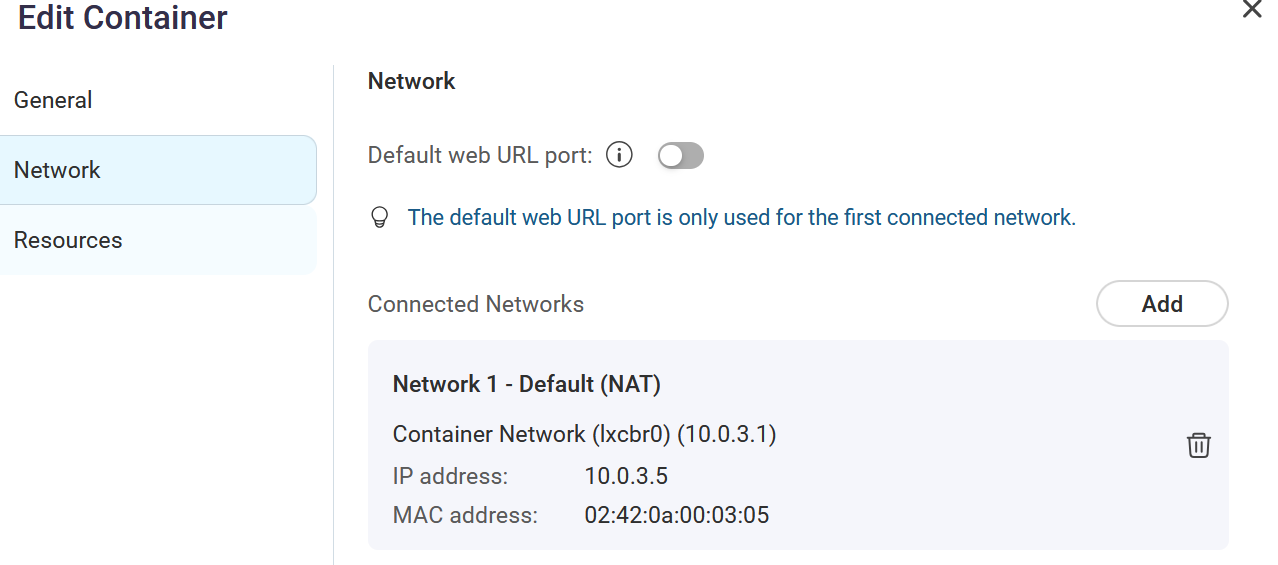
I’m trying to get nginx-proxy-manager setup in CS as a docker compose application. I have it loading via the below yaml file but when I try to setup reverse proxy it fails to get to internal app also running on CS as a docker compose app. Anyone get NPM working in CS?
I can get the app admin screen and log in, create a reverse proxy and get a lets encrypt cert but it not passing to the internal app. gives me 504 error which seems to be common.
services:
  app:
    image: 'jc21/nginx-proxy-manager:latest'
    restart: unless-stopped
    stdin_open: true
    tty: true
    ports:
      # These ports are in format <host-port>:<container-port>
      - '80:80' # Public HTTP Port
      - '443:443' # Public HTTPS Port
      - '81:81' # Admin Web Port
      # Add any other Stream port you want to expose
      # - '21:21' # FTP

    environment:
      # Uncomment this if you want to change the location of
      # the SQLite DB file within the container
      # DB_SQLITE_FILE: "/data/database.sqlite"

      # Uncomment this if IPv6 is not enabled on your host
       DISABLE_IPV6: 'true'

    volumes:
      - /share/nginx-proxy-manager/data:/data
      - /share/nginx-proxy-manager/letsencrypt:/etc/letsencrypt
Made some progress with testing out various things
For the NPM app, I have to add NAT and bridge networking. The bridge gets assigned a static IP address. The NAT allows access to other containers.
When testing, I can execute a bash command and use curl within the NPM container to test access. So far, it will not work if I use the main IP address of a container, i.e., 192.x.x.x, but if I use the NAT IP address 10.0.3.x, I can access the other container. The container name doesn’t seem to work within NPM.
I think with enough playing around, I might be able to get it to work. lol
anyone know how to configure the default nat on a yaml compose file? Right now I create the app, then have to edit the container and change networking. I rather define the networking in the yaml file so when i recreate the app/container it already setup like i need it.
i did get NPM working after a lot of trial and error. Basically i used the command line for docker to create another network called backend. I think used the networking part of the compose file to give each new container app the backend network and npm backend and static ip. I might start a thread with docker compose notes to help others out when i have time to document it properly.