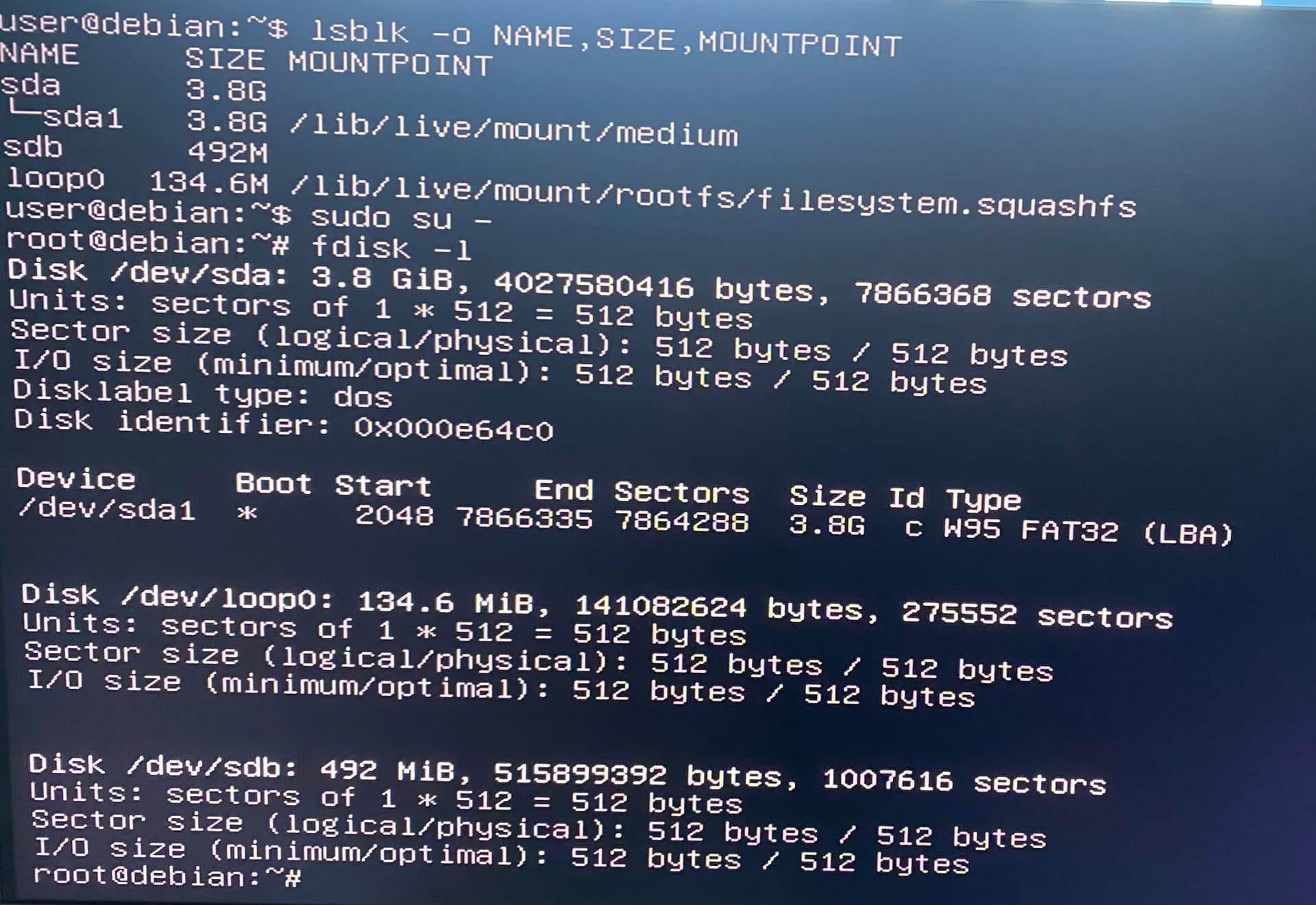
I own a QNAP TS-251 NAS (TS-x51 series), and it no longer boots correctly.
When powering it on, it does not load the QTS operating system. I believe the DOM firmware is corrupted.
Is there someone with a link to the official DOM recovery image for the TS-x51 series (TS-251) and the instructions for flashing or restoring it.
Model: TS-251 Problem: The NAS displays the Freecom / DOS shell at boot and does not start QTS. Reinstallation via USB has not worked. Required: The .img DOM recovery file for TS-x51 series and the recovery procedure.
i already looked there and it only has the recovery files for the TS-251abcd and not the normal one. That’s because the version that I have only has a small 20 mb minimal Linux environment and the os on the drive , where the other versions have the software and the os on the DOM chip
Yes, I saw both recovery images — the 1.2.8 one for the TS-x51 (non-plus) and the 1.3.0 for the TS-x51+ models. That part makes sense.
The reason I mentioned the small Linux environment is because on my TS-251, the DOM only contains a minimal 20 MB system (basically just the bootloader and recovery shell). The full QTS OS itself is stored on the system drives. So technically there is a 512 MB DOM on the board — I can see it — but it doesn’t hold the complete operating system like some of the older x86 units did.
That’s why the usual recovery images for the “full OS on DOM” models don’t fully apply to this version. It boots into that minimal environment and then mounts the drives for the rest of the system.
On a related note, just found out (through a support ticket) that QNAP don’t have and don’t support firmware recovery for the TS-231 and TS-216G models (I have one of each).
Now I’m wondering just how many other models don’t support firmware recovery???
Not yet — I did try the recovery image from the QNAP link (the TS-x51 one), but it doesn’t actually boot on my TS-251.
It looks like this model simply isn’t compatible with the full recovery image. QNAP support confirmed in my ticket that the same file should work, but I’ve tested it and it doesn’t — probably because the TS-251 only uses a small minimal environment on the DOM and loads everything else from the drives.
So for now it seems that the TS-251 doesn’t really support a “full firmware recovery” like the older x86 units. It just relies on the drives to restore the OS.
The DOM should contain the full factory base install (how else would you setup a fresh NAS?).
If your DOM only contains 20MB, then something went wrong along the way and maybe a later update killed the base image. Still, a firmware recovery should restore the DOM
That’s what I expected too — normally the DOM should have the full factory base image so it can reinstall or initialize the NAS from scratch.
But in my case, the DOM contents are definitely minimal — only about 20 MB total, and it boots into a very stripped-down Linux shell. From there it mounts the drives and loads QTS. I checked with QNAP support, and they confirmed the same TS-x51 recovery image should work, but when I flash that to the DOM it still won’t boot properly.
So either the newer firmware revisions moved more of the system to the drives (to save DOM space), or my DOM image got replaced at some point by an update that trimmed it down to the bare minimum.
I’ll try dumping the current DOM contents before doing any deeper recovery steps, just in case there’s a different layout used on newer TS-251 units.
That actually makes sense. I was thinking the same thing. If the DOM originally had a full base image and now only holds that 20 MB minimal shell, then it’s likely that a firmware update (or a failed flash) wiped the factory partition.
It would also explain why the recovery image doesn’t boot. the loader on the DOM might no longer match the expected partition layout or boot sequence. maybe it can be rebuilt manually…
I’m happy to report that my QNAP TS-251 NAS is working again, and I want to thank everyone who helped me out! Thanks to the links and suggestions you provided, I was able to restore the NAS. It was a bit confusing with the different versions of the TS-251, but I found the correct recovery file, and everything is up and running as it should.
I really appreciate all the support I received here. It’s awesome to see how a community can come together to help with tech issues. Again, thank you all for the tips, links, and your patience!