I created a torrent file in a third-party BitTorrent client, and I imported the torrent file in Download Station. I placed my large file to be shared in the /Download folder on my QNAP NAS. I searched in the menu of Download Station, where to select the large file to be shared, but I didn’t find how to do so. In my other BitTorrent client, I only have to place the large file to be shared, in the download folder, and it will mark the torrent download as “Complete” immediately, and start to seed. In Download Station, the large file to be shared is in the /Download directory, but Download Station doesn’t mark the torrent download as complete, it is still at 0% although I pressed “Start”…It doesn’t seem to care about my file in that folder. Any idea?
NAS model: TS-131P Firmware Version/Build numbers : QTS 5.2.7.3297
Thank you for your reply! Maybe I didn’t express myself properly… I’m an uploader, I create torrents, upload the torrent files on BitTorrent trackers, and start seeding right away from my computer (without having to download anything, as the file to be shared is already on my computer).
What I’d like to do is migrate from my computer to my NAS. I’m already able to add the torrent file in Download Station, and I’d like to be able to select the local file associated with the torrent, that is already here on the NAS (i.e. not a file that I want to download).
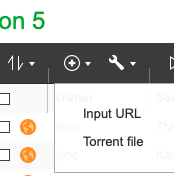
If I press the “+” icon on the main page and choose “Torrent file”, I can choose a torrent file, but then, the next window only allows me to choose the file to be downloaded, not to choose a local file that I already have (a file that I only want to seed).
On most tracker sites, having uploaded the file, you have to download their version of the associated .torrent file, as if you were planning to download the file, following the normal download process, and saving the file where it already exists on the client.
At this point there’s a quick, behind the scenes, pattern match check, and then your client switches to seeding.
Thank you! Yes, this is how it works as well on my tracker. As soon as I upload the .torrent file on my tracker dashboard, I need to download the .torrent file and save it here, as a replacement for the existing one.
This works in qBitTorrent, as I have the possibility to select a local file (e.g. a large MP4 file). But in Download Station, I can’t find this option to browse and select the local large file for seeding.
Thank you for your detailed feedback regarding Download Station.
We appreciate your feedback and have shared your input with our development team for future product evaluation.
In the meantime, for users who require advanced task management and seeding capabilities, we recommend deploying widely-used open-source software from the community (such as qBittorrent) via Container Station. These professional tools offer more comprehensive support for P2P migration and sharing, which may better suit your advanced application scenarios.