Since some time (half a year maybe?) DS started to re-download most of torrent files.
The scenario is like:
a file is downloaded
then the file is seeded as per settings
then the file is moved to Completed
at next restart (my QNAP runs during “business hours”, so restarts daily), the torrent is downloaded anew from 0%
after download is completed, it is moved to the right place, in “competed” folder, replacing already existing file
I use DS as a “standard” user (not admin permissions). I think not all torrents have this problem, but a lot (50%). I don’t know if after second download the cycle repeats.
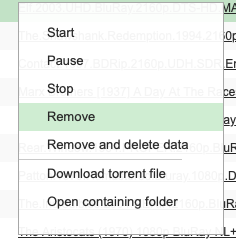
I have not seen this behavior in DS myself. I wonder if somehow it’s not being shown as completed? Maybe you can delete the item from the task list without deleting the files:
The problematic torrents definitely go to Completed status. Yes, the Remove option works as intended here. Now it’s come to my mind that the problem might appear only in cases when seeding is completed uninterrupted (as opposed to stopping a torrent which is being seeded). I’ll try to find out.