I am facing a strange issue, I have very slow uploads using Filestation 6 on my QNAP but I got perfectly fine speed using SMB. I have the issue both in LAN and in WAN connections.
When I am in LAN, I simply use SMB and the problem is avoided, and when I’m in WAN I configured an OpenVPN server on the QNAP and while connected in VPN (using port forwarding) well.. I then use SMB and it works perfectly fine.
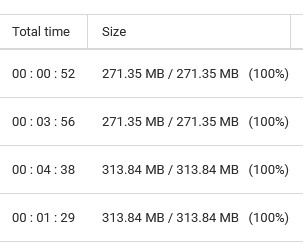
But using the web interface pointing directly to the public ip of my connections (I use port forward to map HTTPS port externally) it is way slower, it hangs for minutes at 1% and then jumps to 25% and so on, but the amount of time needed to upload the same file is almost 4 times longer.
First of all, you should remove your port forwarding. This is very dangerous. Do NOT expose your QNAP to the web. You are exposing the administrative page and this is very easily hacked. Does not matter if you use HTTPs.
You should only connect to your NAS over VPN or you could also use the MyQNAPCloud portal.
As for why it is slower - I would expect a web based connection/transfer to be slower than using SMB.
Again - I am strongly warning you NOT to expose any of your NAS to the internet - unique port numbers of not. 2FA is useless as they attackers use other methods to get through the interface.
@dolbyman can provide you with plenty of previous threads where people had all these “protections” in place and still got hacked.
You do what you want to do but you have been warned.
It’s much more secure (albeit slower) to use the MyQNAPCloud portal to gain access to your NAS w/o using a VPN.
but your answers does not address the speed problem, which is also present when connecting from my LAN, and only on HTTPS connection. Any ideas on that?
I feel I have to address the concerns regarding port forward: I know it’s bad, I’ve been an IT and network technician for the last 25 years, but this case is peculiar the storage is used to exchange data betweek offices and the data stored gets downloaded and backed up as soon as it’s received using a procedure on another server outside the DMZ, si believe me, is’t ok even if an exploit gets my data encrypted tha’s no big deal, I weighted the pros and cons of the configuration
STRONGLY suggest you move the VPN to your router or other properly secured device such as a raspberry pi. You then would not need any port forwarding and can avoid all the headaches already described.
IF you happened to get hit by malware, does your automated backup run regardless? i.e. would it overwrite your “good” data with malware encrypted data? This does not sound like adequate protection, but maybe you know better.
Back to your original issue though, if you are connected via a VPN (no matter where it is running, although I strongly suggest NOT on you NAS which is INSIDE your network), then why not use SMB and avoid file station altogether?
Can you roll back to a working version? Did you report it as a bug to QNAP support?
thank you all for the security concerns, I’d do the same so I get it
I cannot use the VPN access in the router, I can only manage port forward and ACLs on the firewall (not under my management); the FileStation acess is used by a dozens of external agents to place working files on a temporary storage (the QNAP) which is on a DMZ, and on another file server outside the DMZ there’s a procedure polling every 30 seconds the QNAP share loking for new files, which gets moved to another location, MD5 checked and then put in use.
Believe me, security is ok in this setup for my needs
as for the speed issue I’d prefere to fix this rather than rollback to 4.x firmware (not sure if it is even possible to do so), and NO I did not report because the NAS is not under warranty anymore
Ugh! A use case where multiple “users” are accessing the NAS on a DMZ is a recipe for disaster. You do you. But there’s a whole lot going on here that you don’t control. If one of those users gets hit with something nasty, everything you have could get hit as well. Don’t say we did’t warn you. This is incredibly insecure. You would be better off having a share cloud drive from a cloud provider and then having the QNAP (behind a SECURE firewall) pulling files from the cloud provider.
That is the primary factor. As long as YOU are happy, nothing else matters. Many people are not aware of the risks and that is why everyone is jumping all over you
Doesn’t matter. They will still (I believe) take the report and look into it, particularly if you can say is worked in version X, but stopped working in version Y.
for everyone else, thanks again for the security concerns, I’d like to spend ad hour describing exactly how the setup is in place and how it works, and how it really is ok for the situation, but THAT would be a security issue
I am not certain if this specific issue has been addressed in the latest release. I will follow up with our internal team to confirm. Thank you for your patience!
 the storage is used to exchange data betweek offices and the data stored gets downloaded and backed up as soon as it’s received using a procedure on another server outside the DMZ, si believe me, is’t ok
