TS-453 Pro, firmware QTS 5.2.8.3359 Digital Signature
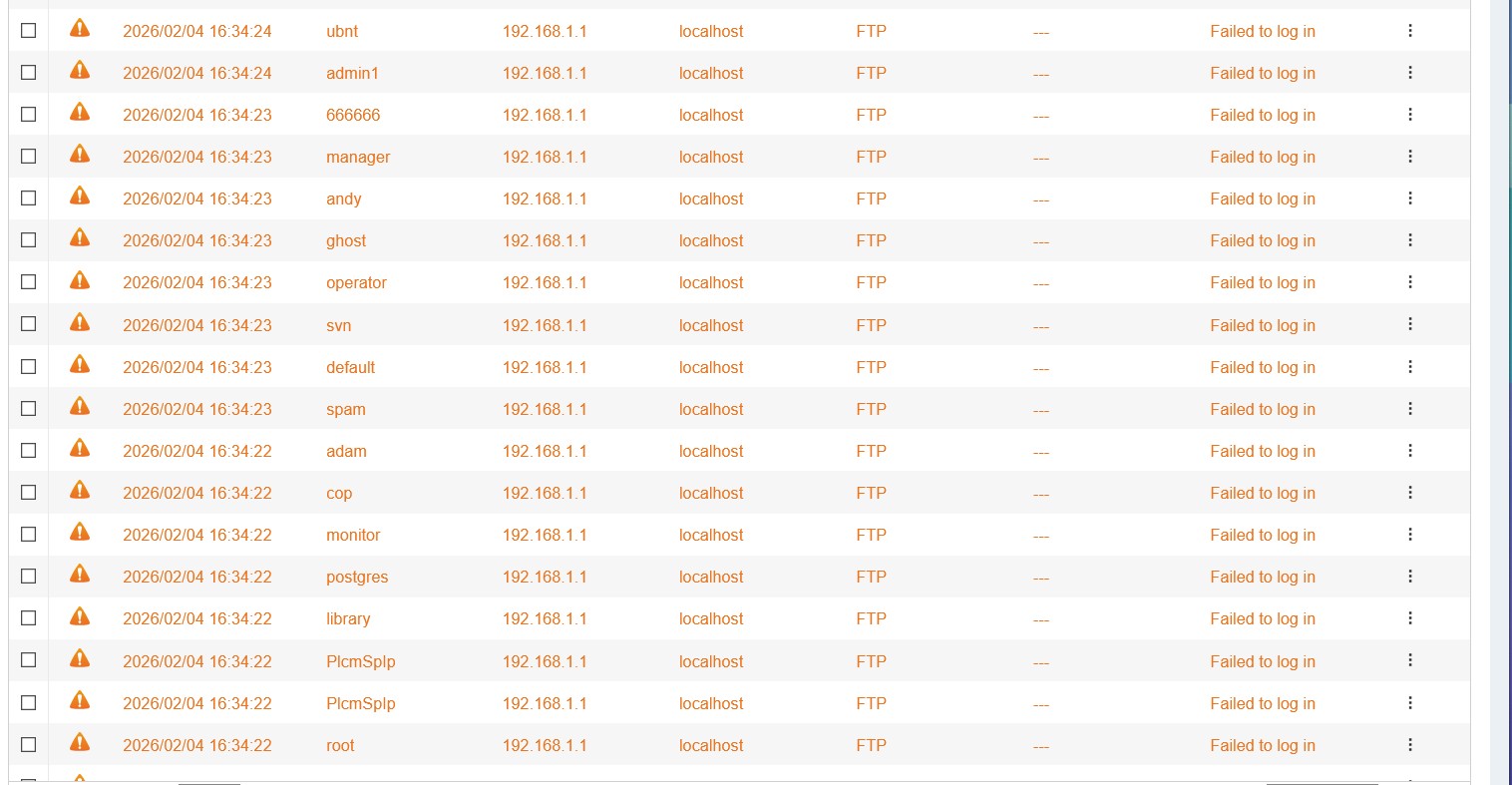
Team, I am getting continued hits from router IP (192.168.1.1) with many different usernames all of which do not exist and admin is disabled. I do run Plex and share with a few friends (3) outside network and restricted to their account info. Attached screenshot but qulog is getting max message so it is continual at this point.
I have QuFTP installed and just de-selected the Enable the FTP server to see if that stops it.
Bots automatically scan every IP address and attempt basic attempts to access your system. This is why you should never directly expose your NAS to such threats. You should disable UPnP on your router and remove any ports that are manually forwarded to your NAS. You should also disable UPnP on your NAS.
You would be shocked if you knew what was being thrown at your NAS right now if you have it published to the internet. You really should not do that. If you want to safely share videos with friends via Plex, then you should all get a Plex Pass or set up a VPN on your router and let them access your server via the VPN.
The IP address being the local router, doesn’t that suggest that the target is the external published IP address of your ISP connection, and those attacks are being routed by Port Forwarding on your router? You need to switch that OFF.
The symptoms may have “disappeared” i.e. it isn’t being logged any more, but unless you have actually taken the steps to disable the access that was in place, you are still at risk. You need to disable UPnP or remove the manually forwarded ports to properly protect your system and your entire network.
Disabling UPnP on the router might prevent other functions from working, outside of the NAS.
If QuFTP is disabled, then it won’t be making a forwarding request to the router, via UPnP for that port. I’d restart the router, just to make sure any previously requested port forwarding isn’t still active.
My ISP tried to “upgrade” me to a router without UPnP and I had to reject it, as I run some services with manual port forwarding (which that router also didn’t support) and a couple with UPnP.
Their 3rd-level support got involved and it was “no problem, we’ll send you a proper router”
Actually, that’s not correct. I ended up buying my own cable modem a few years ago because the one Comcast gave me would not stay in bridge mode after a firmware update. They absolutely want to give you a router (whether it is good or not is another question) and provide your WiFi, etc.
I guess I should have written “ISP routers are to be set to bridge mode […]”.
So far the ones I have gotten here (these days it’s basically Xfinity clones, as my ISP was bough in a cooperation with them) stay rock solid in bridge mode. I offered years ago to buy my own but they said they can only guarantee DOCSIS compliance with their own, so getting my own was not allowed. Plus they change DOCSIS standards every few years, so them swapping it is easier than to re-buy and turf your own all the time.
Yeah, I had theirs for years, but had all kinds of trouble after a firmware update. Comcast Tech support is oh so helpful. They kept asking me about my WiFi and I would tell them I am not using their WiFi and they would be like, “What do you mean?”
A guy at my local Xfinity (Comcast) store, told me to go buy my own modem which I did. I worked great for several years but after my area got upgraded to faster upload speeds, it turns out that particular Aris model was only limited to 40 Mb/s upload even though it was fully compliant to the DOCSIS specs (3.0 or whatever they are on now). So I bought a different modem and things have been great since.
I think you live in BC. Here in the states at least the modems all get certified by the CATV providers. So they already have approved the ones I have used.
I now have to pay for unlimited data when before I didn’t, but then I’m not paying to rent the modem so it’s a wash actually…