Failed to install Container Station 3.1.2 on QuTS hero h6.0.1.3564

I cannot install container station on my TVS-h1288X. I get the error message:
App Center Installing/Updating/Removing Apps [App Center] Failed to install Container Station. Please update your firmware to 5.0.1 or later and then try again.

But I am on QuTS hero h6.0.1.3564, which is definitely later than 5.0.1.

Any help appreciated!

Thanks for the report! We’ll look into this issue internally.

Maybe this helps:

$ getcfg system version
5.0.0

$ grep ^Version /etc/config/uLinux.conf
/etc/config/uLinux.conf:Version = 5.0.0
/etc/config/uLinux.conf:Version = Version 4.13.17
/etc/config/uLinux.conf:Version = 1.0

$ grep ^Version /etc/default_config/uLinux.conf
/etc/default_config/uLinux.conf:Version = 6.0.1
/etc/default_config/uLinux.conf:Version = 1.0

We were unable to reproduce this issue on our end. Could you provide a screenshot of the error you mentioned? Also, may we ask whether you had Container Station installed previously — was this a fresh installation, or an update from an older version? Thanks!

It was a newly delivered QNAP. No container station installed. I got QNAP, updated the firmware, set up storage pools, and tried to install the Container Station.

These are the relevant parts from event log:

Error,2026-08-24,18:58:50,"userxxx","xxxx:xxxx:xxxx:xxxx","Web Desktop","Mozilla/5.0 (Windows NT 10.0; Win64; x64; rv:154.0) Gecko/20100","App Center","Installing/Updating/Removing Apps","[App Center] Failed to install Container Station. Please update your firmware to 5.0.1 or later and then try again."

Information,2026-08-19,16:41:17,"admin","127.0.0.1","---","---","Firmware Update","Firmware Update","[Firmware Update] Updated system from version h5.0.0.2120(20220804) to h6.0.1.3564(20260723)."
Information,2026-08-19,16:39:38,"System","127.0.0.1","---","---","---","---","To complete the update procedure (Embedded Controller firmware - E020)."
Information,2026-08-19,16:39:12,"admin","127.0.0.1","---","---","Firmware Update","Firmware Update","[Firmware Update] Started updating firmware."

Error,2026-08-19,16:35:18,"System","127.0.0.1","---","---","Firmware Update","Firmware Update","[Firmware Update] Failed to install 5.0.1. The digital signature has expired."
Information,2026-08-19,16:35:14,"userxxx","xxxx:xxxx:xxxx:xxxx","---","---","Firmware Update","Firmware Update","[Firmware Update] Started updating firmware h5.0.1.2248 Build 20221215."
Information,2026-08-19,16:35:13,"userxxx","xxxx:xxxx:xxxx:xxxx","---","---","Firmware Update","Firmware Update","[Firmware Update] Started unzipping TS-X88_20221215-h5.0.1.2248.zip."
Information,2026-08-19,16:34:58,"userxxx","xxxx:xxxx:xxxx:xxxx","---","---","Firmware Update","Firmware Update","[Firmware Update] Started downloading firmware h5.0.1.2248 Build 20221215."

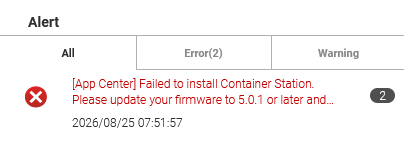
Without container station, QNAP is quite unusable for me. No idea from QNAP?

Update QuTS hero 6.0.2 ???

I’ve been thinking about this ever since I read that version 6.0.2 was released. However, I’m concerned that a crucial post-update step was missed when upgrading from 5.0 to 6.0.1.

There is a risk that the system might appear to be working while actually masking underlying issues that could cause me headaches down the line.

On the other hand, my QNAP is brand new, so I could just reset it. That should trigger a complete re-installation of the system, right? Or am I mistaken?

It looks like there’s no reboot record in the logs. May we ask if you rebooted after the update? Could you try rebooting and then installing again? Thanks!

Yes, as far as I recall, the QNAP restarted automatically. I have also performed several restarts in the meantime. Furthermore, I tried the firmware update—including the restart—again, but with no change.

That does seem unusual then. Could you please open a support ticket so our Support Team can assist you? Thanks!

Hi SteveKo,
i opened a support ticket. The answer is:

Dear Customer,

Since QuTS hero h5.3.0, to support HA management, /etc/config has been symlinked to a new space that can be synchronized between the active and passive nodes.

As a result, some node-specific system information in uLinux.conf must now be retrieved from:

/etc/default_config/uLinux.conf

This behavior is intentional and by design.

Therefore, each QPKG installation script needs to independently ensure that the firmware version is read from the correct uLinux.conf path. In general, a new QPKG version will be released to support this requirement.

Thank you for your understanding.

This causes some system commands—such as getcfg system version—to return an incorrect firmware version. This command displayed 5.0.0 instead of 6.0.2.
I am hoping for a quick resolution, as this is blocking certain installations (and also affecting my confidence in this system).

https://download.qnap.com/QPKG/container-station_3.1.3.1854_amd64.zip

try to manual install

manual install fails with same error message. It works, as soon as I adjust /etc/config/uLinux.confmanually. … which is bad.

try to reset to defaults

in system

i dont think there is no fire alarm if all users have this 5hit

QNAP replied. It is a bug.

Dear Customer,

No action is required from your side in the meantime. There is no need to manually copy any entries from /etc/default_config/uLinux.conf to /etc/config/uLinux.conf.

The system will manage these configuration files automatically. As mentioned previously, the Container Station QPKG was incorrectly reading the values from /etc/config/uLinux.conf instead of the correct /etc/default_config/uLinux.conf.

The fix for this issue will be included in the Container Station 3.1.4 release. Therefore, the configuration files should be handled properly by the system, and you should not need to manually edit or synchronize them.

Thank you for your patience.

So I am going to reset /etc/config/uLinux.conf to default and wait for next container station release.

Overall, I find QNAP support to be very good. Inquiries are taken seriously.

Only yesterday, in QTS 5.2.10, I experienced some odd behaviour while using getcfg.

Despite me specifying the source file as /etc/config/uLinux.conf, it was returning values from somewhere else.

Based-on @qnaphs findings, I’m going to assume it was reading from /etc/default_config/uLinux.conf instead.

I wonder if QTS is being affected by the QuTS builds? :roll_eyes:

BTW: in QTS 5.2.10, /etc/config points to /mnt/HDA_ROOT/.config, which looks correct for QTS.