Hi, I would love to see Internxt cloud storage integrated on our Qnap’s HBS 3 backup service. They offer affordable lifetime plans which would be great to store my data.
1 Like
I suggest your raise a ticket them and request this feature, though unless 100’s if not 1000’s want it, i doubt it will be implemented due to one user wanting it.
Somebody got to be the first one 
would be dope
Yes but too dope for Qnap. They responded to my ticket that they would like to promote the Qnap Cloud Storage which I can imagine. A pity because Internxt has great lifetime deals.
Funny, I raised the same question today towards internxt. I think they could e.g. release an app to the qnap app store that simply runs their cli as a webdav service.
actually I have an even better idea: Internxt could release a docker image with their cli installed that can be started in a way that it automatically enables the cli’s webdav server.
Omg: Someone is already working on this idea GitHub - ne0ark/Internxt-CLI: Internxt CLI Docker
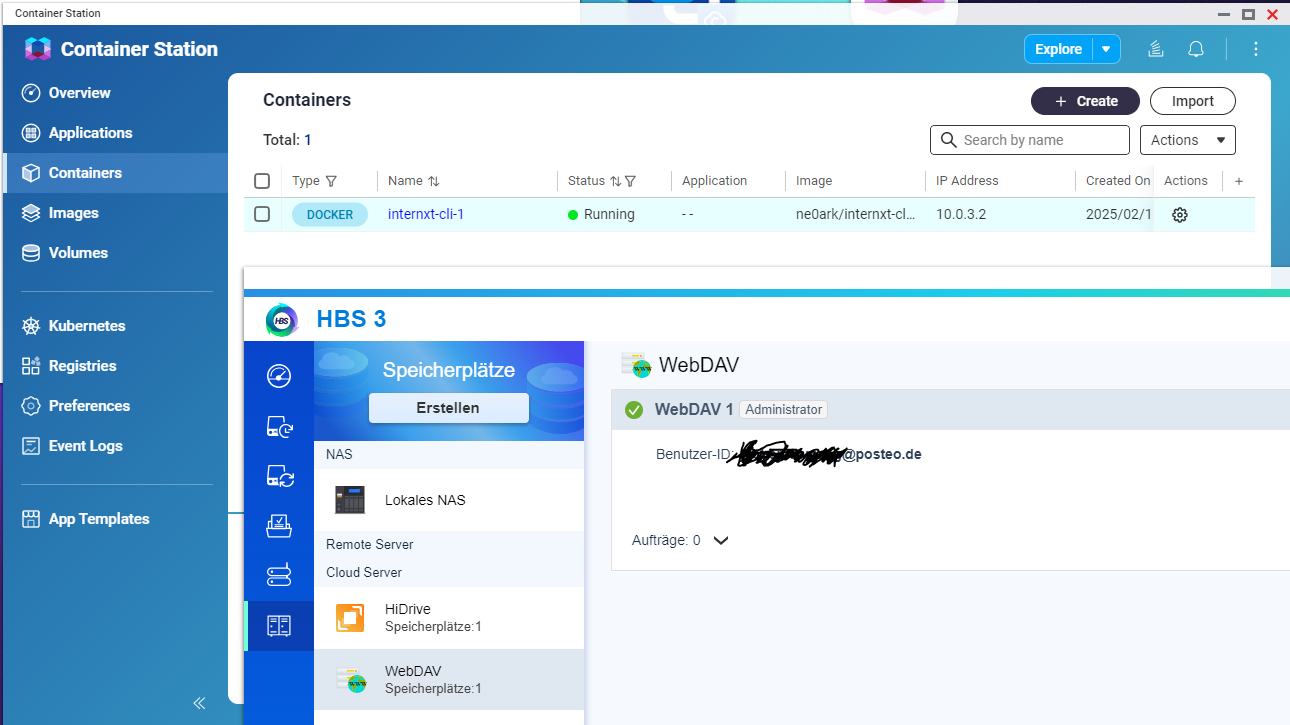
Believe it or not: It works!!
1 Like
Hello Joda, how does it works? I tried but I cannot connect the qnap to internxt via container
Hello Joda,
Thanks for pointing to this internxt-cli. I can get the container running, but only for a few seconds. Then it crashes. Log readout says:
Blokcitaat
env: can’t execute ‘node’: No such file or directory
Blokcitaat
Would you be so kind to to advise? Your help would be highly appreciated
Hello,
I assume you’ve used the dockerfile (GitHub - ne0ark/Internxt-CLI: Internxt CLI Docker) to build your local image. You can than use Container Station to run the container.
When creating a webdav strorage in Hybrid Backup the requested server-url needs to be something like http://10.0.3.3:3005 (=ip of the Internxt-CLI container)
I got the docker container up and running, I can use cyberduck via the container without issues.
HBS 3 does not want to list anything outside of the root folder, trying to access a folder gives me the error:
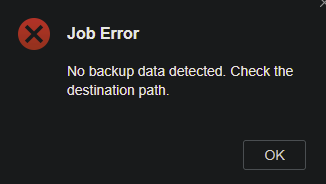
Is that working for you guys? I can’t create a backup job due to this error…
Hello,
So did someone managed to get something working to backup QNAP data toward internxt ?
I have also try the Dockerfile above.
It seems to work well with most client allowing to connect without password (like cyberduck).
But when a user and password is provided, somehow I can see the content (folders structure and files), but I can’t write :-/
And unfortunatly, all webdav option provided on QNAP side requires a user and a password !?
Or did I miss something ?
I’ve thought of a workaround to find a way to connect to the local webdav client from my QNAP but without a password, and I came up with this solution.
I run the internxt-cli on a first container and use that local webdav server to mount my internxt drive using a second container running docker-webdav-client
This is damn slow… and could be improved, but at least it seems to work, so I share it here in case it could help.
If someone could think of a better way to work around the mandatory user/password on the QNAP side… please share.
Now, I can browse and add folders and files using this solution, but so far, any HBS3 backup or sync attempt has failed at some point.
I managed to copy a few GB by a few GB, but I don’t see this as a proper solution to backup a big amount of data. :-/
Here is the resulting docker-compose file that can be used in Container Station after manually building the internxt-cli:v1.5.5 image (build . -t internxt-cli:v1.5.5):
version: "3.9"
services:
  internxt-cli:
    container_name: internxt-cli
    image: internxt-cli:v1.5.5
    restart: unless-stopped
    environment:
      INTERNXT_EMAIL: XXXXXXXXXXXX@XXXXXX.XXX
      INTERNXT_PASSWORD: YYYYYYYYYYYYYYYYYYYY
      INTERNXT_WEB_PORT: 3005
    ports:
    - "3005:3005"
  internxt-mount:
    container_name: internxt-mount
    image: efrecon/webdav-client
    depends_on:
      - internxt-cli
    restart: unless-stopped
    environment:
      - OWNER=100
      - WEBDRIVE_URL=http://internxt-cli:3005
      - DAVFS2_ASK_AUTH=0
      - DAVFS2_DAV_GROUP=users
      - DAVFS2_USE_LOCKS=0
      - DAVFS2_CACHE_SIZE=5120
    volumes:
      - /ZZZZZ/ZZZZZZZZZ/ZZZZ:/mnt/webdrive:rshared
    cap_add:
    - SYS_ADMIN
    devices:
    - /dev/fuse
    security_opt:
      - apparmor:unconfined
After starting these containers, your internxt drive is accessible in the QNAP folder /ZZZZZ/ZZZZZZZZZ/ZZZZ
You might need to change OWNER=100 to the UID of the user needing to access that folder.
1 Like
Hopefully we can expect something soon…
https://www.reddit.com/r/internxt/comments/1nqwsra/windows_258_is_out_now/
Internxt – QNAP and Synology NAS Looks like it has arrived 
Hi there, Internxt’s CEO here
Yep, we finally released the integration via dockerhub Internxt – QNAP and Synology NAS
cli/docker at main · internxt/cli · GitHub Hope it’s somewhat useful!
2 Likes
Thanks for all the effort! Very much appreciated. Hopefully someone can write a detailed how to, to get this working.
1 Like
Did anyone got this working on a Qnap?
Finally I got it working!
On my Qnap get the latest Internxt WebDAV (1.6)
Standard port for web-URL switched on 3005
INXT_USER : email account
INXT_PASSWORD : your password
INXT_TWOFACTORCODE
INXT_OTPTOKEN
WEBDAV_PORT : 3005
WEBDAV_PROTOCOL
ports : 3005:3005
Check ip adres webdav container (my case 10.0.3.2)
HBS 3 Hybrid Backup Sync
Create Storage Space
Choose WebDDAV
enter email
enter password
https://ipaddresscontainer:3005
disable use proxy server
disable Validate SSL certificate
Thank you so much for your help : I’ve been struggling for 2 days, and I’m not sure that I could have found the right settings by myself !!!
For the record, I tried to follow the instructions from Internxt and it’s just amazing how confusing and erroneous they can be…
1 Like