Hello,
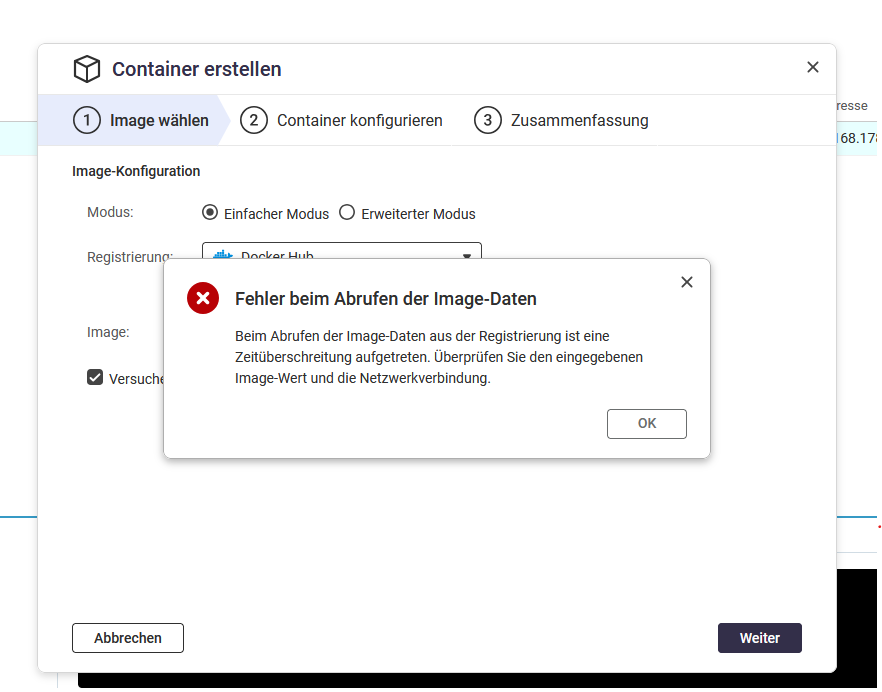
I want to install a Docker application from Docker Hub. Fing-Agent is also found under Discover, and I can select the version, but after a short time I get the message “Error retrieving image data. A timeout occurred while retrieving the image data from the registry. Please check the entered image value and network connection.”
The network connection seems to be working, since the Pi-Hole Docker is running without errors. On Docker, the name of the Fing Agent is identical. I have a Docker account and according to Container Station, I am logged in.
Does anyone have an idea?
Which NAS model and which container are you referring to? For example, if it’s an ARM NAS and there is no suitable ARM container image available, then it won’t work.
We have reviewed the case internally once again and were able to successfully find and install the image on a TS-432PXU-RP in Container Station. Based on our latest test, the issue therefore does not appear to be directly related to the NAS model.
Please try searching for or installing the image using the full name:
fing/fing-agent
In some cases, problems can occur if the full Docker Hub format is not used.
To allow us to investigate your case in more detail, we kindly ask you to provide us with the following information:
Hello,
sorry, there were a lot of other things in life that mattered more at the moment.
The model is a TS-431X2
Current FW QTS 5.2.10.3577
Container Station version is 3.1.2.1742
I selected Fing via Discover, clicked Deploy.
Another way was via “pull” where I entered fing/fing-agent.
Container Station does its thing and no error message appears.
When I try to create a new container, I get an error message: