Trying to rename a Folder (e.g: “Gerry” to “gerry”) my NAS will ISSUE: System Message “FILE EXIST”, while this folder isn’t already existing. So you simply cannot rename a folder with CAPITALS letters to it’s corresponding lower letters.
QNAP TS451+ QTS 5.2.9.3410 filestation 5.5.6.5243
Works perfectly for me! test → Test with TS-464 QTS 5.2.9.3451. However, using File Station 6. Simply download and install!
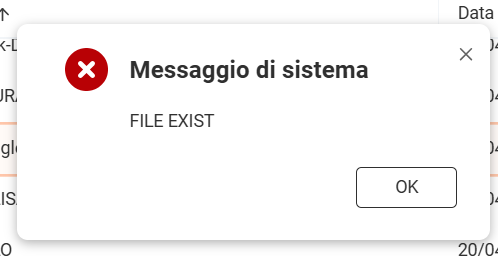
The QNAP Linux is case sensitive. It should work fine.
I just tried this in File Station 5 and had no problem.
I’m working on Linux since 1997 (I’m 62 yo).
on ALL other installation (Synology included) this is working very well, but in THIS case, QNAP sucks. However it’s NOT a big problem (rename Subdir to XXX1, then rename to all capital letters). I thik it’s a BUG,
but I wish to thanks all of you for you kind support.
Ciao dall’Italia
f.
Again, I am not sure why you are having this problem. Others of us are not. I don’t know if there is an option to use case sensitivity in the settings somewhere or if there’s a language setting or something.
All I know is it works for me.
That might be it. 
The OP appears to be using non-English language (Italian?). Might be a bug apparent only when using non-English?
Yeah, for your info: Try to insert a USB DRIVE (FAT32 formatted) and rename a subdir from “test” to “TEST” or “Test” changing from lower to capitals. Then you can experience the problem… Do you?
Remark that windows is also “letter case sensitive”, since MS-DOS: but the OS will change all user input in lower letters, because Bill (Gates) wanted to make PC use more user-friendly for beginners.
regards
Well, I would not expect FAT32 to use case sensitive file systems. That’s not a bug. It’s FAT32.
And I don’t think DOS has ever been case sensitive. Been a long time since I have not much in DOS, but I don’t ever remember it being case sensitive.
Remark that windows is also “letter case sensitive”, since MS-DOS: but the OS will change all user input in lower letters, because Bill (Gates) wanted to make PC use more user-friendly for beginners.
It doesn’t matter if Windows or Dos or whatever. FAT32 is not case sensitive.
FAT32 is not case-sensitive; it treats uppercase and lowercase letters as equivalent. However, it is case-preserving, meaning it retains the case of the file names as they were created.
https://help.goodsync.com/hc/en-us/articles/115003402971-Case-Sensitivity
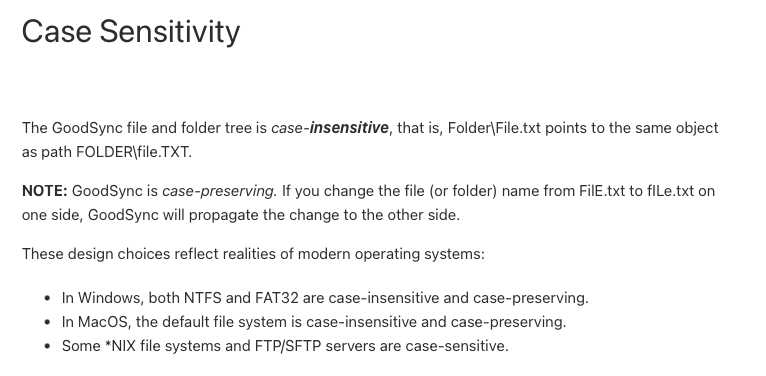
Look at that “In Windows, both NTFS and FAR32 are case-insensitive…”
Now, why QNAP doesn’t preserve the case of the name since FAT32 is case preserving, I don’t know. That may be a Linux issue.
Another quick search online finds:
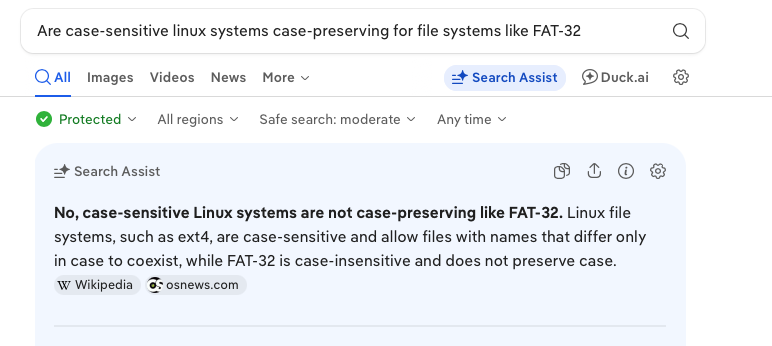
So, since case-sensitive Linux is not case preserving, then it would make sense that it changes the case on a FAT-32 system.
So next time, before you come on here and start accusing QNAP of bugs and saying it sucks, why don’t you do a little research first.
Either way, thanks for the feedback! We’ll work on optimizing the related prompts and mechanisms. Also, a big thanks to the other community members for helping clarify this!