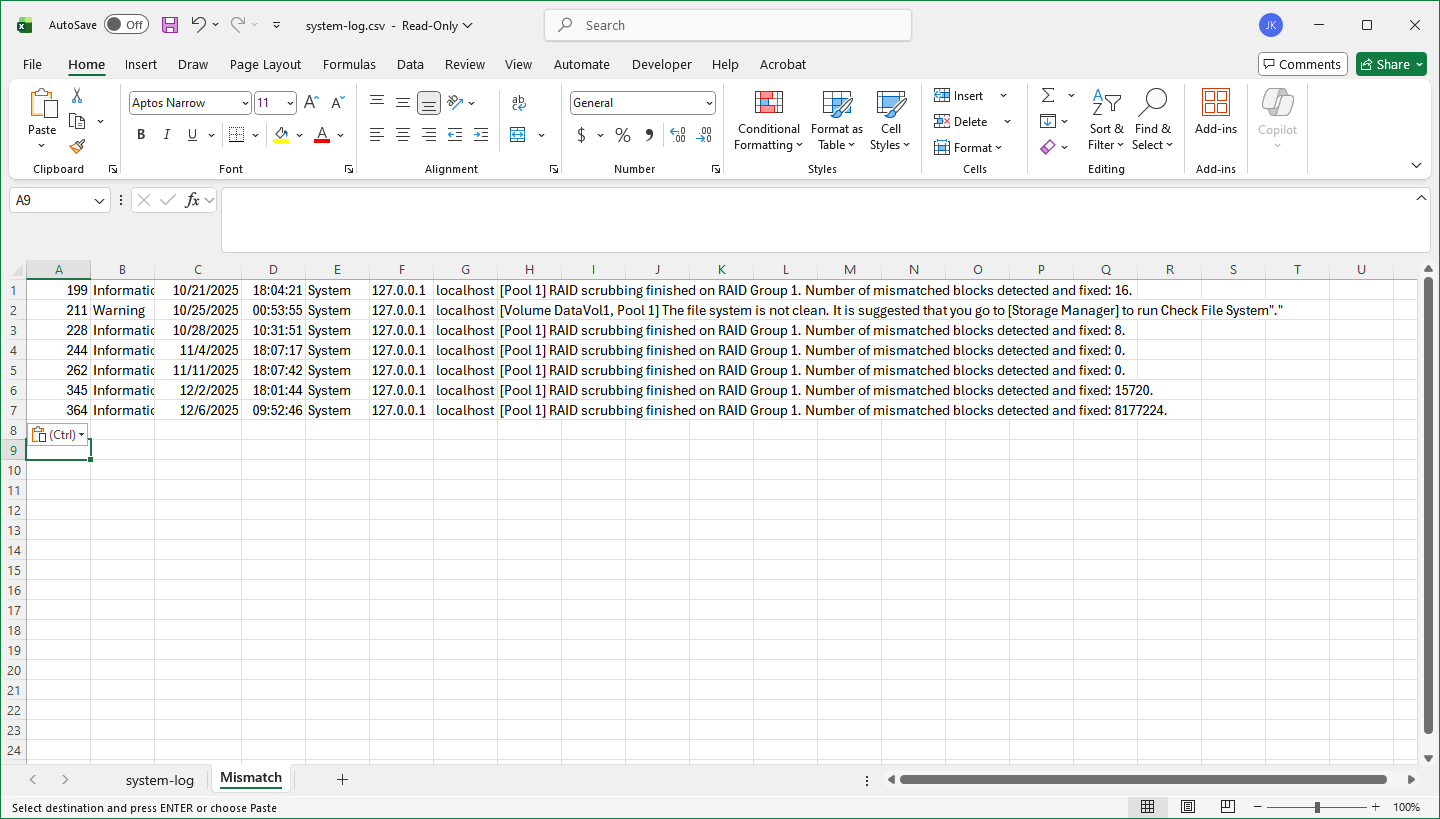
I have an older TS-469 with four (as far as I know) WD Red+ 6 TB drives. I am getting lots of “inconsistent blocks” reported every time I scrub, even with only a few files being added or changed between scrubs. Last week the report was over 15 thousand inconsistent blocks, which it claims were repaired.
So… problem - I can’t find a problem! All the disks are reporting good, no bad sectors, etc. Any suggestions on how I can trace this down?
Well (replying to myself), seems harder than i thought. There is no built-in memory test, nor can i find one to download and add. So looks like I am going to have to make a bootable thumbdrive, get a USB hub, and see if I can run the whole thing with no drives. Seems a LOT trickier than it should be.
I am not trying to upgrade the poor old thing, just get it back to working correctly. While changing only five or six small files over a weeks time, it generated 15K+ errors. So far, I can’t even figure out where these “broken blocks” are. That is, if they are all on one drive, or are they scattered around. All the log tells me is that they were found in a scrub, and repaired. But then the next scrub just shows up a lot more.
I cannot find any indication that any HDD is having problems. That is why it was suggested to me that it might be a memory error. So now I am trying to figure out how much work it is going to be to find a spare monitor and keyboard, make a bootable USB drive, and find a copy of MEMTEST.
As an engineer, it doesn’t seem like it should be this hard to at least find the source of the errors.
The drives are all relatively new. I believe the oldest is about 1 year old, and the NAS is very lightly used. I was suspicious of one of the drives that had been swapped in, so I replaced it. No improvement. Also, annoyingly, I get NO problems shown on the drives. SMART and test show nothing. Load times, retries, etc. are all good. Temperatures are in the low 30 C. Frankly, I am stumped. But I certainly can’t count on the unit as it is now,.
To be honest: I have had a similiar issue with a TS-669. The NAS do not through any errors, but it seems that when doing some load the volume is set to read-only (without any known reason). I did a setup with complete different disks, this was successfull, but when starting a copy job the volume becomes read-only again after some minutes, this is reproduceable.
Currently my suspicion is that a component (which ever) is at end of life causing some weird things.
So may be yours do.
So if I am in your shoes I would do a complete new setup and check if NAS behaves in any other way afterwards.
Thanks for the {not very encouraging} information. {:>)
This build is not that old, unfortunately. I put the disks in and started fresh only about 5 months ago. Everything was fine until about a month ago. Otherwise, it’s been pretty reliable.
One problem that *I* did in setting it up - I basically told it to simply use all of the storage as a thick volume. That was fine until these recent issues causing it to go “read-only” and attempt a recover. It apparently needs >32GB of spare space outside of the volume to do a recovery. So the recovery fails. Unfortunately, QNAP QTS allows you to expand a volume, but not shrink one. So even though I have about 7TB of space left on the NAS, the only solution is to erase everything and start over. [Or stop the errors from occurring. ]
Thanks for the info. I am going to replace the memory in a couple of days, just to see.
Thick volumes always take up the space you allocate to them. So if you have thick volumes taking up most of your drive space and then do some snapshots or other similar things, you could very easily set your drives into read-only mode even though you have plenty of empty space in those thick volumes. As far as the NAS is concerned, that space is taken up - it’s been allocated and when it can’t do anything else because there’s not enough extra space, it becomes a problem.