Is there a way to force download station to use a specific NIC? I have looked but don’t see that as an option in the software package.
The setting for that are in Network & Virtual Switch > System Default Gateway (towards the top-right) > Select the system default gateway > Fixed Gateway > Interface > click the gear icon. You can also set the fallover gateway further down.
If you’re using QVPN you can setup the default gateway with: VPN Client > VPN Connection Profile > Use VPN as NAS Default Gateway. It will use whatever NIC you decided on in Network & Virtual Switch.
Yes that will be the gateway for EVERYTHING. I just want to use a specific NIC just for Download Station. You can do that with some applications.
Is there a service binding available for Download Station?
Not that I can see. I checked that too.
Thanks for the suggestion! This isn’t a feature we have right now, but I’ll pass your feedback along to our team for consideration.
1 Like
I also run into the same issue.
I installed QVPN Service and added a VPN client profile for my NordVPN account. I then tried to configure a container image running qBittorrent to use the created adapter for the VPN profile, but could not find how to do that.
The only way would be to “Use VPN as NAS Default Gateway”, which is something I definitely not want to do.
Please please consider adding this feature!!
The NAS is so powerful and has quite a lot of potential and applications. But without this, there is essentially no use for Download Station (or a docker container in my case) and the QVPN Service’s VPN Client feature.
I ended up doing everything on my router. I have a Wireguard VPN Connection to ProtonVPN set up there. Then in the routing settings, I basically set it so that any WAN traffic coming from the IP of the NAS is routed through the VPN. Works like a charm.
But I still think you should be able to set up your applications so they use specific ethernet connections on the NAS. You can do that with containers. It’s pretty straightforward but I don’t know how that works when using QVPN.
But isn’t this the same as setting a VPN profile on the NAS to be the default gateway? I was under the impression that you only wanted to route the Download Station’s traffic through a VPN.
I also tried to figure out how to use the routing table in Network & Virtual Switch app, to configure traffic from the container to the VPN, but it is too hard and dangerous for me to configure.
So my NAS is still on my LAN and fully accessible as the VPN connection is made on my router. Then it’s a matter of properly routing the packets to the correct interface on the router. So it’s a bit different.
In your case if you are using QVPN to connect to your VPN provider, I’m guessing that setting the VPN as the default gateway would eliminate the NAS from your LAN. I don’t know enough about QVPN to really comment.
If you can make sure that your NAS stays on your LAN (maybe via a second ethernet connection?), then it doesn’t really matter that all WAN traffic from the NAS goes through the VPN. That’s what I decided to do. And you can always test things out. Install BrowserStation on the NAS and go to a site like whatismyip.com and see if your WAN IP is that of the VPN or your ISP.
Also, I don’t know what sort of routing NVS can do. It is a thought…
The other question you may want to consider is running ALL your network traffic (not just QNAP) through the VPN. That depends on the speed of the VPN vs. the speed of your ISP connection. It doesn’t work for me as I have a 2.5GBit connection. I’ve been able to get over a Gigabit on some Proton servers but not consistently and definitely not 2.5Gbit yet. If Proton ever gets its network better than my ISP, then I”m putting ALL traffic over the VPN all the time! So depending on your ISP’s speed, you may want to consider that too…
Ok, I understand, anything LAN related, like SMB requests stay within the LAN and the only internet routed requests (of the Download Station) will go through the VPN, which is what you want.
I cannot do that since I have an ISP branded router, so I am pretty sure it does not support VPN 
I would prefer not to route all my traffic via one VPN though. I also use different VPNs for my work from my laptop. So a solution where everything goes to a VPN via the router is not what I am looking for.
I might resort to using a custom docker image that has VPN support until the feature where the NAS supports using the VPN client profile not as the default gateway, but as an adapter option in menus where one picks the adapter to route the traffic of a container image for example.
Thank you @NA9D for engaging a discussion with me! It was quite helpful to find this topic and chat with you.
So please @SteveKo add my name to the suggestion box 
Is it possible to put your ISP’s router in bridge mode? That way you could put your own router behind it. Or could you ditch using your ISP’s router all together? I did that a few years ago when firmware updates to my ISPs router (which I was using in bridge mode) were messing up bridge mode operation. One of their employees even suggested getting my own cable modem (which I did). I’ve always maintained my own router for years. Never really trusted use of my ISPs stuff for acting as a router. The less equipment I use from them, the better.
I have done something similar on my other home, where the default ISP router was not enough, so I only use it as a WAN interface with a router I bought.
But here I am content with the ISP’s router. It has all the features I need and I do not need to spend money to get me a new one.
It would be good to be able to use Download Stutio in my NAS, but for now I will keep the solution I have set up on my NUC media server, which has a VPN client running, until QNAP adds this feature to the NAS.
1 Like
So am I crazy or is this what you all are talking about? I have my download station running connecting to my OpenVPN connection.
In the AppCenter I clicked the ‘down’ arrow on the Download Station app and there is a ‘Connect To’ option and you can choose a specific connection.
I’ve been using this on my VPN connection, but I’ve been noticing slower speeds than if I was directly connected to an adapter with the VPN on.
No. I’m not sure what you are talking about. Can you post a picture?
I solved this issue by setting up a routing rule in my router to force the NAS over one of the VPN connections I have established on my router.
I haven’t been able to find much documentation on this feature/option which is what prompted me to search these forums…I’m curious to understand more about it.
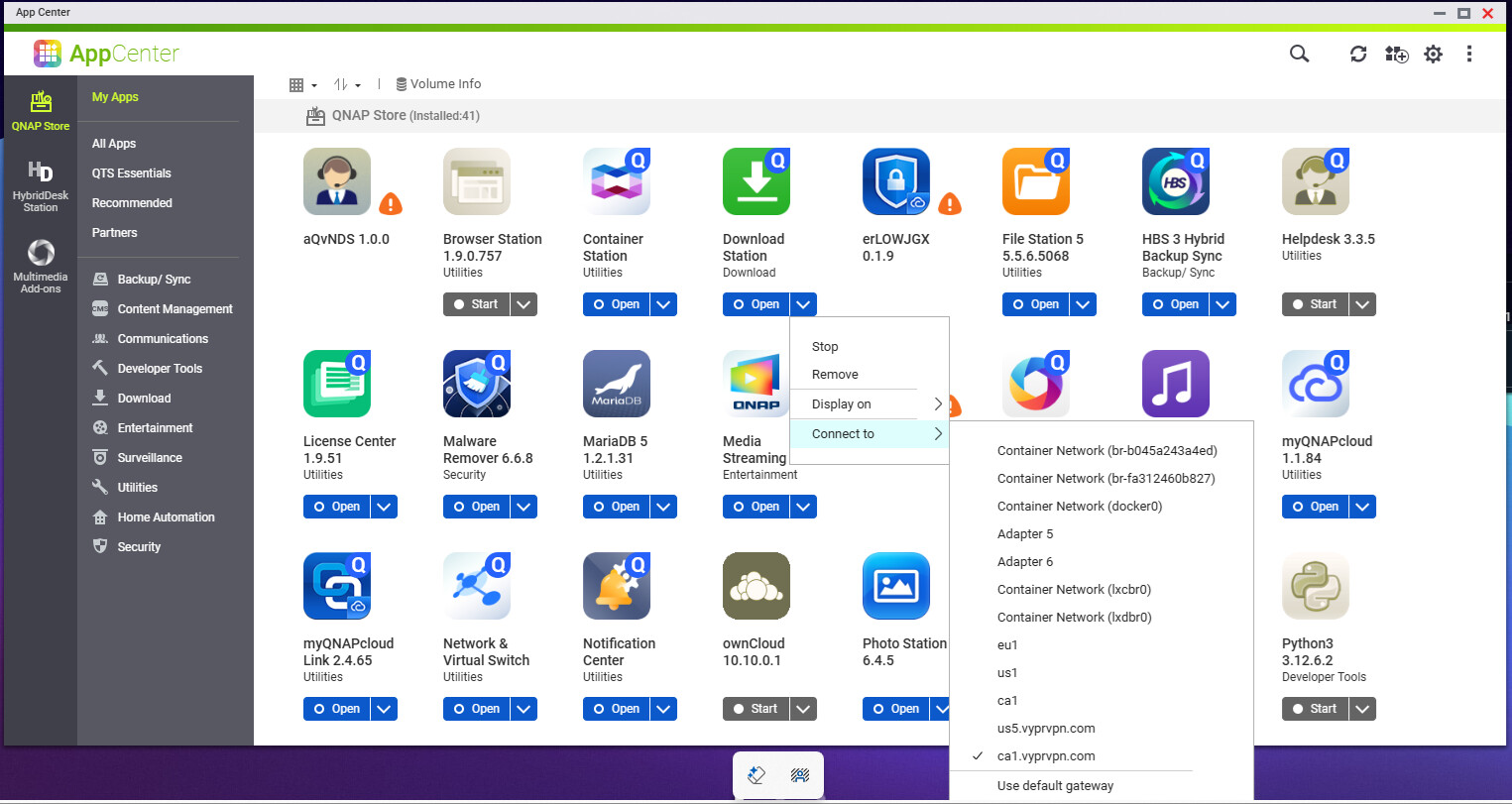
I’ve never seen/noticed this but that simply allows you to download the app over a specific network connection. I don’t think that has anything to do with the network connection the app uses.
So… I just ran a test. And this is exactly the answer for you (at least for my test via my OpenVPN connection).
Your response (about downloading the app over a specific network connection) would make sense except for the fact that this is the ONLY app I have with that dropdown option in the AppCenter.
My test scenario:
As seen in my screenshot, I have my Download Station configured to ‘Connect to’ my OpenVPN connection. As long as that particular OpenVPN connection is active in my QVPN app, then my download task will stay active. As soon as I turn off that connection, the download task quickly went to 0 for download speed while the rest of the NAS continued to have an active network connection. And as expected, as soon as I turned that connection back on and was re-established, my download task automatically resumed.
I am effectively using this configuration as a ‘kill switch’ for the Download Station via my OpenVPN connection. I had been struggling to find an answer for some time on this as I’ve had my NAS box for years and I discovered this ‘connect to’ option earlier this year. If I’m not mistaken, if you do this then you can accomplish exactly what you are asking for.
Easy test for you would be to do exactly what I did or set it up for a particular NIC and yank the network out to see if your download continues. Assuming you have this ‘connect to’ option, I’m betting it works just like mine did.
1 Like
Well, holy smokes. I see that now too! That is really interesting. Hmm…
I know right? Seems to work great for me. I’m not exactly sure why you got a response from a member above that it’s not a feature, yet it’s there.