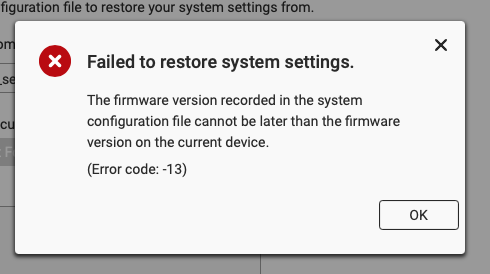
So, wiped out the NAS due to the file system errors. Decided to go back to h5.2 instead of h5.3 on recommendation from QNAP.
But my system backup file of all my settings/accounts/etc was from h5.3 and it won’t let me restore!
GRRR! Not happy!
Written in the manual, though.
It’s Halloween, try to be happy
Yeah, I tried that. But the issue is that h5.3 has quite a few things different in it that h5.2 and so it wouldn’t restore. Hence the picture.
I realized i sent the link for qts..mybad.. but it does not change anything:
My point was that it is written in the manual that it is not possible to restore on an earlier firmware version:
The operating system version on the current device must be the same or a later version than the one recorded in the system configuration file.
Unless you have an older 5.2.x settings backup you have to start with a completely new and fresh NAS initialization
OK. I was reading it backwards. Yeah, you are right… Still doesn’t change my frustration…
Personally, I save a copy of the configuration file along with a copy of the firmware. Aby changes I make to the config, I save the file and put the date and firmware version into the file name. It makes life easier as I do this for all my devices.
But that doesn’t help when the firmware you have is mismatched with the firmware from the config file.
I’m in a unique situation where I had upgraded the NAS to h5.3. Then due to some file system errors, I was advised by QNAP to completely rebuild the NAS. They also recommended I stay at h5.2. So I am now installed at h5.2. If I were to upgrade to h5.3, then I could read my config file.
It allows me to roll back to any previously working firmware version with the appropriate configuration file.
It may not help in all bizarre or unique situations, but should cover for 99.5% of normal user situations. It is very good practice to follow, for ALL your devices. I have every firmware version I could get my hands on from before my unit was purchased, and every one since, including many in between that were pulled for one reasons or another. I’m staying on the QTS 4.5.x stream (I have no reason to go beyond this and I don’t want bloated and often unreliable new streams), but have downloaded all 5.x versions just so that I always have them available to me.
You do what works for you, I’m just offering to you, and to anyone else reading about similar issues, a possible way to avoid issues with config files and firmware versions. I like to be prepared.
i usually do screen shots of major config settings just in case i run into a similar situation. sucks for sure to have to redo everything. i done it a few times as well over the years.
Also a terrific idea, that I do as well, although I usually just print the config to PDF files and store those along with the config and firmware files. Asus routers are notorious for once in a while requiring a reset to factory and manual reconfiguration for example.
This approach has served me very well across a dozen routers, half a dozen NAS units, ATA adapters, tablets, ereaders, etc. Basically any device that can be updated, if I can, I store the firmware and config as you never know when it might be useful. I have a list of units, many of which have been “retired” and sit on the shelf, that I regularly check to see if there is an update that I need to download. I don’t actually apply/write it to the device in these cases, but I am ready if I ever dust it off.
After a firmware update, first step is to save the config file again and put it in the archive.
Well, rebuilding the system prefs of the NAS isn’t that bad. It’s a pain. I’m more upset about the fact that I lost all my notes in NoteStation. I completely forgot to back those up. I thought all that stuff was saved with backing up the system configuration but it isn’t.
On the positive side of things, since my Container apps now have their data stored outside of the .QPKG directory, I was able to VERY easily recreate my Container apps and start them and all the data loaded without missing a beat. Now that was cool!
My other gripe is that you can’t just “recover” a NAS. It’s a very manual process even if you have a backup that is restored. That’s because when you use HBS to do a restore, it basically transfers the entire backup directory to where you are restoring. So you can’t restore a folder from inside a backup to a folder on the NAS. It recreates the whole “backup” directory tree hierarchy so you have to then move all the files after the fact.
And restoring snapshots from a second NAS is blind. Yeah it copies the data down but NOWHERE does anything show that it is doing it or what percentage has been recovered.
Agreed. What is typically called a “bare metal” backup is not possible, keeping these in the consumer market rather than the professional market, IMO.
Yup. A bare metal backup/restore would be amazing. As QNAP has enterprise systems I am surprised they don’t have it.
you can always submit a feature request via support ticket system. idk if that would be enough to get Qnap to implement something but you never know.