Every month I use HBS3 to backup between two QNAP NAS.
Other than during the backup jobs, the backup NAS is powered off (to save wear/tear and power bills) and wired to the LAN.
I’d like HBS to do the following:
Send Wake-on-LAN (WOL) ping to the backup NAS as part of the period backup/sync job profile. It should wait a configurable time (with timeouts and # of retries) before attempting to start the job.
OPTION A - In HBS on the Backup NAS, set itself to shutdown after a particular job is complete.
OPTION B - In HBS on Main NAS, set it to send a Shutdown/Sleep/Other command to the backup NAS on job completion.
I have already submitted this request internally, and it will be added to the relevant product Backlog.
However, the scheduling, timeline, and priority of this feature will be planned by the Product Manager, so I cannot confirm the associated timetable for this function at this time. Thank you!
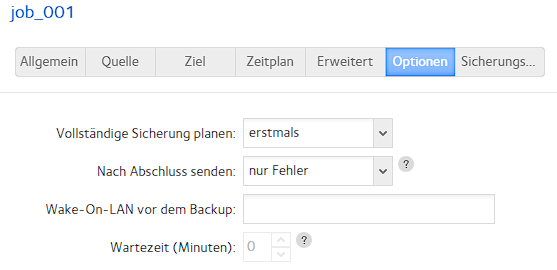
I think I have the same problem. I created an Rsync job from my QNAP NAS to a Netgear NAS. However, the job fails to start because the Netgear NAS is in sleep mode and the QNAP NAS cannot send a Wake on LAN command. Previously, I had two Netgear NAS devices, and with them you could set a Wake on LAN command for each Rsync job with a scheduled task, for example, 1 minute before the actual backup. It would be great if this option were also available on the QNAP. I’ve attached a screenshot showing how this looks on Netgear.
While I agree this could be built in, and that would be nice, you can setup a cron job to send a WOL packet on a schedule. In my case, I would do it 15 minutes in advance (not 1 minute - or ideally build into a script a wait for at least a ping reply) as it takes a minimum of 10m for my system to boot up and be available.