I’ve always used HBS3 Sync to save files from one NAS to another. I decided to try HBS3 Backup instead to see if some benefits in saving storage space and time could be realized.
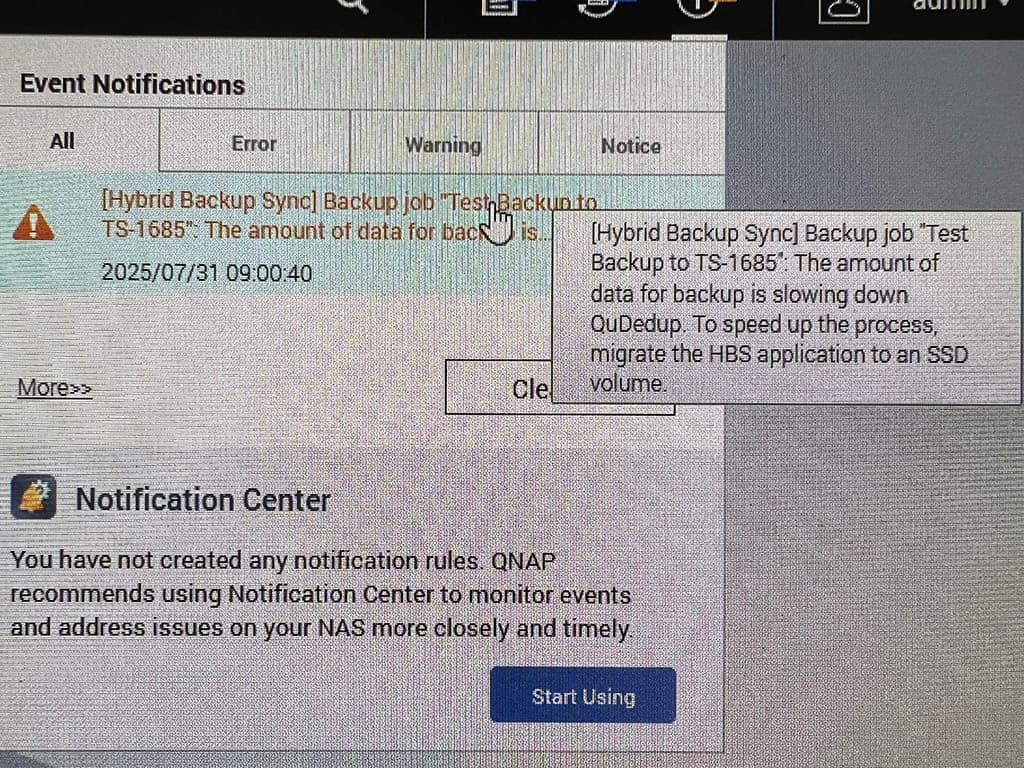
To that end, I set up a backup between my TS-879 PRO and my TS-1685 to give it a try. To my surprise, possibly because ignorance on my part, the speed at which data transfer rate via backup vs that of sync was about 1/10th as fast looking at network up and download speeds via “Dashboard”. Eventually I got a warning message about things running too slowly and that I should migrate the job to an SSD. As there are no SSDs in either system capable of handling the size of the backup, I am not sure that the warning message was telling me to do.
Can anyone help a HBS3 novice with understanding what is going on?
Hi Steve and NA9D (Amateur Radio?), I deleted the backup but will reinstate it and try to duplicate the warning message.
I restarted the backup job and one additional thing I noticed was that the backup job created on the sending NAS was not shown in the “Background Tasks” pull down on the receiving NAS. The task was, however, displayed on the pulldown on the sending NAS. Maybe this is by design?
I redid the backup settings from the TS-879 PRO to the TS-1685 with QuDedup turned off and, yes, the speeds are up from about 75Mbps or 250Mbps. The backup was about 18TB and now it should finish within my “lifetime”.
I’ve been a ham since 1965 when I got my novice license WN6NOO and upgraded through general to advanced and finally to extra when I got my old call sign WB6NOO reinstated as a vanity callsign.
That message doesn’t tell you to move the entire backup to an SSD, but rather the QuDedup application with its own deduplication databases to an SSD.
I’m using QuTSHero 5.3, and I don’t know if it’s possible on 5.2 or the standard QTS, but on my TVS-h874 NAS, you can place the applications on a different pool with noticeable speed increases.
In fact, I have all the system and user applications, including QSirch, on an NVMe with undeniable speed gains.
Just check this: even one normal SATA SSD could boost up your system speed compared to a mechanical HD if you put system apps on it.
Thank you Giulio for that info. I have my DataVol1 on a RAID1 SSD where QTS resides and am not sure where the QuDedup app and databases reside. I do have a 1GB SSD available if QTS will allow me to move the app to it or I could install a larger SSD if necessary. I will investigate this option for sure. Thank you very much!
The deduplication function is built into HBS. This is not about putting the app on an SSD drive so that it runs faster. This is about the process for deduplicating data. If you have a lot of data (in this users case, 18TB), then the deduplication process has to go through every file in that data and determine if there’s duplicate data elsewhere. That will take a huge amount of time. Since SSD drives are significantly faster than mechanical drives, this process will be speeded up significantly. Now, once it’s done, depending on the amount of duplcate data, the backups will be faster and smaller. But one has to weigh the speed/time of doing this with the space saved. If you have a smaller set of data with a lot of duplication, it’s better to run multiple backup jobs where you run the deduplication process on that smaller set of data.
But this has NOTHING to do with his slowdown being because he needs to put his applications on an SSD drive.