HBS3 warning: Backup job "Backup" completed with errors. Folder pairs are invalid or inaccessible.

Hello, I recently installed HBS3 to back up a drive from my TS251 to one in the TR004 daily. The first full backup (about 1.3 TB) ran smoothly without errors, but all subsequent incremental backups have produced this warning:

App Name: Hybrid Backup Sync
Category: Job Status
Message: [Hybrid Backup Sync] Backup job “Backup” completed with errors. Folder pairs are invalid or inaccessible.

I haven’t noticed any questionable folders, but of course, there are a lot of them. How can I find out which folder pairs are causing issues and what exactly is causing this problem?

Thank you very much for your advice!

Volker

–German translation added by Dolbyman–

Dieser Link könnte dir weiterhelfen:

https://www.qnap.com/de-de/how-to/faq/article/warum-schlägt-mein-hbs-auftrag-bei-der-sicherung-oder-synchronisation-mit-einem-externen-gerät-mit-der-fehlermeldung-ordnerpaare-sind-ungültig-oder-unzugänglich-fehl

Zusätzlich kannst du im heruntergeladenen CSV-Bericht nachsehen, ob spezifische Fehler aufgeführt sind.

================

This link might help you

https://www.qnap.com/en-me/how-to/faq/article/why-did-my-hbs-job-fail-with-a-folder-pairs-are-invalid-or-inaccessible-error-when-syncing-to-external-devices

Additionally, you can see if there are any specific errors listed if you download the CSV report.

This AI translate thing is a pain in my behind.

Hello,

How is the TR-004 formatted?

There were problems with versioning on exFAT.

Otherwise, check the logs.

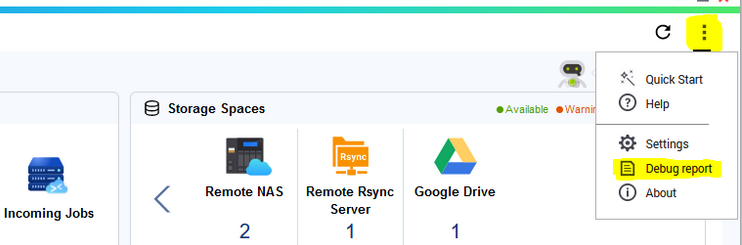
Attached is the image from the link (you can’t see it as a guest)

Hi Dosborne,

Thank you very much for the tips. The link says that the names of the source folders on the QNAP NAS and in the backup definition must be identical. I named the job “Backup” and selected the drive “BACKUP”. HBS then created the Backup folder on the BACKUP drive and, as expected, performed the initial backup without any errors. The warning started with the first incremental run.

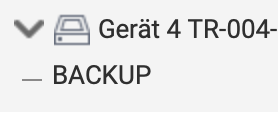
The screenshots of the naming:

image

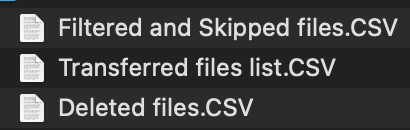
Unfortunately, the CSV files do not provide any clues. Three files are generated and made available, containing only file lists:

Regards - Volker

Hello Becker2020,

Thanks for the tip about the error report. It lists, among other things, all backup data in detail, but there are also some logs with error messages, none of which I understand or can assign to the problem:

HBS-diagnosis-report-2026-02-13T20_18_15/nas/rr2/logs/rr2__rr2_api.get_remote/trace.log

This same message is listed exactly thirteen (!) times per backup run:

2026-02-13 01:00:54,612(ERROR) [get_remote(771):get_share_dir_perm()] {
“case”: “unexpected exception”,
“detail”: {
“ex_name”: “Exception”,
“traceback”: [
“Traceback (most recent call last):”,
" File "/builds/diad/sw2/pack-hbs3-qpkg/build/qpkg/hbs/Hybrid_3/shared/rr2/bin/rr2_api/get_remote.py", line 705, in get_share_dir_perm",
" File "/builds/diad/sw2/pack-hbs3-qpkg/build/qpkg/hbs/Hybrid_3/shared/rr2/bin/rru/util_rr2_log.py", line 463, in _wrap",
" File "/builds/diad/sw2/pack-hbs3-qpkg/build/qpkg/hbs/Hybrid_3/shared/rr2/bin/rr2_api/get_remote.py", line 495, in get_remote_share_dirs",
“Exception: no password”,
“”
]
},
“ex_msg”: “no password”
}

HBS-diagnosis-report-2026-02-13T20_18_15/nas/rr2/logs/rr2__rr2_api.verify/trace.log

This entry appears twice per run:

2026-02-13 01:00:50,940(ERROR) [verify(1848):stop_check_md5_proc_local()] {
“error”: {
“ex_msg”: “process is not found”,
“ex_name”: “Exception”,
“job_id”: “f5de9d60-01e8-11f1-bc12-00089bfee47a-full-check-job”,
“traceback”: [
“Traceback (most recent call last):”,
" File "/builds/diad/sw2/pack-hbs3-qpkg/build/qpkg/hbs/Hybrid_3/shared/rr2/bin/rr2_api/verify.py", line 1784, in stop_check_md5_proc_local",
“Exception: process is not found”,
“”
]
}
}

There are some other files that contain entries for warnings or errors, but I don’t understand or can’t assign any of them either.

If anyone can make sense of this, please let me know, otherwise I’m almost inclined to just ignore the warning since the backup does what it’s supposed to every time.

Thanks again

Volker
Oh, I forgot to mention that the TR004 is actually formatted with exFAT. What kind of issues can occur with versioning?

It doesn’t work.

You have to switch to another format or do without versioning.