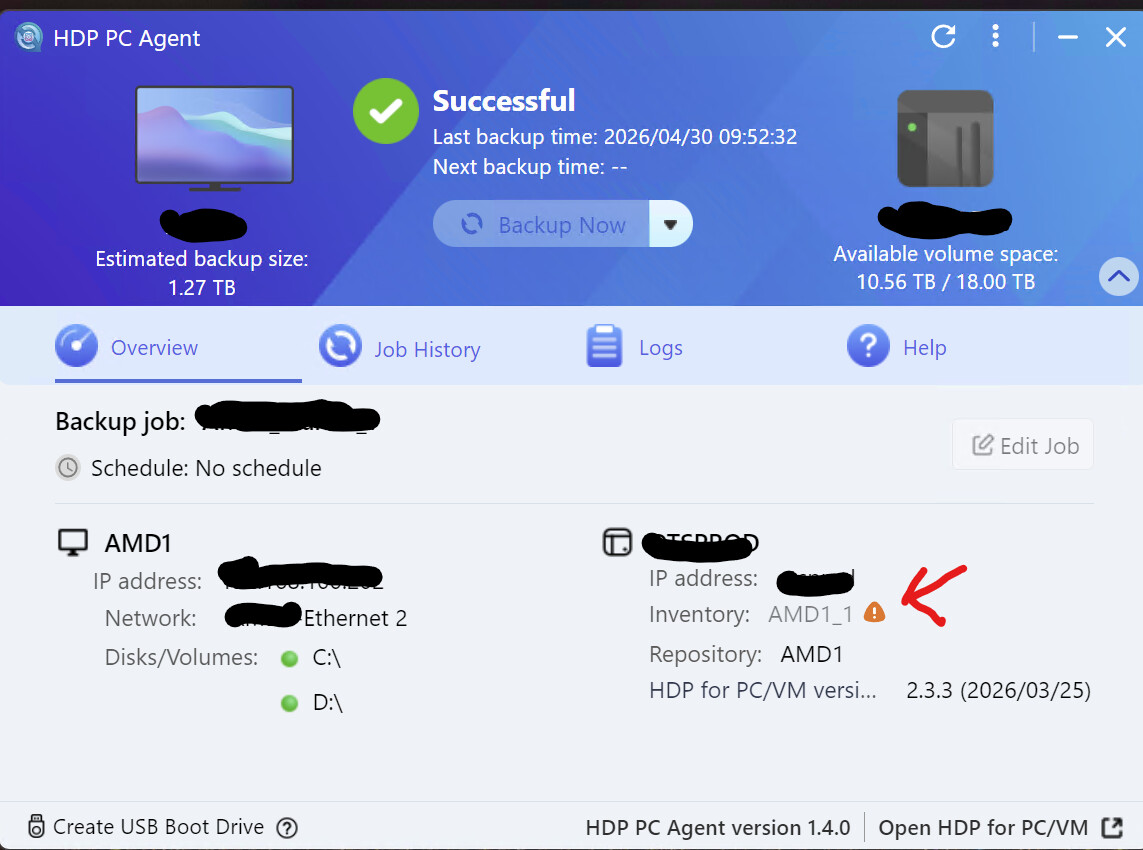
I want the ability to set the timeout for passwords from a few days to either 30-60-90 days. Also when the timeout is hit, log the agent out, not just show a notice icon which can be missed.
Also the setting to limit backups to 4 hours should have 4,12,24. I had a backup done at 8 am and rebooted the OS at 12 pm for patching and backup ran again. I dont need backup done so often. This is under backup on startup option.
Sorry, regarding the “show a notice icon which can be missed” and “set the timeout” you mentioned, our team is not quite sure which page you are referring to. Could you please provide screenshots of the notification and settings to help us better understand?
Also, regarding your suggestion about adding new options, we have already asked our team to start analyzing and working on improvements. Thanks for the feedback!
If the login is no longer valid, instead of this little icon showing a problem, just log the client out since you need to log out and log back in anyways.