I have over 500,000 photos that I’m organizing and here are some features I would love to see in this product that would make it much more useful:
1- The ability to add in the configuration an external Photo Editor or several external Photo Editors as a way to edit the pictures
2- I have several thousands of pictures where AI recognized most of the faces with the same name and I may only want one or two faces recognized and delete the rest, so I have to do that manually one by one. Having the ability to delete ALL the names recognized at once per picture would be save a lot of grief.
3- Once a face is recognized and named (or renamed), that name sold be replicated across similar pictures. Currently that has to be done manually.
Thank you for a great product and looking forward to help you make a better one.
Might be possible when accessing QuMagie on a mobile device using an app, but could be tricky to implement on a desktop device with only a browser window, unless the photo editor was also a web application.
If there was a desktop version of QuMagie, then should certainly be possible.
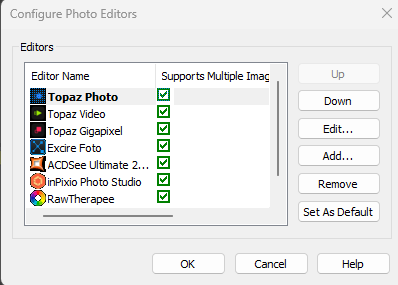
I use ACDSee and they have the following configuration box where you can define multiple editors by defining the name and the location of the file. This allows you to edit the picture you currently have on the screen, instead of having to exit QuMagie, load the program and find the file to edit. It would make the process a lot simpler.
Thanks for the detailed feedback, Roger. Here’s where we are on each point.
External editor: On desktop, QuMagie runs in a browser, so it can’t open a file directly in a program installed on your computer like ACDSee. For now you’ll need to download the photo first and then edit it in your editor. We agree this round trip is clumsy, and we’ll look into ways to make editing with an external app easier.
Removing unwanted faces: For now, you can use the filter in the People view to show only named people, so the unnamed faces stay out of your way. We’re also planning a feature to hide people, which may suit your case better than deleting recognized faces one by one.
Name propagation: Could you tell us a bit more about what you’re seeing? For example, after you name a person, do photos of the same person still show up under a different or unnamed person? Or does this happen after you edit a photo? Knowing the exact case will help us. In the meantime, we’ll also review how QuMagie detects faces again after a photo is edited, to make sure that flow works as expected.