Even though the top promises to list infrastructure, it’s only questions
What is it you are trying to do and achieve? Apparently are trying to upload photos somewhere, but what is supposed to happen with these and what do you mean by ‘other branches’ ?
This time we focus on the company internal use, but between different locations.
What about other branch?
What account should we created for this?
What about the mobile upload from different mobile designated user?
What account should we created for this?
What about the view only mobile and desktop or web?
I assum this is a situation where the main company is in the US and the branch is in the UK, but both share the same intranet. Please correct me if I have any errors in the network configuration.
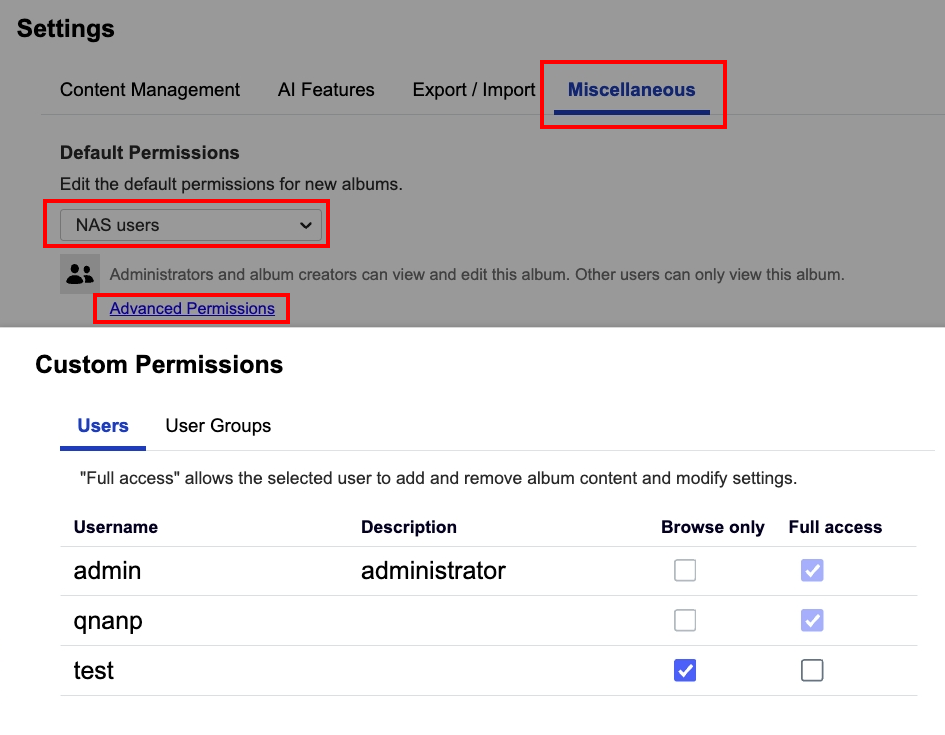
With this in mind, you can create an account for the branch office and go to QuMagie → Settings → Miscellaneous to configure the account can only browse photos and videos or have full access permission.
Whether using the QuMagie website or mobile app, there is an upload button. Branch office colleagues can use the account you created to browse photos and videos and upload files to the NAS you set up at the main office.
Indonesia must have websites for job seekers/freelancers/contract workers.
Advertise a need for a QNAP NAS integrator and get a quote from one or several companies for all or parts of the work (put all requirements in a written document)
This forum has an Indonesian subsection, so QNAP probably sells a good amount of units in that region (just my guess…why else would they create this section otherwise?)
Use web or mobile to access the NAS which is also on the office network will be faster.
You can use myQNAPcloud if on different network, but it will be slower.
then we also need for some member to only view them, not to upload nor delete them.
You can create a specific account on NAS and set it can only browse the QuMagie, that they can only view the photos and videos but can not upload or delete them.