Previous discussion: use the QuMagie as an event album for internal company use.
What's the best setting for QuMagie & Folder for Company Backup Photo, & Editor
This time we focus on the company internal use, but between different locations.
What about other branch?
What account should we created for this?
What about the mobile upload from different mobile designated user?
What account should we created for this?
What about the view only mobile and desktop or web?
I assum this is a situation where the main company is in the US and the branch is in the UK, but both share the same intranet. Please correct me if I have any errors in the network configuration.
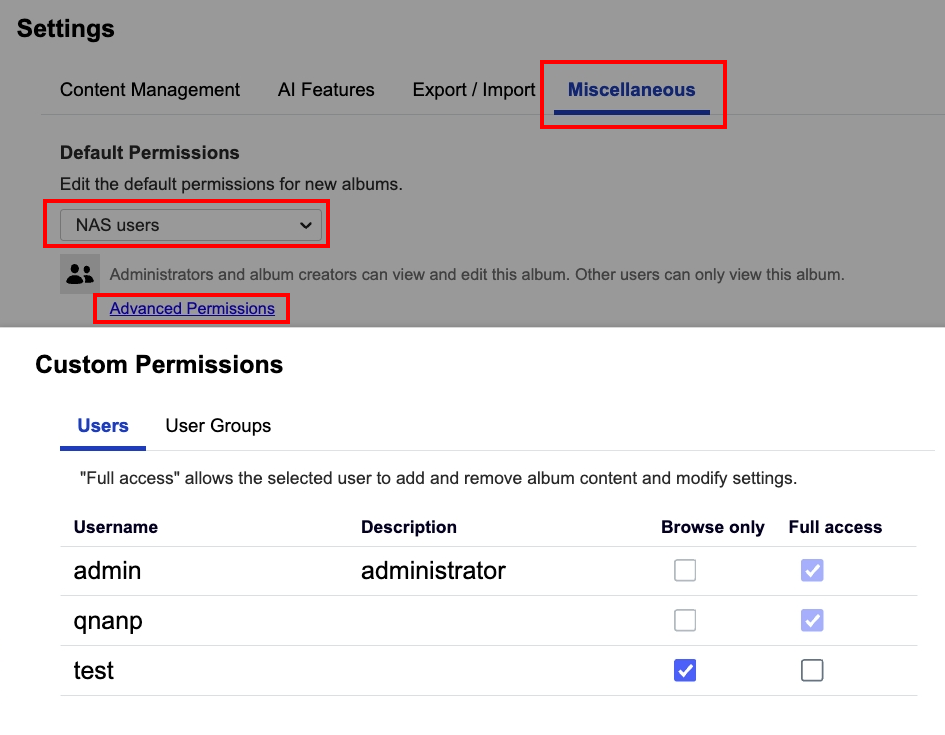
With this in mind, you can create an account for the branch office and go to QuMagie → Settings → Miscellaneous to configure the account can only browse photos and videos or have full access permission.
Whether using the QuMagie website or mobile app, there is an upload button. Branch office colleagues can use the account you created to browse photos and videos and upload files to the NAS you set up at the main office.
