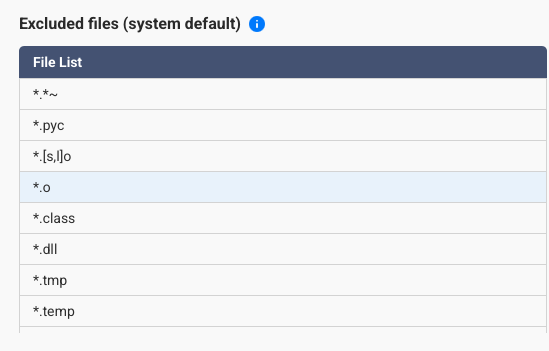
QSirch v7.0.0 (QTS 5.2.7) has a default file exclusion list that is far too comprehensive for my purpose, but I can’t seem to remove any from the list. This means it will skip files I am looking for.
How do I reduce the list? Either via GUI or SSH.
QSirch v7.0.0 (QTS 5.2.7) has a default file exclusion list that is far too comprehensive for my purpose, but I can’t seem to remove any from the list. This means it will skip files I am looking for.
How do I reduce the list? Either via GUI or SSH.
For now I was able to hack the /share/CACHEDEVx_DATA/.qpkg/Qsirch/Qusion/lib/constant/listener_const.pyc file by simply overwriting the characters of the file descriptors I didn’t want.
I’m guessing you meant file-types. 
File descriptors are a different animal entirely.
I would leave the default exclusions in place. Most of those files are things like thumbnails, system files, etc.
@OneCD - It’s actual file filters not types. Types to me a text, jpeg, etc.
Do you really want to search things like .dll, .tmp, etc?
Hacking to remove some of those will just make your indexing take that much longer and many of those are binary files that won’t be searchable anyhow. What type excluded file group would you like to have back?
It’s not just file types or file extensions. For example it excludes “desktop.ini” specifically. And that is the one I want to search for, since Windows has a knack of dumping these in a whole bunch of folders and if I want to delete these folders it wants me to confirm deleting these as they are considered system files.
They are small little text files, so they don’t slow down QSirch whatsoever.
It should be up to me what I want to search through and if it causes slow down it’s my choice. QSirch can put in a default list, but I should be able to remove or disable items from that.
Also, very often I just want to search for filenames and not content.
Actually the file type I mostly search for content are PDF files and they only hash the first 100k of that.
Having a list of filename filters for filename exclusion and a list for content exclusion would be most helpful.
I think they should first spend time on the simple basic functions before the spend time on all the AI searches which are only applicable to a small group of people.
As you can see from comments over the years, QSirch is not very popular. That’s because they focus on the wrong features.
I don’t think Qsirch is the tool to use for searching for filenames vs. searching for content. It’s designed to index content.
I agree that searching only the first 100K of PDFs is annoying but at the same time, trying to fully index every PDF would take a lot of resources.
I find Qsirch to be wonderful so I don’t know why people have an issue. I am able to easily find the content I need in files. I think if you want to search for file names, you are better off using the search feature in file station.
But I’ll agree with you that they should allow you to remove extensions from the exclude list. That is a useful suggestion and you should submit that as a feature request here in the forum.
To help us pinpoint the cause of the issue, could you please clarify: Is this your first time using Qsirch? Or did this issue only start occurring after you updated to version 7.0.0?
Thank you for your feedback!
@SteveKo - It’s very simple. He wants to use Qsirch to search for certain file types that are presently excluded by default in Qsirch. There is no way to remove the exclusion.
I don’t see how that matters at all, since it is not a personal issue, but a lack of basic features in QSirch.
But for the sake of me missing the reason for your question: I have tried to use QSirch in the past, but it used too many resources. Since increasing the memory to 16GB (TS63A) and updating to recent QTS and QSirch versions I have been able to at least keep it running without trouble. Until very recently I have been using Windows 10/11 file explorer, which takes a very long time to search, since it doesn’t index SMB shares.
My first time using this forum and see that when replying specifically to someone’s comment it doesn’t quote them, but only indicates it in the top right corner. I’ll ad the @ next time too.
But that “replied to” person would get a notification of your reply anyways
If you highlight the text you want to quote, then you get a “quote” option popup. 
I see what you mean now! The reason I asked was to clarify whether this was a change you noticed specifically after the update (as our major version updates often involve adjustments to the UI and interface) or if it was your observation as a first-time user.
In any case, I will relay your suggestion to our internal development team. Thank you very much for providing such specific feedback; it is incredibly helpful for our product optimization!
Thank you for sharing your feedback.
Regarding the current exclusion mechanism, it was initially designed with the consideration that most users primarily use Qsirch to index and search for document and multimedia files. By pre-excluding certain system-level file types, we can optimize search performance and ensure more relevant results for general data. For managing or searching specific system-level data, we currently recommend using File Station for direct access.
However, we sincerely appreciate your feedback and the specific use case you’ve highlighted. We understand that the current exclusion list may be too restrictive for certain professional requirements.
Your suggestions have been shared with our product team. We will discuss these adjustments with our developers and plan to implement optimizations in a future update to provide a more flexible search experience that better fits various user needs.
Thank you again for your valuable input and for helping us improve QNAP products.
I do my work on Windows. The QNAP is just intended as a server. Windows File Explorer can communicate with QSirch and use it for searches => I get the results in file explorer and can open the files in the associated apps. If I have to go to the QNAP Web GUI for FileStation or even certain QSirch searches, that doens’t make life easier. I’ve always considered the QNAP Web interface to be for management and configuration, not actual daily use. And I bet this counts for most Windows or Linux users.You don’t want to work on two separate systems.
Now, QNAP claims QSirch was developed mostly for content search. Fine. Please tell me how do I search for “O-ring” without getting massive results for “O” or “Ring”. Exact phrase with or without single/double quotes doesn’t make a difference. Similar to how Microsoft half-assed the search in OneNote.
I can’t answer your question on search syntax, but I believe there is a Qsirch app for Windows.