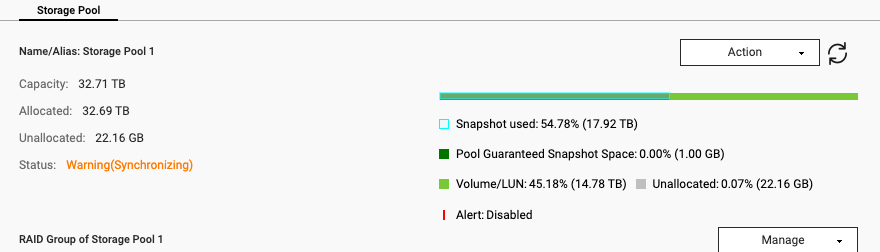
My storage was set to Read/Delete (idkw) and now I can’t log in locally or using the smart url.
My NAS it’s on and I can see it in the QNAP finder.
I tried to contact support but it’s now responding, I can’t work, please some one help me.
My storage was set to Read/Delete (idkw) and now I can’t log in locally or using the smart url.
My NAS it’s on and I can see it in the QNAP finder.
I tried to contact support but it’s now responding, I can’t work, please some one help me.
Start with some basics. What model NAS do you have?
Sounds like at least 1 drive has thrown some errors. What drives do you have in there and in what configuration?
Do you happen to know the firmware version?
What is the status of your data backup?
What does “can’t log in locally” actually mean? Admin GUI shows in browser but you can’t log in? Samba shares? SSH?
my NAS model it’s: TS-832PX
Firmware version 5.2.7.3297
I log in using Local IP, then enter the user name and password. It keeps telling me that it’s not possible to connect.
I have restarted the NAS and it’s on; but I can’t see it in the internet browser using the smart url. So I can’t access to it. I only can see it with the QNAP Finder.
We use Samba shares
How much free space does the NAS have? (Approximately)?
more than 10 TB.
So does the IP that shows up in Qfinder match the IP you are trying to use in your browser?
What happens if you try to log in with the admin account? Have you done the 3 second reset to reset your admin password to default?
Also, if you are on your LAN, I would not use the smart URL, there is no need for that. If your NAS has an issue, it may not be connecting to QNAP. The smart URL takes you through QNAPs servers in Taiwan and is much slower. If you are on your LAN, ether http://localIP:8080 where localIP is the local IP address showing in Qfinder.
Yes, the IP matches the one I use in the browser.
The http://localIP:8080 doesn’t work either.
I haven’t tried the 3 second reset, I’m afraid it erases my data. And I haven’t make a backup in two days, I would lose a lot of info.
Well, the 3 second reset does not erase data.
Second, you should be backing up at least once a day.
delete some snapshots then
Do you have snapshots set up for deletion? I see you don’t have guaranteed snapshot space allocated. So you really should allow them to be deleted so your volume doesn’t fill up. For sure that is your issue.
Regarding this issue, you can refer to this FAQ:
What does it mean when a volume status is “Read/Delete”, and what can I do? | QNAP