I’m trying to plan a 2PB+ NAS set up using QNAP rackmount hardware. I’m considering the TS-h1677AXU-RP-R7-32G, upgraded to 128GB of RAM and 2x QXP-820S-B3408 cards, along with 4x TL-R1620SEP-RP with a total of 80x Seagate 32TB SATA 6.0Gb/s 3.5" HDDs. I have two questions: 1) would this set up work and be capable of supporting the mentioned storage, and 2) would a 25Gbe adapter make any sense with this set up or is 10Gbe already enough? I’m interested in hearing any alternative recommendations that would be comparable to my requirements of 2PB+. I’m also potentially interested in the NAS having an SSD cache.
See the small print here (But I guess you are aiming for QuTS with ZFS)
https://www.qnap.com/en-ca/compatibility-expansion?expansion=tl-r1620sep-rp
The maximum size supported for a RAID group is 308 TB.
The maximum size supported for a storage pool is 308 TB. (Starting from QTS version 4.2, the minimum size of a storage pool is 144 GB.)
The maximum capacity for volumes and iSCSI LUNs depends on both the capacity of the drives and the system specifications.
- f the NAS has less than 4GB RAM, then the maximum capacity is 144 TB.
- If the NAS has at least 4GB RAM, then the maximum capacity is 250 TB.
Also with storage that large, there is no cache option on QNAP that could even come close to providing any benefit (2,3 or 4 drives of NVMe cache)
@Bob, would OP’s plan work ? (never used expansion chassis)
I based my current thinking off of: Petabyte storage solution | QNAP
TS-h2287XU-RP has 16x 3.5” bays and 6x 2.5” bays, which I had assumed was for SSD cache. Using 15TB enterprise SSDs would be ~90TB, so I’d think cache would be possible. I’ve never worked with any of this hardware before and want to get it planned out as well as possible before ordering anything.
ZFS QuTS NAS with more than 8GB of memory use ARC cache already.
https://www.qnap.com/en/how-to/faq/article/why-is-ram-usage-so-high-in-quts-hero
Also cache is not magic, unless you have applications that read the same blocks over and over and over again, there would not be any benefits. (And with that many disks, your sequential reads would be pretty fast already)
Thanks for your help. Well the QNAP Petabyte Storage page says “At least 128 GB RAM is required for the NAS.“ so I’m not sure how much RAM would be left over. It’s for a big data project that would often read the same files over and over, but I don’t strictly require a cache. My main requirement is 2PB+ of storage. It can dip a little below after redundancy, but ~2PB+ gives us some room to grow.
you are thinking incorrectly. You get a QNAP TS-h2477AXU-RP. You run QuTS only. You install two M.2 NVMe drives in the TS-h2477AXU-RP as Storage Pool 1 > RAID 1 configuration for the System. Then you install Twenty Four Seagate Ironwolf Pro SATA drives. With 28 TB drives in a RAID 60 configuration (where 4 drives can fail - QNAP won’t let you do RAID 5 or RAID 6 with 24 drives) - this is 560 TB of usable storage. You can also get Seagate Ironwolf Pro or Seagate EXOS 32 TB drives now, so after RAID 60, that would be 640 TB of usable storage. OK - now you need MORE storage - so you buy the QNAP TL-R2400PES 24 bay expander. This uses the QNAP QXP-3X8PES expander. You can have EIGHT of these 24 bay expanders on the TS-h2477AXU-RP, and now with the main chassis and 3 expanders, you now have your 2 Pedabytes.
And if this is still not enough storage for you - QNAP is about to release the new 60 bay TL-R6020Sep expander, and you can have multiples of those.
For reference, you would not use a TL-R1620SEP-RP with a new TS-h1677AXU-RP - you could use the TL-R2400PES if you wanted a 24 bay expander on this, but for a 16 bay expander you would use the TL-R1600PES-RP, and the same expander card I just mentioned. -
Got more questions ? Ask away. I do giant systems like this all the time.
Bob Zelin
edit - you have not stated your application. So should you have a 10G user interface to your switch or 25G ? What are you doing ? Video editing ? Insurance company? Hospital ? For Video editing, I would put in the QNAP 25G CX6 card, and plug into the new wonderful QNAP QSW-M7230 switch that has 24 10G copper ethenet ports, four 25G SFP28 ports, and 2 100G QSFP ports.
I guess you mean this:
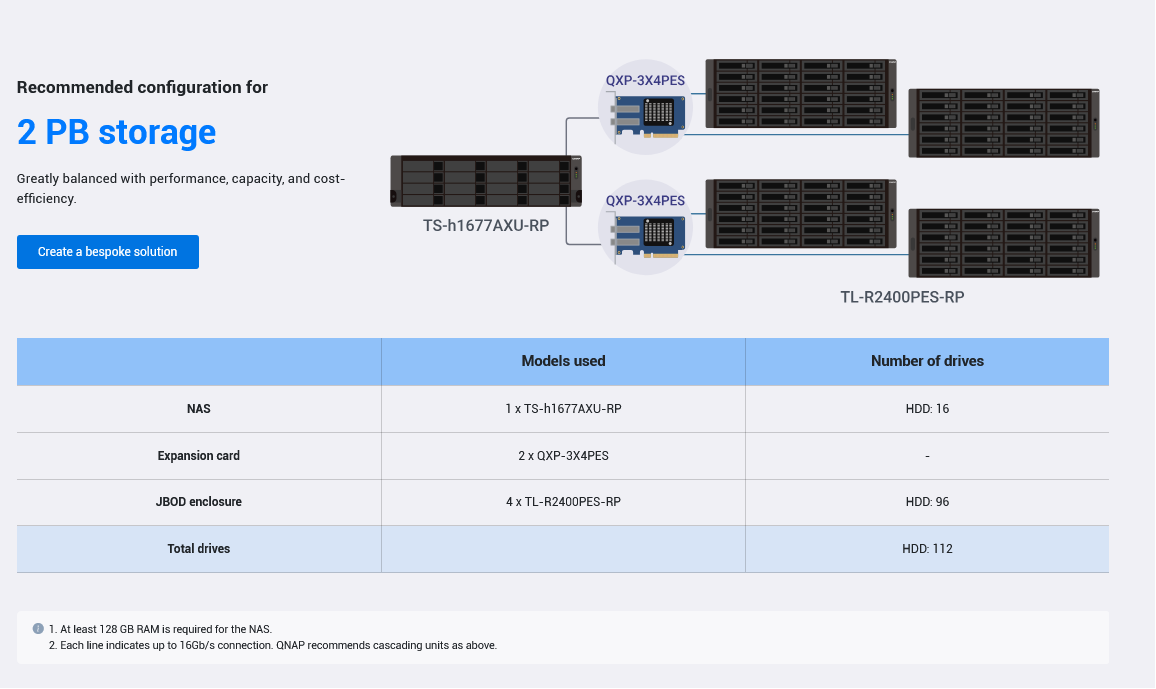
ARC has a max usage of 70% (set in global storage settings) and I think ZFS/QuTS snapshots have no influence in terms of RAM usage, at least according to this page.
So you might have 35ish GB left over (above page mentions 265GB min for 3+ PB though.)
Thanks @Bob. Our use case is a big data one, where petabytes of files, typically ~1MB to ~250MB each get worked with on an ongoing basis. We already have a 100Gbe network for some other hardware, so I’ll probably go with 25Gbe (I’m assuming 40Gbe or 100Gbe would have no benefit here since they’re HDDs?).
So just to check my understanding, using the QNAP TS-h2477AXU-RP with one QNAP QXP-3X8PES and three QNAP TL-R2400PES would be what you’re suggesting, with one port on the QNAP QXP-3X8PES each going to a single QNAP TL-R2400PES and then the third QNAP TL-R2400PES being daisy chained to one of the first two QNAP TL-R2400PES?
The QNAP QXP-3X8PES would take up PCI slot 2 (with slot 1 empty so slot 2 gets the x8 bandwidth) and a 25Gbe card could go in the slot 3 x4 PCI?
Also, could the QNAP TS-h2477AXU-RP really support 8 24-bay expansions with only 192GB of RAM? I’m now considering doing 4x of the QNAP TL-R2400PES, but might that need 256GB of RAM in the NAS?
Hi - you daisy chain the expander chassis. There are “unusual” cables that come with the expanders - and you simply go from the expander card to the first expander chassis, then the second, and then the third. As for your network, yes, you purchase a QNAP 25G CX6 card. This is SFP28 - not 40G, so this will not connect to any 40G ports on your switch. If you don’t have a proper switch, the new QNAP QSW-M7230 is wonderful with 10G baseT copper ports, 4 SFP28 25G ports, and 2 100G ports. 40G is DEAD - no one is making 40G products anymore.
Bob Zelin
honestly - I have no idea. Why don’t you consider doing one of the new TL-R6020Sep 60 bay’s instead ? I have never built a TS-h2477AXU-RP or TS-h3087XU-RP (both 24 bay QNAP’s) with more than 3 expander chassis - so I cannot honestly answer your question.
Bob Zelin
Hi alder.ramirez,
For under 3PB, you may choose TS-h1277AXU-RP, TS-h1677AXU-RP, TS-h2477AXU-RP, and upgrade the RAM to 128GB (1PB) or 192GB (up to 3PB) and connect multiple SAS JBOD units such as TL-R1620Sep-RP, TL-R1220Sep-RP, or the high-density 4U60 TL-R6020Sep-RP JBOD. 25GbE is sufficient for the NAS and JBOD performance.
For 3~5PB, choose all flash NVMe NAS models such as TS-h1090FU, TS-h2490FU and upgrade the RAM to 256GB or higher, and connect multiple SAS JBOD or the high-density 4U60 TL-R6020Sep-RP JBOD. You can connect with built-in 25GbE speed.
Thank you @Bob and @JasonH. I’ve learned so much, with both of your help, as I’ve been preparing to order and do the set up. I’m currently considering a TS-h1090FU with 2x QXP-3X8PES cards, and 4x TL-R2400PES-RP with the CAB-PCIE10M-8644-8X cables.
More questions, in order of importance to me:
-
Since I’m committed to 23” deep racks, I can’t use the TL-R6020Sep-RP, even though it looks very nice. Of course the TL-R1600PES-RP would easily fit within a 23” depth, but the TL-R2400PES-RP is 24.81” deep. I think it’d be alright, since the racks are very secure, and the Rail-A02-90 says it supports mounting post depth from 22.8" to 34.3", but it’d be nice to confirm that.
-
Would 6PB work with 256GB of RAM, or would it require more? I ask because I’m now thinking of starting off with 4x JBODs, with the possibility of expanding to 8x in the future, which would be 6PB. It’s very nice the TS-h1090FU supports up to 1TB of RAM.
-
What would the maximum number of TL-R2400PES-RP, or TL-R1600PES-RP, in such a system be? I’ve seen QNAP documents that seem to say 8x is the max, but I’ve also seen some QNAP documents showing support for 10x JBODs per QXP-3X8PES card. I’m interested in what the nuances are here.
-
Is the QXP-3X8PES the best card for this, or are there any others I might consider instead?
-
Since I’m now planning on using an all-flash NAS, would it be beneficial to put cheaper SSDs in that? What’s the minimum for speeds that would make sense?
Hi Alden -
you seem very unfamiliar with all of this, and you are about to embark in a very expensive purchase. Are you the one that is going to be setting this up ? Because we cannot teach you how to build a QNAP on this - or any - forum. If you are not qualified to do this - you should hire someone who has experience doing this. When you say “since I am now planing on using an all flash NAS” - and you then you the world - “cheaper” - it gives me the impression that you have done no research on any of these products, and are completely unaware of the prices of how much things cost today. The TS-h1090FU, uses U.2 NVMe flash drives, and these are DEADLY EXPENSIVE - dramatically more money than regular SATA drives. And even regular SATA drives today are deadly expensive. A single Seagate Ironwolf Pro 32 TB SATA drive is $899 and a Seagate EXOS 32 TB drive (one drive) is $1100. And this is CHEAP compared to the price of U.2 NVMe drives.
If your application is professional video editing, then I can help you - but if’ it’s not, and its just raw storage, then you will have to hire someone that has experience in your field.
Bob Zelin
@Bob, thank you for your concern, but I’m certainly capable of looking up listed prices. Our target budget for the initial system is up to ~$120k but we could go somewhat higher than that if desirable, so no problem there. From what I see, the TS-h1090FU seems to use either U.2 NVMe or SATA flash drives, but my question on that is simply what minimum speeds would make sense to do, since there’s a wide range of price points. The higher-end Solidigm drives look incredible, but they’d obviously be overkill for this system. I meant cheaper as in toward the lower end of the price range. All of these prices are perfectly reasonable and I honestly think it’s amazing to see multi-petabyte capability available at such a low cost. As for my use case, like I said, it’s a custom big data system that we want to run locally. I’ve been pretty clear we’re not doing video. Thanks for your help, but I’m looking forward to @JasonH or another of the QNAP Staff’s answers.
I asked sales about my question #3, and they could only confirm that it will work with 8x. They seemed to have no answer as to why the product page for the QXP-3X8PES card shows up to 10x on a single card. I have a feeling 6x on each card for 12x JBODs in total would work perfectly fine, but sales seemed to be saying there’s a software limit set to 8x currently, so I don’t know.
This led me to reconsider using 6x of the TL-R1620Sep-RP instead of 4x of the TL-R2400PES-RP. On my question #4, I found that using 2x of the QXP-1630S-3816 cards instead of 2x of the QXP-3X8PES cards would provide 3x the bandwidth and the product page for the QXP-1630S-3816 shows it supporting up to 16x JBODs on even just a single card, so I’m now leaning toward that set up due to the higher bandwidth and greater possibility for expansion. Additionally, using the shallower TL-R1620Sep-RP instead of the deeper TL-R2400PES-RP would make my question #1 a moot point.
I’ll continue working on finding answers to my questions #2 and #5, and would appreciate any input, but for #2 I think it’s not particularly important because I can just put 512GB of RAM in the NAS and I’m sure that’d be enough for any storage expansion we’d do in the future. As for #5, I’m thinking SSDs at least 2x to 3x faster than the HDDs would likely provide a noticeable benefit. If anyone has any advice on minimum SSD speeds and sizes given the hardware I’m discussing, I’d love to hear that.
We’ve decided on the TS-h1090FU with 512GB of RAM, 2x QXP-1630S-3816 cards and 6x TL-R1620Sep-RP. We’re planning on testing the TS-h1090FU with a couple of options for SSD cache. Hopefully this document is just outdated, but QNAP seems to have relatively low limits on SSD cache size, at least when using QuTS hero: SSD Cache | Boost storage I/O speed | QNAP
If that’s accurate, we’d be going with 10TB of cache. We’ll start with testing 10x PCIe Gen4 NVMe 1TB SSDs using M.2. PCI-e NVMe to U.2 Adapters. If we run into issues there we’d go with 10x 1TB SATA SSDs: Amazon.com: Western Digital 1TB WD Red SA500 NAS 3D NAND Internal SSD - SATA III 6 Gb/s, 2.5"/7mm, Up to 560 MB/s - WDS100T1R0A, Solid State Hard Drive : Electronics
Using 32TB HDDs, this will start out with 3PB raw, and should be expandable up to at least 9PB. Memory can be upgraded to the full 1TB if needed. We’d probably look at doubling the capacity to 6PB raw in the future as the prices for 32TB HDDs naturally decreases, once our needs have outgrown the initial 3PB.
I would likely go w/o caching. In QTS at least, cache slows things down and I don’t how much better it is in QuTS Hero.
Unless you are accessing the same data over and over again, caching will do very little since once the cache is full, you still need to go back to the hard drives.
OP has a budget of 120k, he can throw money around and see what sticks. Speaking of, QNAP now offers QTier on QuTS 6.0 as well. Could be another option (and actually increases storage space, in contrast to cache). But not sure if SATA SSD’s would offer a benefit over SAS arrays filled with NVMe storage (or what was the plan, it’s all a bit confusing now)