This is my first QNAP NAS and I’m trying to get used to the way QNAP does things (I used Synology before).
I was given a TS231P and my previous question was answered quickly. I did all the OS and firmware updates.
This question is about iDrive. If I try to install it from the APPS app, it fails. I went online and tried to do some research and didn’t have much success. I did find the app under this device and there was a drop-down box beside it which brought up a list of devices.
The answer may seem obvious to regular users but I just want a clarification. If I find a drop-down box beside an app online, does that mean only those devices support that app? This will be handy to know going forward.
So I use the iDrive app all the time. iDrive is trying to pull a fast one on NAS users. They now have a NAS backup service where you can use Hybrid Backup Sync to backup your NAS. But the cost to do that is EXPENSIVE. The iDrive app treats your NAS like any other Linux server and uses normal iDrive backup space.
If the iDrive app won’t install from the App Center, install it manually. To do that, download it from the App Center:
Looks like your NAS would be a TS-x31x from the NAS selection menu.
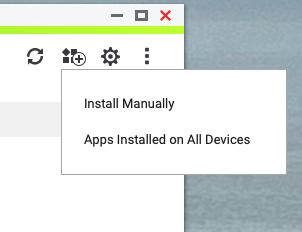
To manually install the app after downloading the package, go to the app center. Click the install button (second from right at the top with the little “+” sign) and select Install Manually
Thanks again for the quick reply. After sending the question, I went to my iDrive account and they want to rip off users to pay for backing up through a QNAP option in their menu.
I’ll try your suggestion.
And thanks again for helping out a ‘rookie.’ I try to research before posting any questions, only posting when I can’t find anything.
Yeah, they just started the “NAS” backup thing and it is a rip-off. It is nice that it integrates through Hybrid Backup-Sync but why charge more for NAS storage than normal storage? They used to have the QNAP app on their website. Now they don’t.