Can anyone please confirm that check if the official retail packaging of TS-1655 includes:
2x thermal pads, 2x rubber pads and 2x aluminum heatsinks for the installation of 2 m.2 ssd drives
Are thermal pads preglued to aluminum heatsinks or separate?
I assumed by the way it was worded in the manual that those are included as they don’t mention to buy the separately.
I actually do have plenty of the needed qnap m.2 heatsinks for ts-1655 separately, but not sure if thermal pads are pre-glued on them and I have no rubber pads either and don’t know where to source them…
P.S. Just talked to qnap and they said that you can put heatsink directly on the controller with no thermal or rubber pads as it passes temperature test without them. Planning to get 2x 9100 pro 2tb for zfs pool
So the heatsinks come with the NAS. I don’t know about the thermal pads. I don’t remember those.
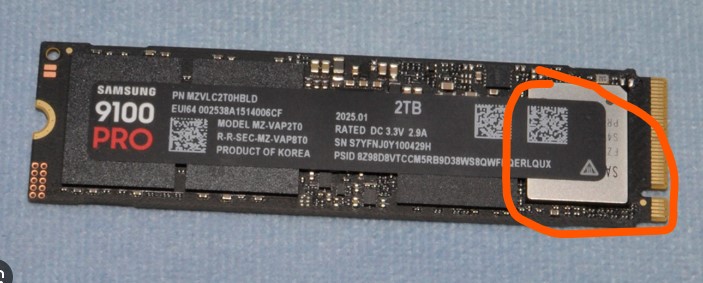
However, the heatsinks for the M.2 drives are kind of superfluous I think. The reason is that every M.2 drive I have seen has a label over all the chips on the board. That label acts as a thermal barrier (I doubt it is thermally conductive), and will prevent optimal heat sinking of the controller chip. Plus you can’t really see where the controller chip is in order to properly mount the heat sink. You can remove the label, but in so doing, you void the warranty on your M.2 drive.
So… How much good do these really do? My assumption is that the M.2 drive manufacturers design and spec their devices to be run w/o heatsinks.
That’s nice that the sticker doesn’t cover the entire package. But it still presents a thermal barrier. And yes, that is the controller.
On my M.2 drives in my TS-873A, I have one drive where I completely missed the controller with the heatsink. The other, is placed “more” correctly. But the temperature of those 2 drives is within 1 degree C of each other and is running between 29 and 32 C. They are cooler than the hard drives.
For my TVS-672XT, I don’t think I have any heatsinks on my M.2 drives. I bought that NAS used, and I don’t think it had the heat sinks. Those drives are showing higher temp - as high as 60 degrees C but averaging 40 to 50 C, but looking at M.2 SSD specs, 60C is a normal temperature under load. The drives will throttle back above 80C. I have not seen either NAS’s temps go that high…