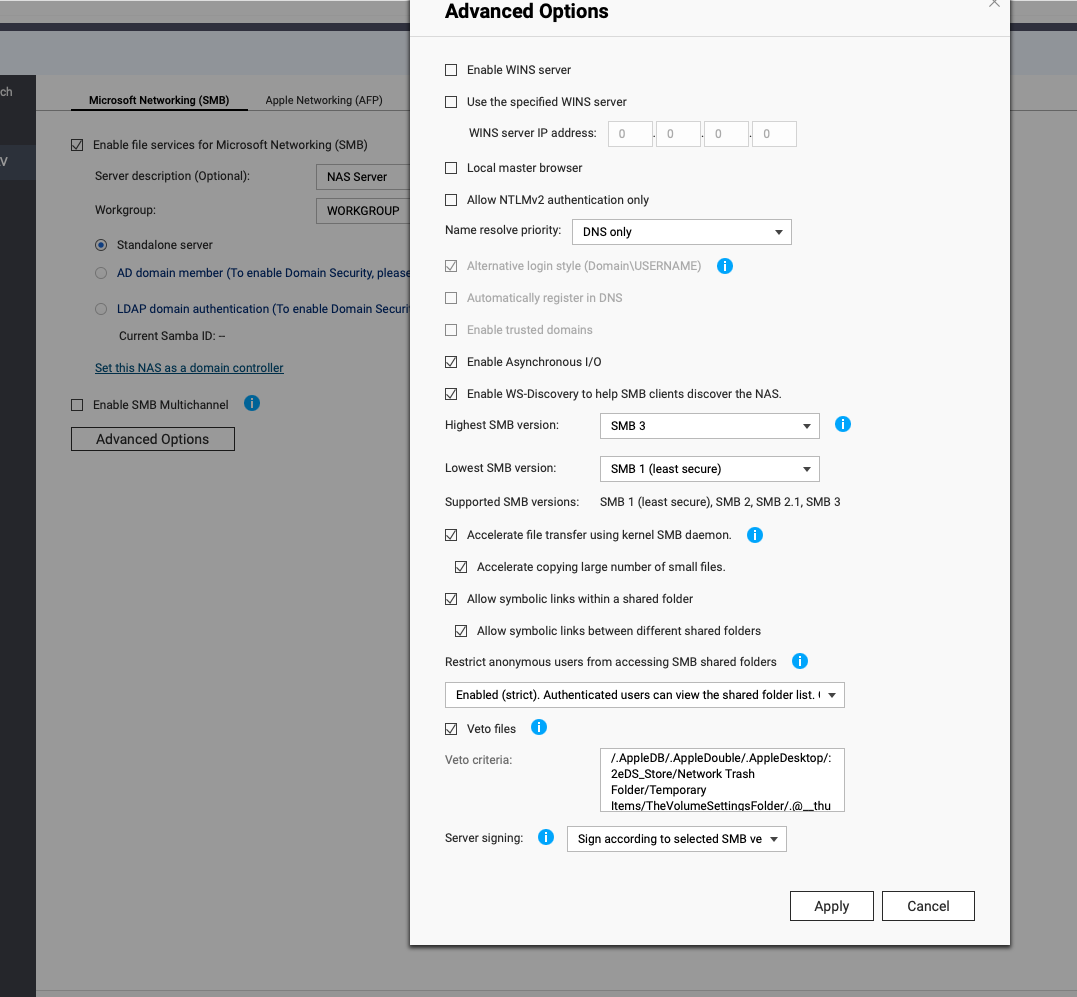
On daily base I’m using macOS (15.6.x) on a daily base together with a TS-853A (QTS 5.2.6.3229) and noticed over the last couple months that when copy files or renaming files using macOS Finder that files that the activity either can’t be fully performed or that the files end up being “locked” without being able to do much more. It’s clearly a macOS Finder issue when it tries to write meta data since performing file copy from terminal windows works fine.
While I’ve being configuring back and fort like disabling the writing of meta data against network shares from macOS still have issues and kind of running out of ideas.
So what are for example the recommended settings for SMB Advanced Options on the QNAP?
Beside for example disable .DS_store writing on network drives:
I use multiple MACs on Multiple NAS units and have never had the problems you suggest. I leave .DS_Store alone, it’s an annoying aspect of MacOS but I ignore those. Who cares.
It sounds more perhaps like a permissions issue than anything else. Are you sure that your NAS user has R/W permissions on the NAS? Here’s the settings I use on my primary NAS (note: I have SMB v1 enabled as my Sonos system requires that in order to work and the NAS is a server for Sonos).
Kind of the same settings that I have, so based on that I’ve been tweaking my Mac quite heavily I made a factory reset and with that done, the issues were gone. So clearly I’ve done a bit to much tweaking on the client side.
What I’ve been trying to fix is the general annoyance that the Mac is frequently unmounting the smb shares, so that I either have to proper click on the volumes to get it going again and frequently I have to re-connect to the server to get the volumes back again.
My question is really how to you get the smb shares to stick in the same way that they do in a Windows system? Having recently moved over from Win 11 to macOS v15.x this would be my real and only annoyance I have.
Currently the only thing I’ve played around with, which didn’t really improve anything, was to create /etc/nsmb.conf file with the following:
Thanks @NA9D for the article and which mirrors also to a certain extend to what I had including that it also included erroneous parameters such as ‘veto files’ which is a SMB server side parameter only, so realised that I had to take a deep dive into the topic to get it correct.
For a starter checking what parameters macOS v15.x actually supports makes a lot of sense to let’s start with that for the sake of how I came to the conclusion of which parameters to use. From terminal window just copy and past the following and one realise quickly that what you might expect be available on Linux system isn’t necessary the same you would expect on macOS:
man page: nsmb.conf
Based on the above this I what I tweaked together and so far has shown to be more stable on my end:
[default]
# Increase timeout to prevent premature disconnections
max_resp_timeout=90
# Enable multichannel for redundancy with minimal channels
mc_on=yes
mc_max_channels=3
mc_prefer_wired=yes
# Optimize directory caching to reduce server queries
dir_cache_max=180
dir_cache_min=60
dir_cache_async_cnt=5
# Disable submounts to simplify connections
submounts_off=yes
# Restrict to SMB 2.x and 3.x for modern, secure connections
protocol_vers_map=6
# Disable signing to avoid compatibility issues
signing_required=no
# Use soft mounts to prevent hangs on server failure
soft=yes
There are a few reductant parameters which is already enabled by default by macOS (mc_on and signing_required) which I wanted to have in the config just as verification for myself, and then I tweaked a few already enabled parameters to ease up on the QNAP NAS.
Additionally, when setting protocol_vers_map=6 it’s disables the use of SMB 1.x which then removes the need for netbios parameters which I used myself in my previous configuration.
And additional to be used together by running the following from terminal window as well: