After ugrating to the latest version, the DLNA server is not visible on the my home network.
Where I can find the previous version?
Firware version QTS 5.2.10.3577
Hello,
for a INTEL-NAS (TS-x64, …) there
https://download.qnap.com/QPKG/MediaStreamingAdd-on_500.1.1.12_20260518-98_x86_64.zip
When you have another NAS i need the NAS.
I have no problem with 500.1.1.13 on my TS-264
Hi, I have a TS-462
Thanks a lot! The downgrade worked just fine. As soon as I’ve installed, the DLNA server showed up in the clients (e.g. VLC)
My sincere thanks! QNAP shall review the quality checks prior to release or allow a roll-back tool.
This is crazy for an end-user. It shouldn’t happen
Becker, thanks a lot!!!
PS is the link a pemanent link?
You know… for the future  I normally update all for safety reasons… but at least I have chance to roll-back
It’s as “permanent” as any other link on the Internet. The link target can disappear at any time without warning. 
Save a local copy of the link target, not the link.
I don’t know
But the oldest version i have (for my TS-264) is always online
https://download.qnap.com/QPKG/MediaStreamingAdd-on_500.1.1.5_x86_64_20240122.zip
I have a local app-archiv
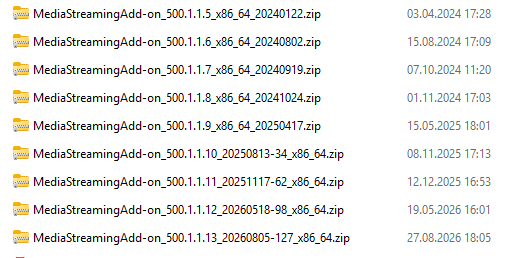
 yes. The real question was if QNAP officially keep this kind of structure
Great!
Just thinking to the average end user… but QNap is probably targeting the geek community and not actual end users
For the “official” policy, you’ll need to ask QNAP.
Better to keep a copy of the zip file somewhere on your NAS, rather than hope the link to the old version remains usable.
@Osto70 As I know that is not permanet link but I don’t know the termination rules.
I did not encounter that DLNA Server was not displayed correctly in version 500.1.1.13 and the team is trying to reproduce this, thanks for you let us know this.
Thank you so much.
Unfortunately the effect was actually clear
I’ve removed and reinstalled (rebooted etc etc) a few time but onky reinstalling an older version solved.
Thanks to all for the great support!