Hey QNAP Community! I’m hoping someone experienced can shed some light on a NAS migration I’m trying to perform. I’ve read through all the relevant official support pages and searched the forum but a few things remain unclear.
First, the details:
NAS #1 (Source): TS-1685
QTS 5.2.8.3332
Xeon D-1531 CPU + 32GB DDR4 RAM
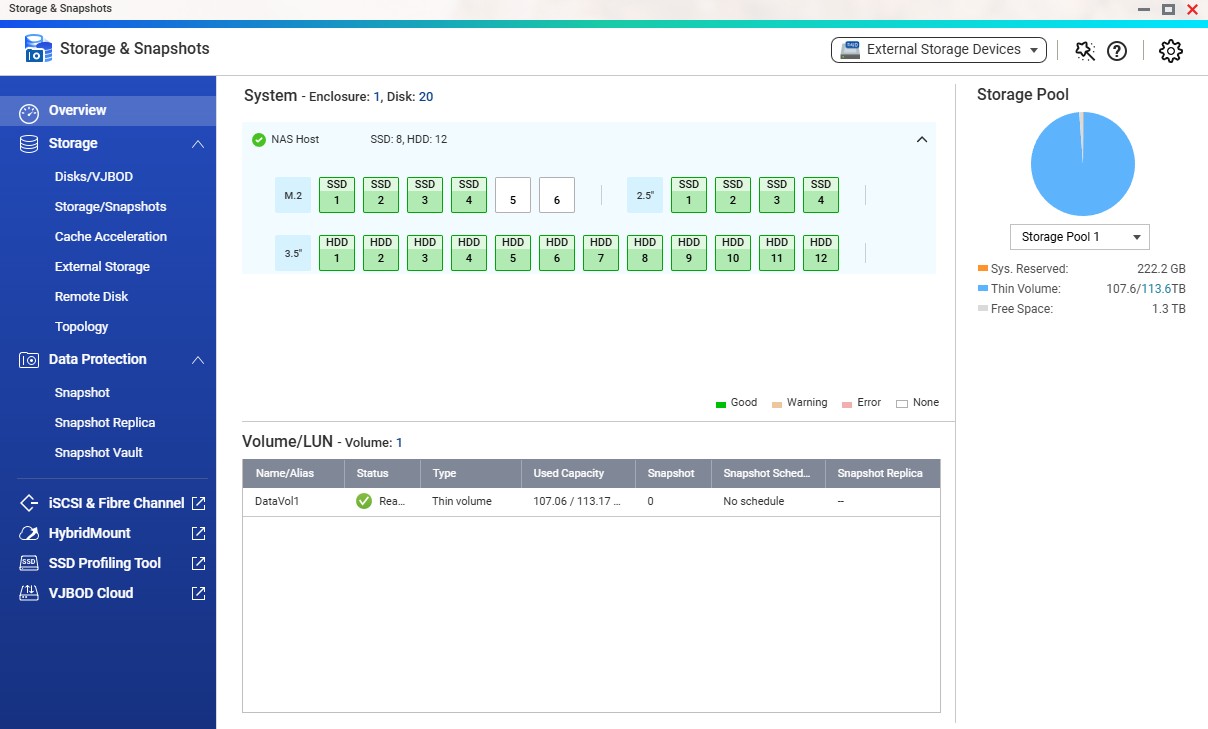
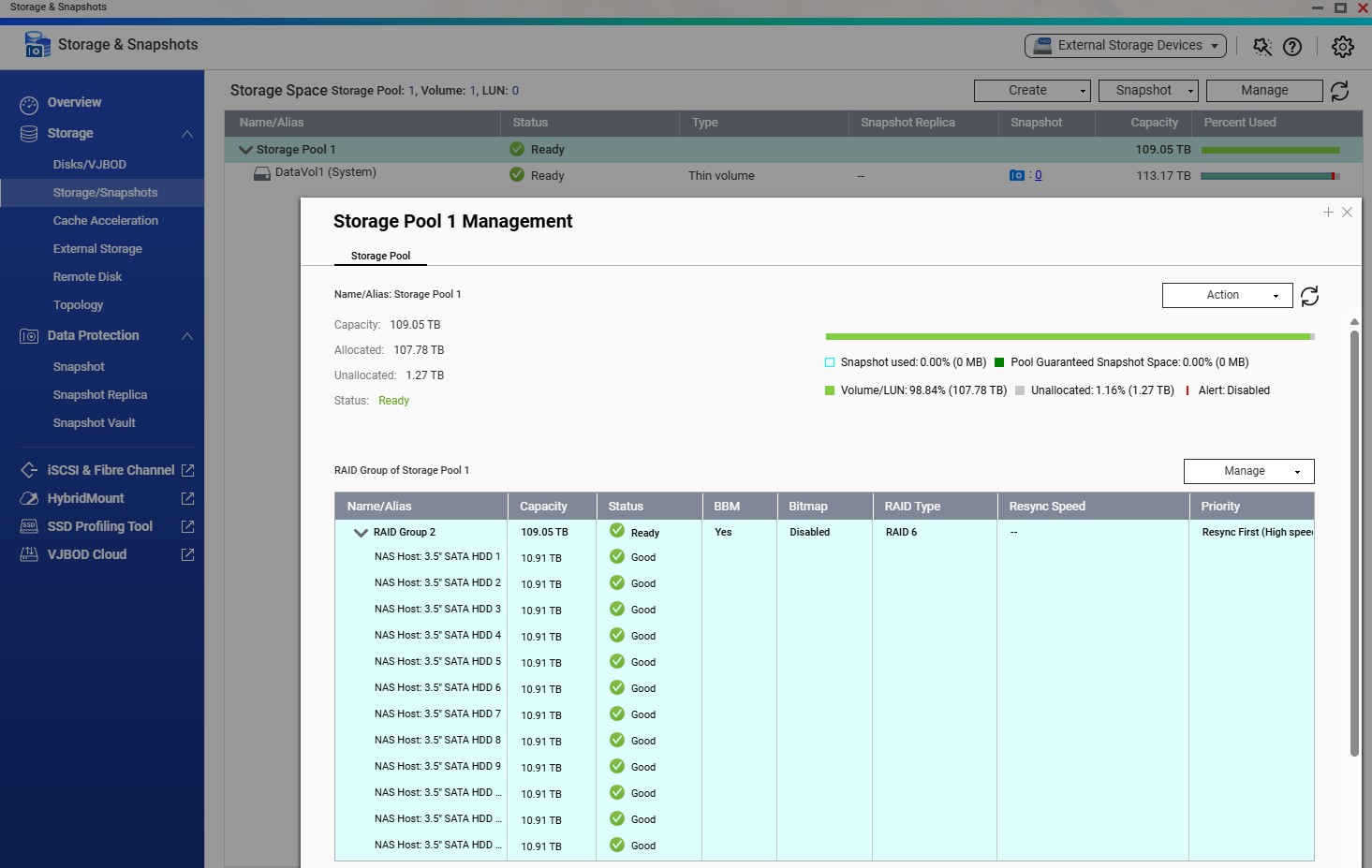
12x12TB Seagate Exos HDDs in one RAID6 Group > one Storage Pool > one Thin Volume. ~107TB used.
QTS has been stripped down to bare essentials, basically just an overpowered SMB share.
No extraneous apps, services, virtualization, etc. – Only stock QNAP apps, DA Drive Analyzer, SMB share, and UPS master.
Simple DHCP-assigned network configuration, connected via single SFP+ link.
NAS #2 (Destination): TS-1635AX
QTS 5.2.8.3332
Marvell Armada 88F8040 ARMv8 CPU + 8GB DDR4 RAM
Currently diskless
Incompatible?:
The official migration compatibility page says direct migration isn’t supported between these two models. WHY NOT? None of the footnote issues on the page apply to my situation. I understand there are some hardware differences, but isn’t that just a self-correcting matter of the OS recognizing the changed hardware environment and adjusting accordingly (drivers, device labels, etc.)? Many times I’ve moved *nix and Windows boot drives between vastly different computers, and maybe a couple of those times it required some tinkering, but I can’t recall it ever failing to work.
My hunch is that the compatibility guide is being overly cautious and there aren’t really any show-stopping incompatibilities. Does anyone here know otherwise as a fact? What will happen if I shut down both units, move the HDDs to the new enclosure, and boot it up?
If they are truly incompatible for direct migration:
According to multiple official support pages, they say I’ll need to manually copy the data to a new storage pool on the new NAS. This isn’t an option for me, as I have neither the spare $4000 for another set of drives nor the week-or-two it would take to RAID them and then copy 107TB.
Can’t I just follow the procedure of safely removing/exporting the pool on the source NAS, installing the drives in the (pre-configured and running) destination NAS, and then running “Attach and Recover Storage Pool”?
Again, as with the compatibility guide, I suspect QNAP Support is just being extra cautious with their advice in order to protect inexperienced users.
True, I guess that’s a barrier only an OS purpose-built for resilience could overcome. It shouldn’t have any effect on the actual storage pool structure and data though, right? (As far as preventing me from being able to detach it from NAS 1 and recover the data on pre-configured NAS 2)
Good. Glad to see you are keeping the 1685 around! And for just file storage, the 1635 should be fine.
As for the attaching and detaching the storage pools (your other question above) - I’m not sure why it would make a difference between core types. You would think it would be the same. I’ll let someone with more knowledge answer that one! It might be a wise idea to open a ticket with QNAP.
As for you other two NAS units you are getting rid of - I’ll pass.
I don’t see any issues with transferring just the storage pool between these 2 NAS models. If only it were that easy.
Problem is: when you move the drives between models, you’re also moving the OS. It’s stored on the drives in partitions and arrays separate to your userdata. So, it’s not just data files you’re moving. It’s executables too.
Maybe someone from QNAP can provide an official reason?
We will provide your requirements and situation to our internal team to see if there is any way we can assist you.
In the meantime, could you please provide a screenshot of your Storage Manager? This will help us better understand your current configuration. Thank you!
I know QTS stores copies of its OS data across the disks but I guess it’s still a little mysterious to me, after all my years of Qnapping, the actual where/what/how of that extra data – And, most importantly in this case, how NAS #2’s QTS installation will react to that extra data from NAS #1. Since I’d be attaching/recovering the pool on its already-running OS, I’m hoping it will just discard that old extra data and replace it with its own
Screenshots attached!
Note: I previously had read-only Cache Acceleration and Ultra-High Speed Qtier configured with M.2 and SATA SSDs, but I disabled both features in preparation for this move.
I did a test using the 4 free SSD drives on the TS-1685:
I used them to create a new RAID6 storage pool + thin volume, then loaded some files onto it. Then I used “Safely Detach Pool” in Storage Manager, which worked fine. When I inserted the drives into the TS-1635AX and used “Attach and Recover Storage Pool”, it worked just fine. Rebooting the 1635 after recovering the test pool worked fine, too – It didn’t try to boot 1685’s OS.
I think I’ll be alright moving the 100TB HDD pool this way.
I’m not sure about Qtier (others can comment) but it’s a generally accepted fact that cache acceleration is not useful on QNAP systems in most cases and can actually slow things down. Unless you are reading a large amount of small files, it’s pretty useless because once the cache gets full, it then does a poor job of moving content in and out and you are at the mercy of your slowest drives at that point.
Good news, everything worked out and I’ve got the full storage pool recovered + shared on the 1635 now. It took a little finessing to get the 1685 to revert to another storage pool/volume as the System drive so that it would allow me to detach the HDD pool, but once I got that figured out it was smooth sailing.
@NA9D Good to know about the cache acceleration, I’ll have to do some tests. Qtier always seemed to work well for my scenario – I had a ~4TB ultra tier that facilitated long transfers of very large (100GB+) files at consistently high speeds (400-600MB/s).
With this new setup on the 1635 I’m trying a different approach, a small write-only cache. I’ve got 4x128GB SSDs in a RAID10 array, 185GB usable after overprovisioning. From the small test I’ve done so far it allows for a burst of 300-500MB/s up to the saturation point, and then it falls back to regular cache-less speeds (180MB/s), even with all the extra processing overhead.