Old Mac user - new NAS user. I am trying to move a very large folder to my QNAP. Obviously, it’s slow. This was going to take days. It usually ended in some sort of error. Is there a more eloquent way other that drag and drop? Are there sync utilities? There is a USB-A port on the unit. Can I go in through the front door with a flash drive or something of the like. I would still need to sync, but the bulk would be loaded.
Move or copy? You could use a flash drive / portable usb hdd. You could also use Hybrid Backup Sync to setup a 1 or 2 way sync, or even map an external drive (Hybrid Mount) in File Station.
EDIT: and there’s also Qsync Client.
What is considered a very large folder?
First of all, I would zip that folder and transfer the zip file. This will make things faster to transfer a single large file than many small ones. Then unzip it on the NAS. You can do this if you use a USB thumb drive to copy the files or your network.
As @Richard suggests you could set up a backup job or use Qsync if you want to keep that folder synchronized on your Mac and the NAS.
Just a thought. You haven’t said what model of Qnap NAS you have, but if it has a “One Touch Copy” USB port on the front, and you want to use that for the transfer, you’ll have to configure it to be recognised as external storage.
On the sidebar in HBS3, click Services > External Devices - USB One Touch Copy > Operating Mode - External Storage Drive > Apply.
My model is a TS-262. I have a USB-A port on front and I have seemed to have connected. I don’t know what “HBS3” is. I use Qfinder. What’s interesting. In Qfinder when I go into Preferences>USB QuickAccess any choices are greyed out. I looks as if I transferring something at a much higher rate of speed. Also, since it was asked. The drive is a 1T capacity drive that I am trying to move
QuickAccess isn’t available on that model NAS. It allows you to treat the NAS as a big USB drive and attach it directly to your PC. But its speeds are limited to 1Gb/s.
You’ll get faster speeds if you’re using a USB3 (or-later) device.
You may want to consider using Qsync for your needs.
–-Translation added by Dolbyman–
Hi, the NAS has several USB ports: one on the front and the others on the back. Make sure you use a USB 3 port. Then it’ll be lightning fast. Even over a 1 Gbit network, it shouldn’t be a problem with a 1 TB drive.
====
Hi, the NAS has several USB ports: one in the front, the others in the back. Make sure you use a USB 3 port. Then it’ll be super fast. Even over a 1 Gbit network, it shouldn’t be a problem with a 1 TB drive.
Please only post in English in the English section
Hi @dolbyman
I’m not familiar with the community here yet. I read the question in German and, of course, answered in German. Tell me how/where I can find the German version, and I’ll use it right away 
Sorry to Vancouver
You answered in German again
German section is ONLY in the link below, I asked QNAP to remove auto translation, as it makes everything confusing
The comments here were all very helpful. What I am trying to sync is on a SanDisk Extreme Portable SSD. The flash drive has a USB-C connection but the USB port on the front of my QNAP is USB-A, so I need to use an adapter. That might attribute to the slow transfer, but even direct connected, it is very slow. The NAS usually logs off. But, this is working in small bites and I am going to use Qsync based on recommendations. It works (slowly). I had various versions of the DROBO. The Qnap ain’t a Drobo. That was the gold standard of NAS for Idiots like me.
Again, a lot of small files = slow transfer speed. If you want to have faster transfer speeds, zip your entire hard drive. The USB adapter is likely not the cause of slower speeds. Depending on your NAS, you may have USB-C connections in the rear.
Lots of files take time.
The Drobo units were nothing like QNAP.
If you are experiencing a similar situation, this FAQ provides some common solutions:
How to use Qsync to synchronize files between the NAS and my other devices? | QNAP
This lead me to download the QSync Client for Mac. That did “something” but I have more questions.
-
I only see a Client version for Mac, but it seems there are “Central” versions depicted with way more options.
My Finder based QSync folder data sync’d like a charm to somewhere. I would like to find that “somewhere”. The folder does not appear in Qfinder. When I go to File Station, it created a new folder and I can see everything in my browser. Is there a File Station add on client for the Mac?
Is there a Finder client where I can feel, see, touch, and smell those files in a Finder window?
The Qsync Central is an app that is on your NAS that is used for setting up preferences for users, etc. The client is what runs on the Mac.
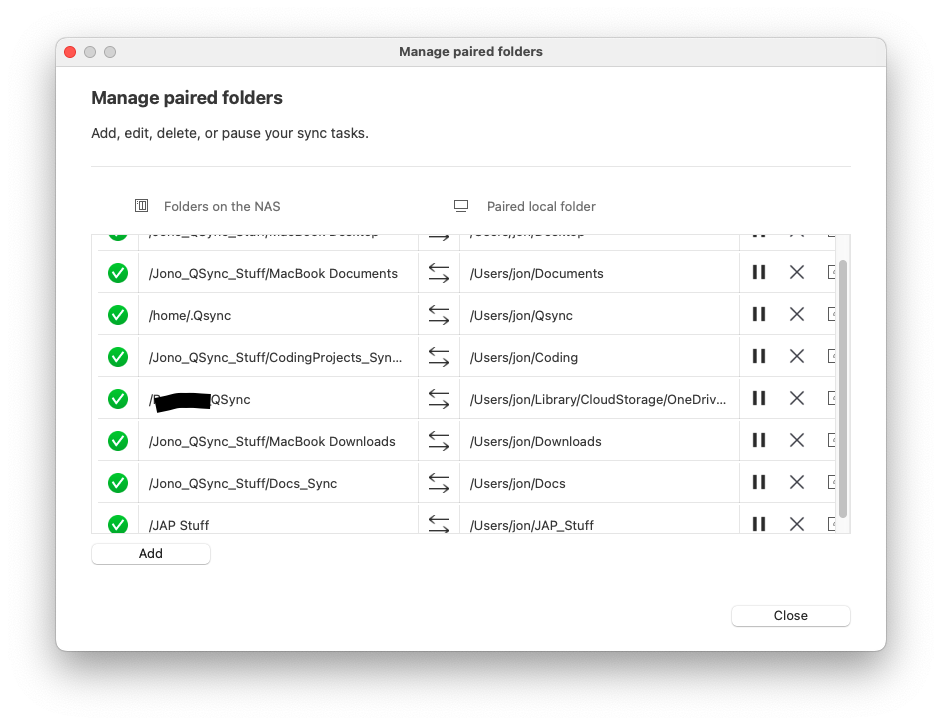
You can set up specific paired folders. So that a folder on your NAS corresponds to a folder on your Mac. Here is a picture of some of mine.
Qfinder is not what you use to access folders and files on your NAS. Qfinder is only really needed to “find” your NAS when it first comes on your network. It should not be needed on a daily basis at all.
You don’t need anything special on your Mac to view your NAS contents on your Mac. Simply go to “locations” in your sidebar and select your NAS. Enter your NAS login info when prompted and boom! It mounts as a drive. If it doesn’t show up there, then look under Network.
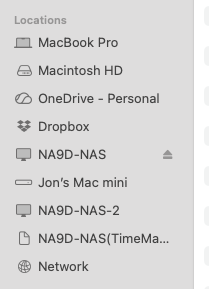
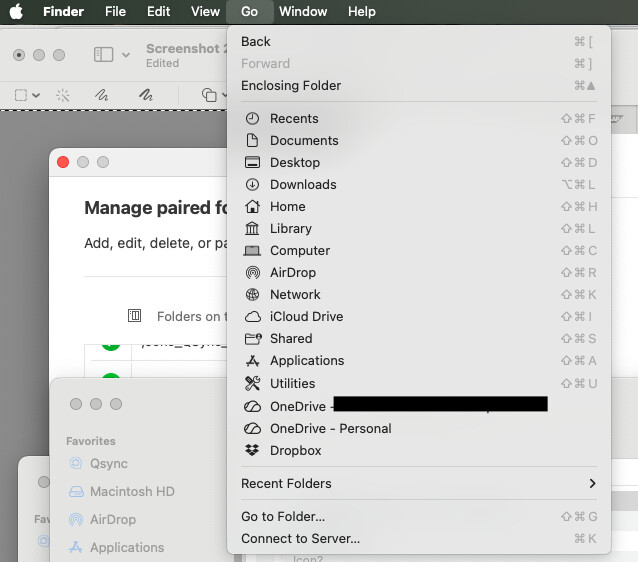
If it still doesn’t show up, then go up to the Go menu in finder. The select “Connect to Server”
Then in the window that pops up, enter: smb://IP_of_NAS
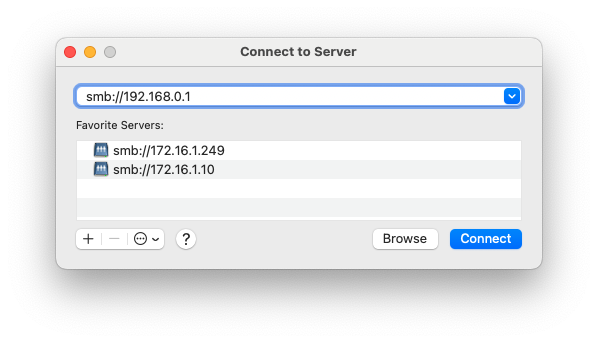
You may be prompted to log in. Log in with the NAS login (not your Mac). Save that information in your keychain (there’s a box to check).
Now you will get a new window with all your shares on the NAS:
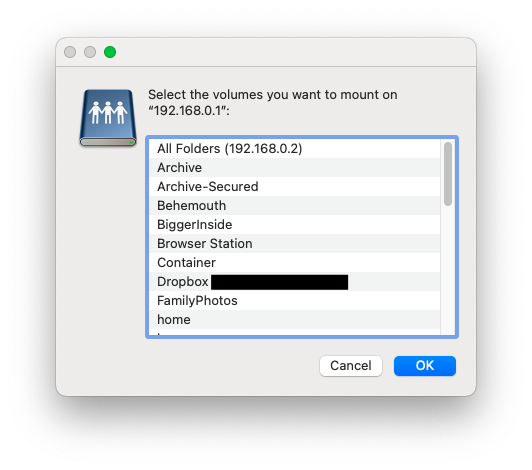
Select the folder or folders you wish to access. They will now be mounted in the Finder like drives and you can easily access them.
I don’t have a Mac (only windows & linux), but in addition to what @NA9D has posted above, if you are accessing your NAS via “Network Drives” in Qfinder, the Mac Finder window is likely to only show shared folders that have the “hidden” attribute turned off. You can change this through the Qnap interface via Control Panel —> Shared folders —> Edit properties (icon at the right). Alternatively you could type the full path (IP & folder name) in the address bar. It should show up even if normally hidden.
1st Comment to all who have replied. This community is lights out the best I have ever be involved with. The quick responses with helpful screenshots and understandable commentary is by far the best I have ever experienced.
One more question. Thanks, for the login info. I should have been using that as my login protocol. My last question has to do with QSync. I ran what looked to be a successful sync. All the files show up in File Station on my web browser. Why don’t I see them in Finder? In File Station, they look to be in a separate QNAP. Is there a different IP address?
So you should see them in Finder on the NAS. It depends on how you have it set up. I think the default setting is to use a .Qsync folder on the NAS - yes - /home/.qsync. This will appear as a hidden folder and if your Mac is not set up to view hidden folders and files, then you won’t see it.
You can pair any folder on the NAS with any folder on the Mac. As you can see - I have multiple..