This morning all 7of my NAS’s Showed an update to MMC version 2.9.0. I updated and it immediately came back with an update for version 2.10.0. But this update repeatedly fails on all 7.
5 Likes
Same problem here (TS-264 QTS 5.2.9.3410).
My NAS showed an update to MMC but I didn’t note the version number. I ran the update but also came back with an update. It’s currently on 2.10.0 but the latest download is 2.10.1. The release notes don’t even mention 2.10.0.
Sorry, should have added that the update to 2.10.1 fails. It looks like my MMC was updated to 2.10.0 on 02/02/2026. Version 2.10.1 only came out today (i think).
1 Like
Hello
same for me
2.10.0 appears in app center. If I go to QNAP website it says 2.10.1, but when I download to install manually the file says 2.10.0.
3 Likes
I too was also not able to update past v2.10.0. Tried before updating FW.
I just updated to FW QTS 5.2.9.3410 and will try again.
I’ve just spent about 2 hours trying to figure this out - Even Google AI couldn’t solve it. Looks like the server caches haven’t been updated.
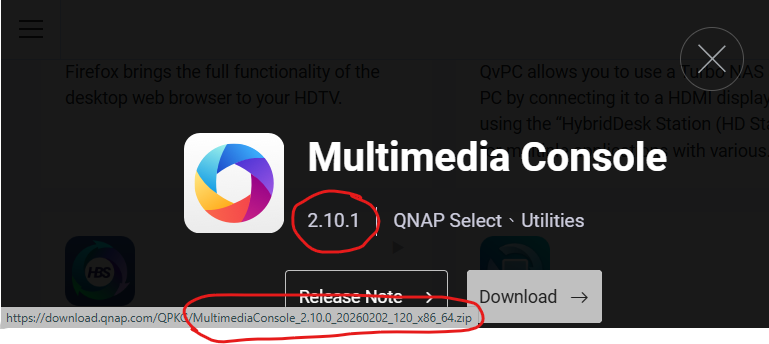
Guess we are waiting for QNAP to upload the new version.
Yes…
I’m not ok. FW 5.2.9.3410 has loaded successfully, but i cannot update MMC past 2.10.0. It goes throught the update process but never updates.
However, the real problem is the nVidia driver. If I run that it hangs the NAS at 50% progress and everything stops responding. It doesn’t even respond to ping. I have to restart (not gracefully) to recover. I think I’m going to reinstall 5.2.8.x and skip 5.2.9.3410 all together. 
HBS also broken now. I have backups so whatever. Don’t have time for this.
Take that back… NAS won’t boot now. I guess this was a self-inflicted wound. Now I have to deal with it. 
4th times a charm. Up now. Going to downgrade FW and sit this one out.
Still dead in the water. Pulling out my magic wand.
***EDIT - Back on 5.2.8.3359. Everything stable and working again.  I can wait for MMC 2.10.1. HBS working and I’m no longer being prompted to update the nVidia Driver.


Me too. Update of MMC to 2.10.0 has failed & I am on Firmware 5.2.8.3359. Also, Cinema 28 1.2.5 will not start after being stopped during the MMC update attempt.
Also, Unable to resume thumbnail generation in MMC
I suggest you not upgrade to 5.2.9.3410 for the time being. Although I downloaded the second release, my NAS became extremely unstable. There are some folks above who didn’t have any issues, but my system kept dropping off my network, wouldn’t respond to ping and would become unresponsive without any way to gracefully restart. I did get MMC to update to 2.10.0 but 2.10.1 would not load. The new Nvidia driver was also problematic. Then I discovered HBS quit and couldn’t be restarted. At that point I was done trying. I’m sitting this one out.
I haven’t used Q-Finder in 12 years. If it can’t find your NAS, you know you have issues.
Finally on like the 4th or 5th restart it detected, and I downgraded my firmware. Up to you if you want to try 
Same problem ( QuTS hero h5.2.9.3410)
I’m sure support will be all over this in the coming days. Was slightly inconvenient but I had everything working again in under an hour. That’s why I stay loyal to QNAP. 
Same problem here with: QTS 5.2.9.3410
Sunday night in US is Monday morning in China; give them about 12 hours from now to get on it.
1 Like
I updated to 5.2.9.3410 after the 2.10.0 console update failed hoping that would help. Rebooted and reapplied 2.10.0 manually but still failed. Hope support can figure this out