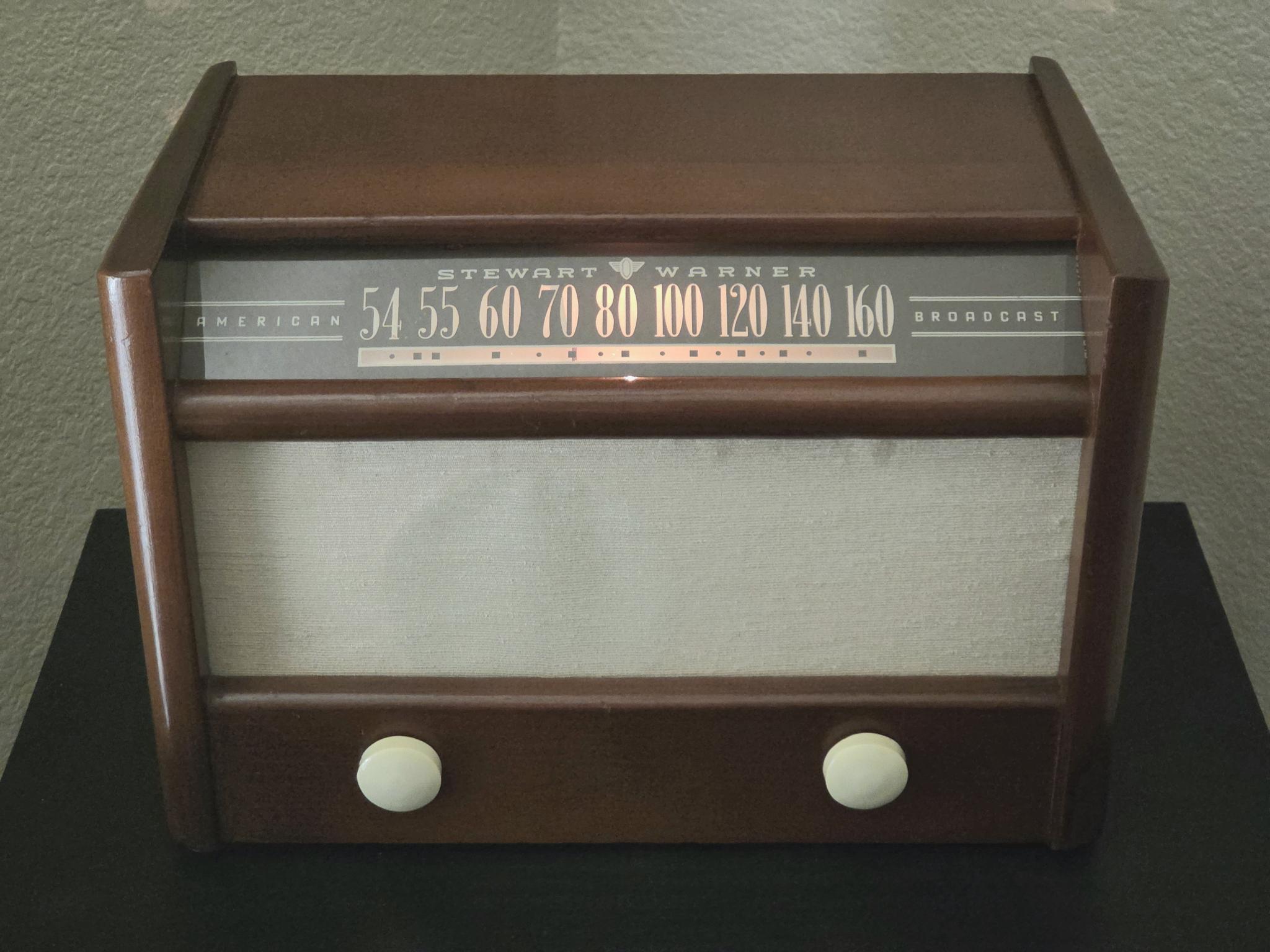
I am using QNAP Music Station 5 with a USB audio adapter (AB13X USB AUDIO) connected to the NAS and routed to a low-power AM transmitter. My goal is to create a one-click “radio station” experience where I can launch a playlist named “Broadcast” directly from the Spotlight page and have it automatically play through the USB audio adapter instead of the default Streaming/local speaker mode.
So far, I have successfully:
Created a custom “Broadcast” playlist
Added the playlist shortcut to the Spotlight page
Configured the playlist order using filename prefixes and FileName sorting
Confirmed that playback through the AB13X USB AUDIO device works correctly when manually selected in “Multi-zone control and streaming”
Confirmed that clicking the Broadcast shortcut from Spotlight immediately starts playback
However, every time Music Station 5 is restarted, clicking the Broadcast shortcut defaults playback back to Streaming/local speakers instead of the USB audio device. I have tested manually selecting the USB output, stopping playback cleanly, restarting Music Station, and reopening from Spotlight, but the output selection is never retained.
It appears that Music Station stores playlists independently from the playback/output device, and that playlists or Spotlight shortcuts cannot be associated with a specific audio output target.
My question is:
Is there any way to make “AB13X USB AUDIO” the persistent/default output device for Music Station 5?
Or is there a way to bind a playlist or Spotlight shortcut to a specific output device instead of Streaming mode?
Hi @jhanley the Music Station is a bit outdated that we will need to take some time to check it.
I would like to confirm whether “restart” means close and reopen the Music Station tab, or disable and enable the Music Station in the App Center? or reboot the NAS?
I would highly recommend another streaming solution over Music Station. As @haru0 said, it’s a bit old and outdated. You would be better off with a different solution.
May I ask why you are using a low power AM transmitter? With this you will lose fidelity and stereo. If you are going to use a low power transmitter at all (there’s much cleaner ways of doing all this), then I would use an FM transmitter which will have much better fidelity and stereo capability.
Music Station might be outdated, but it’s adequate my particular use case.
When I said “restart,” I meant the app. No matter what, the output device always defaults to streaming. However, it’s not the end of the world to manually switch to the USB adapter.
I’m using an AM transmitter to broadcast to a local 1947 vintage radio. The playlist includes a collection of music and commercials from 1947 and 1948, so the loss of fidelity and stereo is intentional and desired. However, since both you and @haru0 mentioned that Music Station is outdated, do you have a recommendation for an alternative app?
Aha. That’s cool on the vintage radio. What brand/model is it? I have a collection of several Hallifcrafters units. Maybe more from the 50’s than the 40s.
Given what you want to do, maybe Music Station meets your needs now that I understand this. I don’t know if the more modern apps like Plex would support local output on the NAS. I think Music Station may be more unique in that you can choose the audio output on the NAS. Maybe someone else can comment if there’s a different app that would work the way you need it to…
I would not use the NAS as a player (as always) but just any other mini music player directly piping into the AM transmitter.
You can directly stream via SMB or something move fancy like Plex (did you ever post the NAS model ?)
I don’t see anything wrong with what he is doing. I mean Music Station is not ideal but it does remove the need for some other “player” device in the middle.
The project is just for fun. Sure, I could use another output device, but since I’m already using my QNAP TS-453D w/32GB for Samba and Home Assistant, using Music Station is simply convenient without any additional overhead.
AM Transmitter with power supply and 3.5mm audio-in
Dual-shielded 3.5mm universal aux audio cable
Ground loop noise isolator
USB to 3.5mm jack audio adapter
The local reception is loud and clear with virtually no static or humming.
Here’s my playlist from 1947/1948:
Ted Weems - Heartaches
Nat King Cole - (I love you) For Sentimental Reasons
Dinah Shore - Buttons And Bows
Air Wick
Pepsi Cola Jingle
Frankie Laine - That’s My Desire
Margaret Whiting - A Tree In The Meadow
Lucky Strike
Ajax
Mills Brothers - Across The Alley From The Alamo
Art Lund - Mam’selle
Camel Cigarettes
Colgate Shaving Cream
Vaughn Monroe - Ballerina
The Andrews Sisters - Toolie Oolie Doolie
Vimms Vitamins
Lifebouy Health Soap
Nat King Cole - Nature Boy
The Andrews Sisters - Civilization (bongo bongo bongo)
Bosco
Aunt Jemima Pancake Flour
Perry Como - Chi-Baba Chi-Baba
Frank Sinatra - You Call Everybody Darling
Polmolive Soap
Luster Cream
Arthur Godfrey - Too Fat Polka
Tex Williams - Smoke! Smoke! Smoke!
Gellete Blue Blades
Coleman
That’s really cool. That radio looks gorgeous. Did you restore it? If so, nice job. Is it running true 1940’s tubes and all or did you put a transistor radio in there? I like how you have some commercials spread in your play list. But why not a longer playlist? There’s certainly a lot more great music from that era. Glen Miller and all the swing for one thing. And a lot more Frank, Perry, Nat, etc…
I did not restore the radio. I bought it in Frisco, Texas, from a vintage radio guy who lives in the area.
The electronics are original and contains 5 tubes, although the resisters have been replaced. Other than that, the inside is preserved. The cabinet is walnut and the “slide rule” glass is original.
The playlist can definitely be longer. This is just a sampling. I had one rule when creating it: the music and commercials had to be true to 1947/1948. In order words, this is what people would have heard when the radio was brand new. But there’s lots of other great music from that era. Finding commercials that are era accurate took some time. AI was helpful with that.
Normally yes, but if you had seen all the issues with these apps over the years, it’s a lot easier on the nerves of users, to just use a dedicated player, no kicking or screaming necessary (some users have even taken out their NAS with projectile weapons out of frustration .. no joke).
Honestly, my NAS has performed great for everything that I have asked of it. However, configuring it is not always for the faint of heart. I actually tried to run a music service on my Ubuntu server, but the performance was lacking. The NAS performs the same task much better because it’s designed for streaming media. That said, the obvious simplest solution is to use a dedicated device. But the purist in me likes the idea of using the NAS for such tasks.
Sure. That would work but now you have another device to maintain and load the playlist too. The music is already on the NAS. Changes made there are reflected instantly and no additional player needs to be updated.
Sure. I’ve used Music Station myself a bit when I was figuring out the NAS. All of the QNAP multi-media apps are somewhat long in the tooth and are definitely not modern. That said, I’m not sure why some users would take a shotgun to their NAS over a sub-standard app when there are plenty of good apps (ie: Plex) that work quite well. But for this user’s needs, I think Music station works fine other than the settings issue he first enquired about…
Seems easier to me, less problematic, less power. Personally though, I’d modify the unit to play directly removing much of the intermediate equipment. I like taking something old, and modernizing it. I have a portable 5" B&W TV for instance that I added a Raspberry Pi to the inside to play back video.
To each their own, I suppose. Personally, I prefer to preserve the original condition of a device, especially if it’s of collector quality. There’s something magical about using an antique piece with all its inherent restrictions and limitations. I was thrilled the first time I heard my playlist through the radio via an AM transmitter. Although television existed in 1947, most people’s primary method of home entertainment was still the radio. For me, it’s a time capsule moment that reminds me of my mother, who was 18 at the time. These are the songs and commercials she would have heard back then.
Anyway, I appreciate everyone’s input on the topic. It just goes to show that there’s more than one way to skin a cat. (Talk about an old timey phrase!) That said, I still haven’t figured out how to configure my playlist to play through the USB aux by default. Oh well.
Hi @jhanley , after checking internally, Music Station 5 does not currently support binding a playlist or Spotlight shortcut to a specific audio output device. The output selection in Multi-zone is session-level and is not persisted per playlist or per shortcut, so the reset you saw on restart is expected behavior.
Sorry that there is no setting or workaround within current Music Station itself that would achieve the one-click USB-output launch you’re describing.
While the one-click functionality would be ideal, getting my playlist started is no biggie:
Click the 3-dot icon on the Spotlight shortcut
Click the “Multi-zone” button in the upper right hand corner
Click the USB adapter from the “NAS Audio Output” pane
Click the play button
It will then continue to run in the background until the server is restarted.
Despite being “long in the tooth,” Music Station works perfect for this use case.
It’s the same reason why some people like to drive a 40 year old pickup truck. It might not be new and fancy, but it’s reliable and just works without any fluff.