So following the discussion with @HanzSung in a separate thread, I am starting a new thread to talk about the general slowness of SmartShare links in MyQNAPCloud.
SmartShare is a great way to securely send files to others, but honestly, it is slow. I was told that the reason for this slowness is that the data has to go through the QNAP servers in Taiwan. However, according to @HanzSung the is a global network that is used for the SmartShare links but it has some speed restrictions.
So I wanted to see what the latest speeds were. For reference I have a 2 Gbit/sec download that generally runs pretty close to that and a 350 Mb/sec uplink. Since I have to upload the file through the QNAP infrastructure, my uplink speed should be the limiting factor. However, that is not the case.
I just tried using a SmartShare link to transfer a 15 GB video file. During the transfer (while I had it running), the maximum speed was about 11 Mb/sec. That’s Megabits not MegaBytes. Honestly that’s really bad. A couple years ago, I had shared a video that I had done for a client over SmartShare and it took them hours if not days to transfer it. I think I ended up putting it on a thumb drive and taking it to them.
I’m not certain why QNAP would put a limit on download speeds. Frankly, the faster you can have someone transfer a file through your system the better. Get it over with. I understand infrastructure like AWS likely charges for the number of bytes transferred but if you transfer 15 GB at 300 Mb/s or 10 Mb/s, it’s still the same number of bytes! And if QNAP has not established a regionally localized CDN to handle this sort of thing, well - they should!
Now, I have a MyQNAPCloud storage space and I just uploaded this file to that storage space (the storage space is located in Texas). My speeds uploading are on average well over 100 Mb/sec - I’m seeing speeds as high as like 360 Mb/sec. Generally it’s around 200 Mbps or higher. The entire file is transferred to the cloud space in minutes as opposed to hours - it’s 20x faster. Here’s a couple minutes of transfer speeds. So the infrastructure is there.
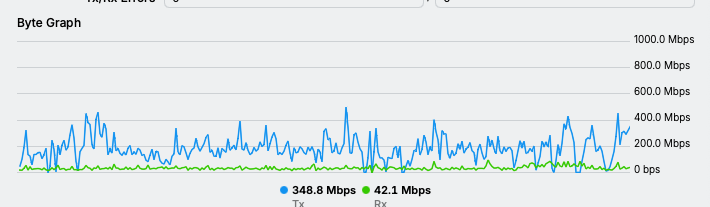
So file is uploaded. Now I am downloading it via a SmartShare link. It’s strange - supposedly it transferred in Safari around 100 Mb/sec. But it didn’t show up in Safari’s download screen and I can’t find the file. Sounds like an error in the MyQNAPCloud website. Anyhow, I am transferring it via Chrome now and getting about 8 Mb/s. So very, very slow - similar to the speeds directly from my NAS.
Now if I download it directly from my MyQNAPCloud storage space (still using Chrome), I get a download speed of around 100 Mb/sec with peaks close to 200 Mb/sec.
So, while the download of 100 Mb/sec directly from QNAP’s storage space is half of my upload speed, it is still 10x that of the SmartShare download.
There’s no conceivable reason that I can understand why SmartShare should be limited so much. It makes for a very poor user experience. This is one reason why people expose their NAS to the WAN (which is very unsafe), so they can reliably and quickly share large files.
We do we need to do to improve SmarShare speeds?