@Ozeki
I see.
Normally, a DHCP server has a “lease time” setting that determines how long an IP address is assigned. During the lease period, even if the client is not found on the network, the server will not assign that IP to another device. If the lease time is exceeded and a new client requests an IP, the server may assign that IP address to the new client. That’s how it works.
Since your router was stopped for a certain period, I suspect the lease time was exceeded and the DHCP server reassigned IP addresses to almost all devices under its control.
My understanding is that the IP address previously assigned to the NAS was also automatically assigned by the router, so with this reassignment, it’s possible that the IP address previously set for the NAS has now been assigned to another device.
Yes, your understanding is correct.
Is the IP address range distributed by the DHCP server set to a default value?
My understanding is that it depends on the manufacturer.
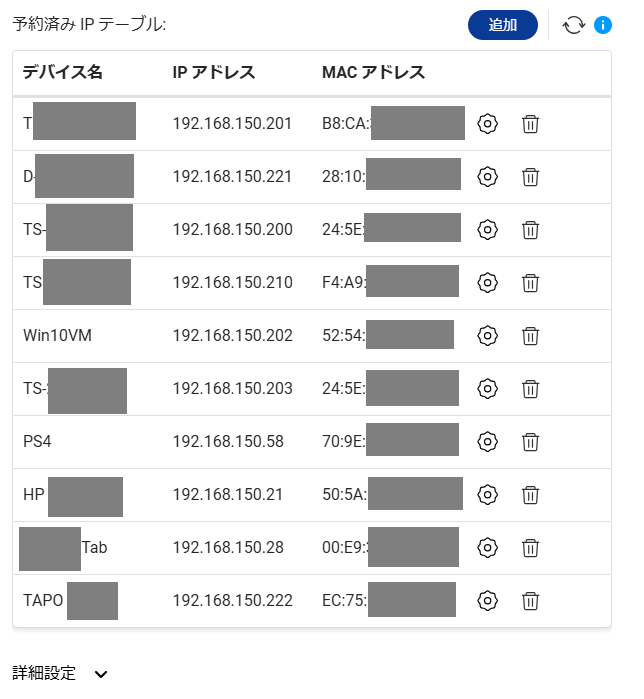
Also, if the IP address you want to specify (let’s call it IP-A) has already been assigned to another device, is the idea to reserve IP-A as a static IP and then reassign it to the desired device via the router’s management interface?
Yes, that’s generally correct.
Depending on the manufacturer, you may need to remove the device currently using IP-A from the network so that no client is using that IP, and then set that IP as a reserved address. Some routers require this procedure.
For security reasons, there are PCs that access the NAS with a fixed IP address, and now those PCs can no longer access it.
I’m not sure I understand the security reasons, but if you don’t mind sharing.
If you’re setting a static IP on the client side, it’s probably better to have the DHCP server assign a fixed IP as well.
From my past experience, sometimes static IPs don’t work well because the route information isn’t clear. In a DHCP environment, the DHCP server usually acts as the gateway, so if there’s an issue, devices tend to “ask the gateway device,” which seems to work.
(Sorry for the vague explanation. I’m guessing it could be something like the gateway isn’t set, or a static routing mismatch occurred because the IP address changed.)
With the QNAP Qhora router we use, it works like this with static IPs.
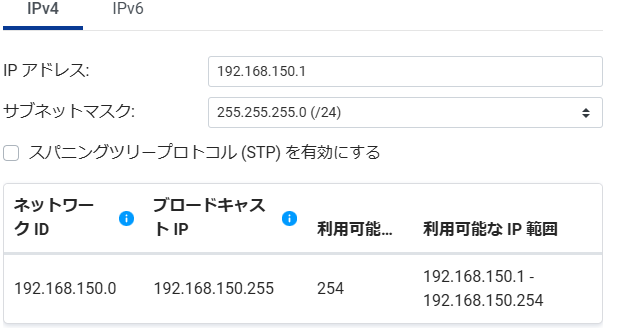
Qhora allows you to set reserved IPs from within the “DHCP-assigned IP address range,” so the assignment range looks like this.
Do you know the manufacturer and model number of the router you are using?