PLEASE NOTE
 Note: This bypasses QNAP’s own built-in UPS handling (
upsutil / the GUI’s “Network UPS slave” option) and runs the standard NUT upsmon daemon manually instead, with a custom SHUTDOWNCMD. This is not officially supported by QNAP. Test it in your own environment before relying on it — I accept no responsibility for any data loss, missed shutdowns, or other issues that result from following these steps.
So I had documented a fix a long time ago on the old forums but these have gone now.
I have just changed my UPS to a Unifi UPS 2U and this supports NUT Server, with a configurable UPSName, username and password.
I used claude desktop to get it working again. Hope this helps you.
Fixing QNAP as a NUT (Network UPS Tools) client — GUI “Network UPS slave” doesn’t work properly
The setup
- A NUT server running on a separate device (in my case a UniFi UPS acting as the NUT server), reachable at
<NUT_SERVER_IP>:3493.
- A QNAP NAS (QTS 5.2.9) that needed to monitor that UPS as a client/slave, so it can react to power events.
The problem
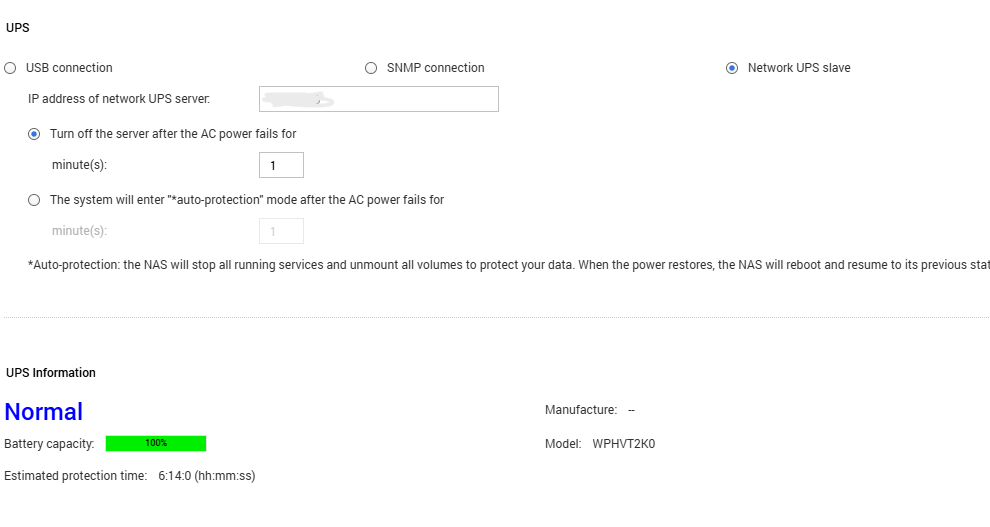
QNAP’s own GUI option for this — Control Panel → System → Power → UPS → “Network UPS slave” — only asks for the server’s IP address. There’s no username/password field.
Real NUT MONITOR connections (the ones that register a device as an authenticated client and allow proper shutdown coordination) require credentials matching an entry in the server’s upsd.users. Without that, QNAP’s GUI-driven process (upsutil) can’t fully authenticate, so:
- The NAS never appeared in the NUT server’s connected-clients list.
- The GUI’s own UPS Information fields stayed blank (AC power status, battery capacity, model — all showed
--), even though the UPS was clearly online.
Manually running a read-only query worked fine:
upsc <ups_name>@<NUT_SERVER_IP>
This returned full live data (battery charge, load, status, etc.) — proving the server was reachable and the UPS name was correct. But this is just an unauthenticated read, not a monitored client connection. It doesn’t tell you whether the actual monitoring daemon is working.
The key discovery: ps | grep -i ups showed only upsutil running — upsmon (the real NUT monitor daemon) was never actually running on the NAS at all. The GUI’s “Network UPS slave” option doesn’t launch it.
The fix
1. Edit the real upsmon config directly
QNAP ships a standard NUT upsmon.conf, but the GUI doesn’t populate the MONITOR line with credentials because it never asks for them. Edit it directly (via SSH or SFTP):
/etc/config/ups/upsmon.conf
Add (or fix) the MONITOR line with the proper NUT credentials from the server side:
MONITOR <ups_name>@<NUT_SERVER_IP>:3493 1 <monitor_username> <monitor_password> slave
Tip: find the correct <ups_name> (this is the internal device name registered on the NUT server, which may not just be “ups”) with:
upsc -l <NUT_SERVER_IP>
2. Start the real monitor daemon
QNAP’s upsmon binary doesn’t accept -c <path> the way standard NUT builds do (that flag is repurposed for sending commands like fsd/reload/stop). It reads its config from a fixed default path instead — which happens to be the same /etc/config/ups/upsmon.conf above — so once that file is correct, just run:
/usr/sbin/upsmon
Check it’s actually running (you should see two processes — a privileged parent and an unprivileged worker):
ps | grep -i upsmon
Once running, the NAS immediately showed up correctly in the NUT server’s client list, and the connection was properly authenticated.
3. Make it persistent (crontab watchdog)
QNAP’s GUI doesn’t know this process was started manually, so it won’t survive a reboot, and any GUI power-settings change or ups.sh restart will kill it. Rather than fighting with QNAP’s autorun.sh (which needs to be enabled in Control Panel → Hardware → General, and can be silently disabled again by the Malware Remover app’s scans), a simple crontab watchdog is more reliable:
*/5 * * * * pgrep -x upsmon >/dev/null || /usr/sbin/upsmon
This checks every 5 minutes whether upsmon is running, and restarts it if not — covering reboots, crashes, and the GUI stomping on it.
Important on QNAP: editing /etc/config/crontab directly (e.g. with Notepad++ over SFTP) doesn’t take effect with a simple crond.sh restart. You have to explicitly reload the file into the active crontab first:
crontab /etc/config/crontab && /etc/init.d/crond.sh restart
Then confirm it loaded:
crontab -l
(Also worth checking line endings are Unix/LF if editing from Windows — CRLF can cause cron to silently ignore the line.)
Result
upsmon runs continuously, authenticated, and shows correctly in the NUT server’s connected clients list.upsc <ups_name>@<NUT_SERVER_IP> continues to confirm live UPS data.- A cron watchdog keeps it running across reboots and GUI interference, without needing QNAP’s fragile autorun.sh mechanism.
Summary of root cause
QNAP’s built-in “Network UPS slave” GUI option is a simplified, non-authenticating wrapper (upsutil) — it is not the same as running the standard NUT upsmon daemon, and cannot do proper authenticated client monitoring. If your QNAP UPS status page shows blank fields and the NAS doesn’t appear on your NUT server’s client list, check whether upsmon is actually running (ps | grep upsmon) — it likely isn’t, regardless of what the GUI shows.