NAS won't shutdown from NUT master

I am trying to configure my NAS to get shutdown by command from my NUT server, I have tried many things and variations, including renaming my server / adding a dummy-ups named [qnapups] and adding admin/123456 user, or changing the configs exactly as done in this blog:
https://www.dalbert.net/qnap-nas/
but I can’t get my NAS to be shutdown.

Currently after following each step in blog above (changing the MONITOR command on the NAS to match the correct username/password and add a dummy-ups named qnapups in master), I have a working connection under Control Panel-> External device-> UPS with my server ID as supposed to, and also by running upsc myups@<ip> from ssh, I get the UPS data, But no signal seems to affect it.

However when sending shutdown signal with

 upsmon -c fsd

on master, only the other clients are being shutdown, not the NAS.

I can’t get this intractable NAS to shutdown, (I have tried before a pure ssh approch, and it was worse.)

my /etc/config/ups/upsmon.conf on NAS:

RUN_AS_USER admin            
MONITOR qnapnas@<ip> 1 monuser secret slave
MINSUPPLIES 0                
# NAS is a client (if it is NOT powering other devices)
SHUTDOWNCMD "/sbin/shutdown -h +0"
FINALDELAY 0     

(other files are as untouched)

As said, both upsc myups@ip (real ups) and upsc qnapups@ip (dummy-ups) work as expected, it just doesn’t perform shutdown, and so with:

upscmd -u monuser -p secret qnapups@ip load.off
OK
upscmd -u monuser -p secret qnapups@ip driver.killpower
OK

Nothing get’s it to shutdown

I don’t have any logs, and as far as I understand, there isn’t acutal full verion of NUT client on this thing, so it doesn’t really work as expected with all log files.

I can’t figure out even how to debug local shutdown test, as upsmon -c fsd doesn’t work on the NAS:

[~] # sudo upsmon -c fsd
Network UPS Tools upsmon 2.7.4
kill: No such process

Any help would be appricated!

Model: TS-832PX
Software: QTS 5.0.1 2376

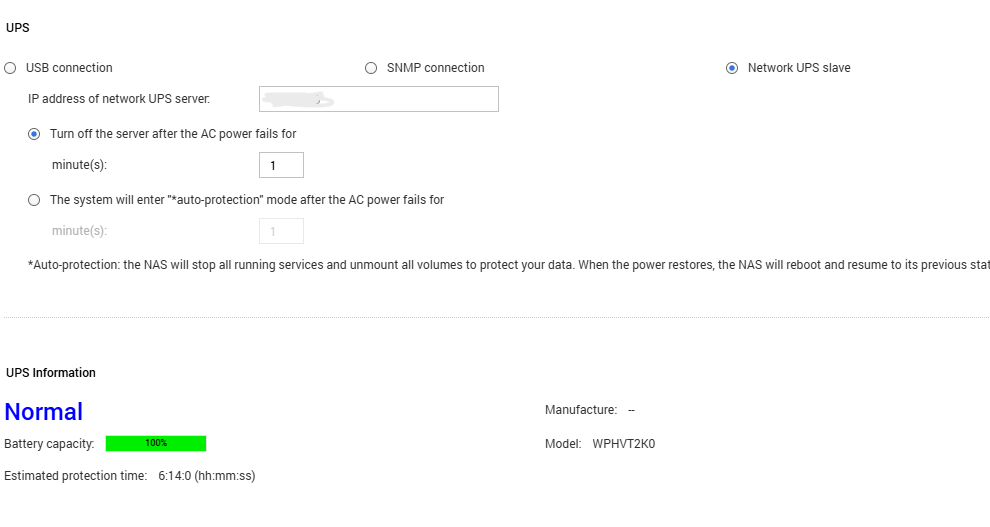
Could you please try setting up the NUT Slave via our UI? Or is there a particular reason why you can’t set it up directly through the UI?

Regarding the issue with using a command, I’ll be forwarding that to our internal team for analysis. Thanks for the report!

Finally, it strarted obeying the BL status and starts the timer defined in the UI, it wasn’t working before (maybe needed a roboot apart form apply button)
but I want to trigger an FSD at given moment, I don’t want a nattery event timer, I set it in the UI to 100 minutes so it won’t distub.
I want it to obey upsmon -fsd from master, which is not currently
I could do it with dummy-ups and give 0 minutes timer, but UI won’t let me.

Any update?

PLEASE NOTE

:warning: Note: This bypasses QNAP’s own built-in UPS handling (upsutil / the GUI’s “Network UPS slave” option) and runs the standard NUT upsmon daemon manually instead, with a custom SHUTDOWNCMD. This is not officially supported by QNAP. Test it in your own environment before relying on it — I accept no responsibility for any data loss, missed shutdowns, or other issues that result from following these steps.

So I had documented a fix a long time ago on the old forums but these have gone now.

I have just changed my UPS to a Unifi UPS 2U and this supports NUT Server, with a configurable UPSName, username and password.

I used claude desktop to get it working again. Hope this helps you.

Fixing QNAP as a NUT (Network UPS Tools) client — GUI “Network UPS slave” doesn’t work properly

The setup

  • A NUT server running on a separate device (in my case a UniFi UPS acting as the NUT server), reachable at <NUT_SERVER_IP>:3493.
  • A QNAP NAS (QTS 5.2.9) that needed to monitor that UPS as a client/slave, so it can react to power events.

The problem

QNAP’s own GUI option for this — Control Panel → System → Power → UPS → “Network UPS slave” — only asks for the server’s IP address. There’s no username/password field.

Real NUT MONITOR connections (the ones that register a device as an authenticated client and allow proper shutdown coordination) require credentials matching an entry in the server’s upsd.users. Without that, QNAP’s GUI-driven process (upsutil) can’t fully authenticate, so:

  • The NAS never appeared in the NUT server’s connected-clients list.
  • The GUI’s own UPS Information fields stayed blank (AC power status, battery capacity, model — all showed --), even though the UPS was clearly online.

Manually running a read-only query worked fine:

upsc <ups_name>@<NUT_SERVER_IP>

This returned full live data (battery charge, load, status, etc.) — proving the server was reachable and the UPS name was correct. But this is just an unauthenticated read, not a monitored client connection. It doesn’t tell you whether the actual monitoring daemon is working.

The key discovery: ps | grep -i ups showed only upsutil running — upsmon (the real NUT monitor daemon) was never actually running on the NAS at all. The GUI’s “Network UPS slave” option doesn’t launch it.

The fix

1. Edit the real upsmon config directly

QNAP ships a standard NUT upsmon.conf, but the GUI doesn’t populate the MONITOR line with credentials because it never asks for them. Edit it directly (via SSH or SFTP):

/etc/config/ups/upsmon.conf

Add (or fix) the MONITOR line with the proper NUT credentials from the server side:

MONITOR <ups_name>@<NUT_SERVER_IP>:3493 1 <monitor_username> <monitor_password> slave

Tip: find the correct <ups_name> (this is the internal device name registered on the NUT server, which may not just be “ups”) with:

upsc -l <NUT_SERVER_IP>

2. Start the real monitor daemon

QNAP’s upsmon binary doesn’t accept -c <path> the way standard NUT builds do (that flag is repurposed for sending commands like fsd/reload/stop). It reads its config from a fixed default path instead — which happens to be the same /etc/config/ups/upsmon.conf above — so once that file is correct, just run:

/usr/sbin/upsmon

Check it’s actually running (you should see two processes — a privileged parent and an unprivileged worker):

ps | grep -i upsmon

Once running, the NAS immediately showed up correctly in the NUT server’s client list, and the connection was properly authenticated.

3. Make it persistent (crontab watchdog)

QNAP’s GUI doesn’t know this process was started manually, so it won’t survive a reboot, and any GUI power-settings change or ups.sh restart will kill it. Rather than fighting with QNAP’s autorun.sh (which needs to be enabled in Control Panel → Hardware → General, and can be silently disabled again by the Malware Remover app’s scans), a simple crontab watchdog is more reliable:

*/5 * * * * pgrep -x upsmon >/dev/null || /usr/sbin/upsmon

This checks every 5 minutes whether upsmon is running, and restarts it if not — covering reboots, crashes, and the GUI stomping on it.

Important on QNAP: editing /etc/config/crontab directly (e.g. with Notepad++ over SFTP) doesn’t take effect with a simple crond.sh restart. You have to explicitly reload the file into the active crontab first:

crontab /etc/config/crontab && /etc/init.d/crond.sh restart

Then confirm it loaded:

crontab -l

(Also worth checking line endings are Unix/LF if editing from Windows — CRLF can cause cron to silently ignore the line.)

Result

  • upsmon runs continuously, authenticated, and shows correctly in the NUT server’s connected clients list.
  • upsc <ups_name>@<NUT_SERVER_IP> continues to confirm live UPS data.
  • A cron watchdog keeps it running across reboots and GUI interference, without needing QNAP’s fragile autorun.sh mechanism.

Summary of root cause

QNAP’s built-in “Network UPS slave” GUI option is a simplified, non-authenticating wrapper (upsutil) — it is not the same as running the standard NUT upsmon daemon, and cannot do proper authenticated client monitoring. If your QNAP UPS status page shows blank fields and the NAS doesn’t appear on your NUT server’s client list, check whether upsmon is actually running (ps | grep upsmon) — it likely isn’t, regardless of what the GUI shows.
:warning: Note: This bypasses QNAP’s own built-in UPS handling (upsutil / the GUI’s “Network UPS slave” option) and runs the standard NUT upsmon daemon manually instead, with a custom SHUTDOWNCMD. This is not officially supported by QNAP. Test it in your own environment before relying on it — I accept no responsibility for any data loss, missed shutdowns, or other issues that result from following these steps.

QNAP + NUT: fix SHUTDOWNCMD if you’re running upsmon instead of QNAP’s upsutil

If you’ve bypassed QNAP’s built-in “Network UPS slave” option (which uses their own upsutil tool and doesn’t support authenticated NUT connections) and are instead running the standard NUT upsmon daemon directly, there’s one more thing to fix: the default SHUTDOWNCMD in upsmon.conf does not work on QNAP and will fail silently during a real power event.

The problem

QNAP ships upsmon.conf with the stock, unmodified NUT template default:

SHUTDOWNCMD "/sbin/shutdown -h +0"

This is just the generic example from upstream NUT’s source package — it’s the same default on every Linux distro. QNAP included the file as-is without adapting it to their own OS, because their supported path was never meant to use upsmon at all — it’s built around upsutil instead (see the companion post on why upsutil doesn’t work properly with authenticated NUT servers).

The result: /sbin/shutdown does not exist on QNAP (QTS). Confirm with:

which shutdown
ls -la /sbin/shutdown

If upsmon ever needs to trigger an emergency shutdown (UPS on battery, critical), this command will simply fail — silently, from upsmon’s perspective — leaving the system running on a dying UPS with no shutdown actually happening.

Why upsutil doesn’t have this problem

upsutil (QNAP’s own tool) never goes through SHUTDOWNCMD at all — its shutdown/unmount logic is hardcoded internally, presumably calling QNAP’s real poweroff path directly. It’s a completely separate code path from upsmon/upsmon.conf. The stock SHUTDOWNCMD line only matters if you’re running upsmon yourself.

The fix

QNAP’s actual poweroff entry point is:

/sbin/poweroff

This is confirmed as the real binary QNAP’s own /etc/init.d/poweroff script calls internally (after its own scheduling/busy-volume checks, which you don’t need for an emergency UPS shutdown — you want it immediate).

Update upsmon.conf:

SHUTDOWNCMD "/sbin/poweroff"

Then restart upsmon to pick up the change:

pkill upsmon
/usr/sbin/upsmon

Takeaway

If you’re setting up upsmon on a QNAP NAS (because the GUI’s “Network UPS slave” option doesn’t support authenticated NUT servers), don’t trust the default SHUTDOWNCMD shipped in upsmon.conf — it’s generic upstream boilerplate that QNAP never adapted, and the referenced binary doesn’t exist on QTS. Change it to /sbin/poweroff before relying on it for real.

Maybe a more generic implementation (or support) should be requested as a product enhancement to avoid workarounds? Sounds like a good use case to me.

Imagine Qnap supporting NUT out of the box… now who thinks that’s an option? :rofl: