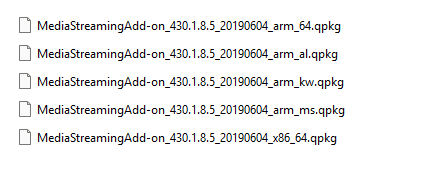
New to this forum, I’m here looking for some help…
I’m taking advantage of the fact that a thread has already been started about this add-on.
I’m a French grandfather who was given an old TS119PII NAS by a friend.
I’ve activated the DLNA server, but it’s asking for the “Media Streaming Addon,” which I can’t find! My NAS is running QTS 4.3.3 and is only used locally for backing up and streaming videos for my grandchildren.
Any help in finding this add-on would be greatly appreciated.
Thanks in advance.
Grandpa Jojo.
PS: I don’t speak English; I’m using a translator.
Install twonkey: Twonky 8.5.2. I belief the arm-x19, below on the page. That is saidly the only solution. Your NAS has reched EOL, so the Media Streaming Add-on has been phased out.
Are you able to install videostation
I am afraid your setup is doomed to fail, cause i do not know if twonkey is free of charge.
Thank you so much! The “…arm_kw.qpkg” package has been installed and everything works! I’ll be able to use the media center and stream movies for my grandchildren.
Grandpa Jojo.
Dear All, sorry to tell that I have the same issue on a TS-228 NAS. After a power shutdown, it did not succed to restart properly. Resetting to factory default I lost the Média Streaming Add-on. I am running firmware 4.3.6.2805 and I previously had Add on version 430.1.8.12. AS post of the user, I cannot find the package to re-install the Add-on. Can someone share a link to get 430.1.8.12 or 430.1.8.13 in order to restore it on the NAS ? Many thanks in advance for your help. KR. Thau67
Hello, I have a QNAP TS-112 running QTS 4.3.3.2784 Build 20240619. I need MediaStreamingAdd-on_430.1.8.5_20190604_arm_kw.qpkg. Could you please provide the download/Smart URL? Thank you.